AI Chatbot vs Voice Agent: Which to Build First
Most businesses that plan to use AI with customers end up wanting both a chatbot and a voice agent. Budgets and teams rarely allow both at once, so the real question is which comes first. This guide compares the two honestly on use cases, effort, cost and risk, and shows how to build the first one so the second is quick to add.
Quick answer
Should you build an AI chatbot or a voice agent first?
Build an AI chatbot first if most of your customer contact already arrives by web chat, WhatsApp or email, or if you want the cheapest, lowest-risk way to prove AI on your own knowledge. Build an AI voice agent first if your phone lines carry the volume, cost or missed calls you most want to fix, such as bookings, order status or after-hours calls. Either way, design one shared back end for knowledge, tools and handover so the second channel costs far less to add.
The real difference between them
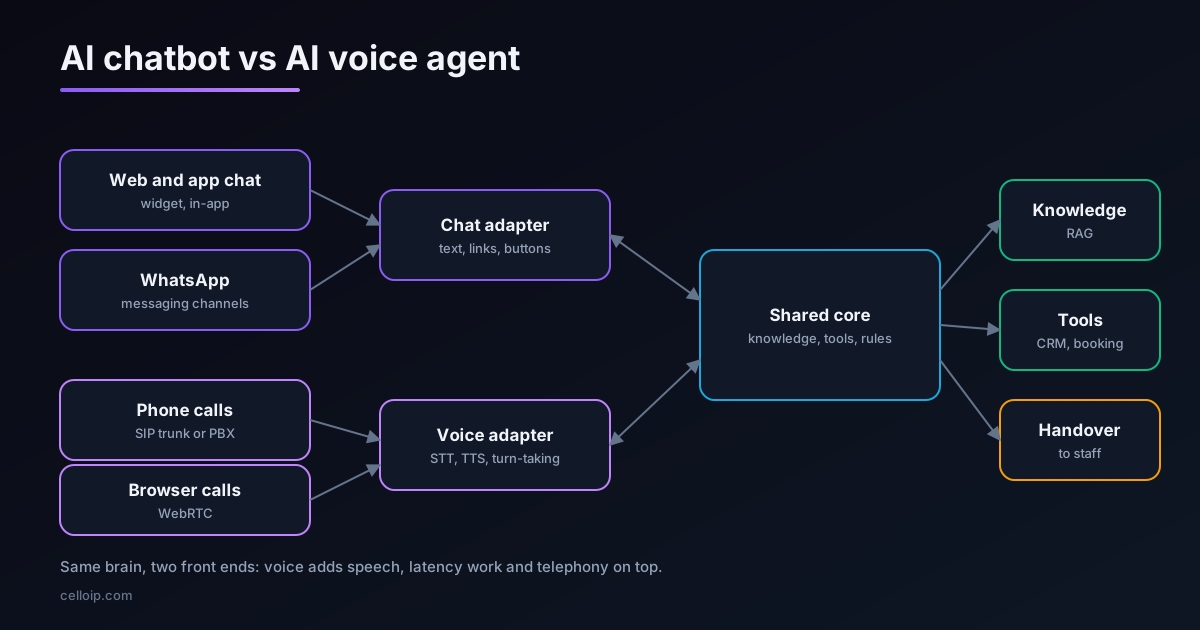
Underneath, an AI chatbot and an AI voice agent are the same kind of system. A language model reads what the customer wants, looks up answers in your knowledge base, calls tools such as an order lookup or a booking API, and hands over to a person when it should.
The difference is the channel. A chatbot works in text: a website widget, a mobile app, WhatsApp, Instagram or email. The customer reads at their own pace, can scroll back, click links and send photos. A voice agent works on a phone or browser call. It has to turn speech into text, reply within about a second, speak naturally, cope with interruptions and background noise, and work with phone systems for transfers, caller ID and recording.
That extra layer is why voice usually costs more and takes longer. It is also why voice can deliver more value: phone calls are often the most expensive contacts a business handles, and the ones customers are least willing to wait for.
Chatbot vs voice agent, side by side
| Factor | AI chatbot | AI voice agent |
|---|---|---|
| Channels | Website, app, WhatsApp, Messenger, Instagram, email | Phone (PSTN via SIP), browser calling, app calling |
| Response time customers accept | A few seconds is fine | About one second or less, or the call feels broken |
| Content it can show | Text, links, images, buttons, forms | Speech only; links and long lists must be sent by SMS or email |
| Extra components | Messaging channel integration | Speech-to-text, text-to-speech, turn-taking, SIP trunk or PBX |
| Testing | Text transcripts, easy to automate | Real audio, accents, noise and phone lines |
| Typical MVP timeline | 3–5 weeks | 4–6 weeks managed; 8–16 weeks custom |
| Running cost per conversation | Mostly model tokens and channel fees | Model plus speech and telephony per minute |
| Regulatory exposure | Data protection; marketing rules on WhatsApp and SMS | Data protection, call recording consent, and outbound calling laws |
| Best at | Questions, status checks, forms, documents | Bookings, urgent requests, after-hours calls, people who prefer to talk |
Start with a chatbot when
Your contact is already digital
Most enquiries arrive by web chat, WhatsApp or email, and agents spend their time answering the same questions.
Your knowledge is scattered
A chatbot forces you to clean up policies, FAQs and documents, which a voice agent will need later anyway.
You want the lowest-risk pilot
Text transcripts are easy to review and correct before anything is heard by a caller.
Answers need links or documents
Order pages, forms, PDFs and images work naturally in chat and badly on a call.
Budget is tight
A one-channel chatbot MVP is the cheapest way to prove AI on your own content.
WhatsApp is your main channel
In many markets customers expect to message a business first; see our WhatsApp AI chatbot guide.
Our RAG chatbot guide covers how a chatbot answers reliably from your own documents, and the WhatsApp AI chatbot guide covers Meta's rules for that channel.
Start with a voice agent when
The phone carries the volume
Most contacts are calls, and queues, missed calls or after-hours voicemail are costing you business.
One call type dominates
Bookings, order status, delivery changes or payment reminders make up a large share of calls and follow a clear pattern.
Speed matters
Urgent requests, such as service calls or patient appointments, cannot wait for an email reply.
Your customers prefer to talk
Older customers, drivers, field workers and some markets simply phone rather than type.
Agents are expensive or scarce
Overflow and after-hours cover by an AI agent can protect service levels without hiring.
Outbound calls follow a script
Reminders, confirmations and follow-ups, within the calling rules for your country.
Our AI voice agent guide explains how voice agents work end to end, and adding an AI voice agent to your existing phone system shows how to start with one call type without replacing your PBX.
Build and running cost compared
The build ranges below match our AI chatbot development and AI voice agent development pages.
| Build | Typical range | Timeline |
|---|---|---|
| Chatbot MVP: knowledge base, one channel | $6,000 – $15,000 | 3–5 weeks |
| Production chatbot: several sources, channels and integrations | $15,000 – $40,000 | 6–10 weeks |
| Voice agent MVP on a managed platform, one use case | $8,000 – $20,000 | 4–6 weeks |
| Custom production voice agent on a self-hosted framework | $25,000 – $60,000 | 8–16 weeks |
Typical build ranges: upper end of each range (USD)
Upper ends of the build ranges published on CelloIP's AI chatbot and AI voice agent service pages. Running costs are separate.
Running costs differ in shape, not just size:
| Running cost | Chatbot | Voice agent |
|---|---|---|
| Language model | Per token, per message | Per token, per turn of the call |
| Speech | None | Speech-to-text and text-to-speech, usually per minute or per character |
| Channel | WhatsApp, SMS or other channel fees where they apply | SIP trunk minutes and phone numbers |
| Platform | Hosting, or a platform fee if you use one | Hosting, or a per-minute platform fee on managed platforms |
| Human review | Reviewing transcripts | Reviewing transcripts and listening to sample calls |
Our AI voice agent cost guide breaks down per-minute voice costs component by component.
Risk, quality and rules
Voice is less forgiving than chat. A chatbot that takes three seconds to answer is fine; a voice agent that pauses for three seconds sounds broken, and callers talk over it. A chatbot's wrong answer can be spotted in a transcript review; a voice agent's wrong answer has already been heard.
- Latency: voice needs streaming speech, a fast model and careful turn-taking; chat does not.
- Recognition errors: names, numbers, addresses and accents are harder by voice, so confirm key details back to the caller.
- Outbound rules: automated and AI-voiced calls are regulated in many countries; see our guide to AI calling laws by country.
- Recording consent: many jurisdictions require callers to be told a call is recorded or that they are speaking to an AI.
- Handover: both channels need a clean route to a person, with the conversation so far attached.
The AI calling laws guide and AI to human handover guide go into these two areas in detail.
What each one needs from your team
The build is only part of the work. Both channels need your people to supply content, access and decisions, and voice needs a few things chat does not. Check these before you choose, because a missing item delays launch more often than the code does.
| You will need | Chatbot | Voice agent |
|---|---|---|
| Knowledge content | FAQs, policies and documents, cleaned up and owned by someone | The same content, rewritten into short spoken answers where needed |
| System access | APIs for orders, bookings or the CRM | The same APIs, fast enough to answer within a call |
| Channel set-up | Website widget, app SDK or WhatsApp Business Platform account | Phone numbers, a SIP trunk or PBX access, and call routing rules |
| Handover path | A live chat or helpdesk queue for staff | A transfer route to agents or a callback process |
| Review time | Someone to read transcripts weekly | Someone to read transcripts and listen to sample calls weekly |
| Legal check | Privacy notice and data retention | Privacy, recording notices, AI disclosure and outbound calling rules |
If your phone system is hard to change or owned by another team, that is a practical reason to start with chat while the telephony access is arranged. If your website or app cannot host a widget soon, the reverse applies.
One brain, two channels: build it once
The most expensive mistake is building the chatbot and the voice agent as two separate systems, each with its own copy of the knowledge base, tools and rules. They drift apart, customers get different answers by channel, and every change is made twice.
Instead, put everything that is not channel-specific into one shared service: retrieval from your knowledge base, tools such as order lookup and booking, business rules, and handover. The chat and voice front ends become thin adapters that call it and format the reply for their channel.
# One shared assistant core, two thin channel adapters (Python).
from dataclasses import dataclass

@dataclass
class Reply:
    text: str            # the full answer
    links: list[str]     # useful in chat, not on a call
    handover: bool       # pass to a human?

def assistant_core(message: str, customer_id: str) -> Reply:
    """Shared by chat and voice: retrieval, tools, rules, handover."""
    # 1. retrieve from the knowledge base, 2. call tools (order lookup, booking),
    # 3. apply business rules, 4. decide on handover. Stubbed here.
    return Reply(text="Your order 4821 left our warehouse today and should arrive on Thursday.",
                 links=["https://example.com/orders/4821"], handover=False)

def chat_adapter(message: str, customer_id: str) -> dict:
    r = assistant_core(message, customer_id)
    return {"text": r.text, "buttons": [{"label": "Track order", "url": u} for u in r.links],
            "handover": r.handover}

def voice_adapter(transcript: str, caller_id: str) -> dict:
    r = assistant_core(transcript, caller_id)
    # Voice: short spoken sentences, no URLs; offer to send links by SMS instead.
    speech = r.text + (" Would you like me to text you the tracking link?" if r.links else "")
    return {"say": speech, "transfer": r.handover}
Built this way, adding the second channel is mostly front-end and telephony work, not a second project. Our comparison of OpenAI, Claude and Gemini for business chatbots also explains how to keep the model swappable behind this core.
Score your own case in five minutes
Answer each question for your business. Whichever column collects more points is usually the better first build.
| Question | Points to chat if… | Points to voice if… |
|---|---|---|
| Where do most contacts arrive today? | Web chat, WhatsApp, email | Phone calls |
| What is the biggest pain? | Agents answering repeat questions in writing | Missed, abandoned or after-hours calls |
| Do answers need links, images or documents? | Yes, often | Rarely |
| How urgent are typical requests? | Can wait minutes or hours | Need an answer now |
| How ready is your knowledge base? | Not ready; needs cleaning up | Ready, or the use case needs little of it |
| How much delivery risk can you take? | Low; need a safe first step | Moderate; can pilot on one call type |
A sensible three-stage roadmap
| Stage | What you build | What you learn |
|---|---|---|
| 1. First channel | Chatbot or voice agent for one narrow use case, on the shared core | Whether AI resolves real contacts, and what knowledge is missing |
| 2. Second channel | The other front end on the same core, starting with the same use case | How customers behave differently by channel |
| 3. Expand | More use cases, languages and channels; deeper tools and integrations | Where AI saves the most cost or wins the most revenue |
Measure each stage on resolution rate, handover rate, customer satisfaction and cost per resolved contact, not on how many conversations the AI touched.
A real example: four channels, one assistant
CelloIP built a RAG AI chatbot for a Middle East healthcare provider that answers patients' questions from the provider's own documents on four channels: a website widget, WhatsApp, chat inside the provider's app and the phone. It works in English, Arabic and one more language, cites the source of every answer, follows guardrails on what it will and won't answer, and hands conversations to staff when needed.
Because the knowledge, guardrails and handover sit in one back end, the phone channel uses the same answers as the text channels instead of a separate system.
CelloIP project outcome (client kept private)
One assistant across web, WhatsApp, in-app chat and phone, in three languages, built on OpenAI GPT models, Python, PostgreSQL with pgvector and a dedicated vector database. Built in three to six months and maintained by CelloIP.
For a voice-first example, our AI voice agent for a North American contact centre handles inbound support, outbound calls and bookings in English and Spanish.
Common mistakes
- Building chat and voice as two separate systems with two copies of the knowledge base.
- Reading chatbot answers aloud on a call: long paragraphs, bullet points and URLs do not work by voice.
- Starting with the hardest use case instead of a narrow, frequent one.
- Launching voice without testing on real phone lines, accents and background noise.
- Hiding the route to a human; customers who cannot reach a person stop trusting the channel.
- Measuring conversations handled instead of problems actually resolved.
Frequently asked questions
What is the difference between an AI chatbot and an AI voice agent?
Both use a language model to understand requests, look up information and take actions. A chatbot works in text on a website, app, WhatsApp or another messaging channel. A voice agent works on phone or browser calls, so it adds speech-to-text, text-to-speech, real-time turn-taking and telephony such as SIP trunks, call transfer and recording.
Which is cheaper to build?
Usually the chatbot. As a guide, a knowledge-base chatbot MVP on one channel is typically $6,000 to $15,000, while an AI voice agent MVP on a managed platform is typically $8,000 to $20,000 and a custom production voice agent $25,000 to $60,000. Voice costs more because of telephony, latency work and audio testing.
Which is cheaper to run?
Per conversation, chat is normally cheaper. A voice call pays for speech recognition, speech synthesis and telephony by the minute on top of the language model, while a chat pays mainly for model tokens and any messaging channel fees, such as WhatsApp template charges.
Can the same AI power both a chatbot and a voice agent?
Yes, and it should. Keep the knowledge base, tools such as booking or order lookup, business rules and handover logic in one shared service. The chat and voice front ends then become thin layers that adapt the replies to each channel, for example shorter sentences and no links on voice.
Is a voice agent riskier than a chatbot?
It carries more delivery risk. Calls happen in real time, mistakes are heard immediately, and outbound calling is regulated in many countries. A chatbot is easier to test, review and correct. That is one reason many teams start with chat and add voice once the knowledge and tools are proven.
Should a business with a busy phone line still start with chat?
Not necessarily. If missed or abandoned calls are your biggest problem, a voice agent for one narrow call type, such as after-hours bookings or order status, can show value faster than a chatbot on a channel few customers use.
How long does each take to launch?
A one-channel chatbot MVP typically takes 3 to 5 weeks. A voice agent on a managed platform typically takes 4 to 6 weeks, and a custom production voice agent 8 to 16 weeks, mainly because of telephony integration and testing with real calls.
Work with CelloIP
Not sure which to build first?
Tell us where your customer contacts come from and what you want to fix. CelloIP builds AI chatbots and AI voice agents on one shared back end, so the second channel is quick to add. We reply within one business day, and you own the code.