RAG Chatbot: Architecture, Cost and Build Guide
A RAG chatbot answers from your own documents and data instead of from a model's memory. This guide explains how it works end to end, the design choices that decide its accuracy, how to measure it, and what a custom build costs.
Quick answer
What is a RAG chatbot?
A RAG (retrieval-augmented generation) chatbot answers questions from your own content. For each question it searches your documents for the most relevant passages, then asks a language model to answer only from those passages and cite them. That keeps answers specific and current, and lets the chatbot say “I don't know” instead of guessing.
What a RAG chatbot is, in plain terms
A large language model is very good at language and reasoning but knows nothing about your products, prices, policies or customers. Ask it anyway and it will often produce a confident, plausible and wrong answer.
Retrieval-augmented generation fixes that with an open-book exam. Before the model answers, the system looks up the few passages in your content most likely to contain the answer and puts them in front of the model with an instruction: answer from these, quote them, and say so if they don't cover the question.
Everything that makes a RAG chatbot good or bad follows from that idea: how well the content is prepared, how well the right passages are found, how strictly the model sticks to them, and how carefully the whole thing is tested.
RAG vs a plain LLM vs fine-tuning
These are often confused. They solve different problems, and for a chatbot that must answer from company content, RAG is almost always the core.
| Plain LLM | RAG | Fine-tuning | |
|---|---|---|---|
| What it is | The model answers from what it learned in training | The model answers from passages retrieved from your content | The model is further trained on your examples |
| Knows your latest content | No | Yes, as soon as it is re-indexed | Only after retraining |
| Can cite sources | No | Yes | No |
| Risk of made-up answers | High for company facts | Low when guarded and evaluated | Medium |
| Respects user permissions | No | Yes, by filtering what is retrieved | No |
| Best for | General writing and chat | Answering from documents and data | Tone, format and narrow tasks |
RAG chatbot architecture
A RAG chatbot has two paths. Ingestion runs whenever content changes and prepares it for search. The question path runs for every message and should finish in a second or two.
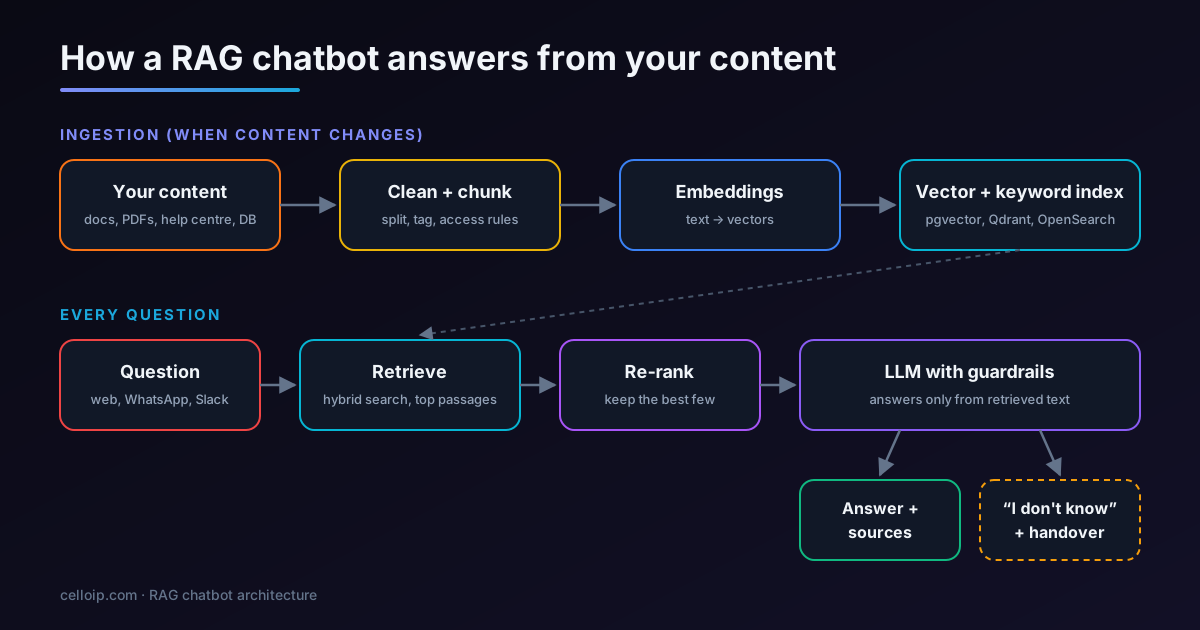
Ingestion path
- Pull content from its sources: help centre, file shares, wikis, databases, tickets.
- Clean it: remove navigation, duplicates and outdated versions; extract text and tables from PDFs.
- Split it into chunks and attach metadata: title, URL, date, product, language and who may see it.
- Create an embedding for each chunk and load chunks into a vector and keyword index.
Question path
- Rewrite the question if needed, using the conversation so far.
- Search: vector and keyword search together, filtered by the user's permissions.
- Re-rank the results and keep the best few passages.
- Generate an answer from those passages with citations, or hand over to a person.
Chunking: the decision that matters most
If the passage that answers a question is split in half, or buried in a chunk about something else, no model can recover. Most accuracy problems we fix in existing RAG systems start here, not in the model.
| Method | How it works | Good for | Watch out for |
|---|---|---|---|
| Fixed size with overlap | Split every N tokens with some overlap | Uniform text such as articles | Splits tables and steps in the middle |
| Structure-aware | Split on headings, sections and list items | Manuals, policies, help centres | Very long sections need a second split |
| Semantic | Split where the topic changes | Mixed or long documents | Slower and harder to debug |
| Parent–child | Search small chunks, send the larger section | Precise search with full context | More tokens per answer |
- Start with structure-aware chunks of a few hundred tokens and a small overlap, then tune using your evaluation set.
- Keep each chunk's heading path (for example “Billing › Refunds › Annual plans”) in its text so it makes sense on its own.
- Convert tables to a consistent text or Markdown form, and never split a table across chunks.
- Store the source URL and section anchor so every citation links to the exact place.
Retrieval: hybrid search and re-ranking
Vector search finds passages with similar meaning even when the words differ. Keyword search finds exact terms such as product codes, error messages and names, which vector search often misses. Production systems use both.
Hybrid search
Run vector and keyword search together and merge the results, for example with reciprocal rank fusion. This is the single biggest retrieval improvement for most business content.
Metadata filters
Filter by permissions, product, language, region or date before ranking, so users only see what applies to them and what they may access.
Re-ranking
Pass the top 20–50 candidates through a re-ranking model and keep the best handful. It costs a little time and greatly improves which passages reach the model.
A minimal RAG pipeline with pgvector and OpenAI
This is the core of a RAG chatbot in a few dozen lines: a table for chunks with embeddings, a search query, and a guarded prompt. A production system adds keyword search, permissions, re-ranking, caching and evaluation on top.
-- schema.sql (PostgreSQL with the pgvector extension)
CREATE EXTENSION IF NOT EXISTS vector;

CREATE TABLE chunks (
  id          bigserial PRIMARY KEY,
  source_url  text NOT NULL,
  heading     text,
  content     text NOT NULL,
  allowed     text[] NOT NULL DEFAULT '{public}',  -- groups that may see it
  embedding   vector(1536) NOT NULL                -- text-embedding-3-small
);

CREATE INDEX ON chunks USING hnsw (embedding vector_cosine_ops);
# answer.py — pip install openai "psycopg[binary]" pgvector
import os
import psycopg
from pgvector.psycopg import register_vector
from openai import OpenAI
client = OpenAI() # reads OPENAI_API_KEY
conn = psycopg.connect(os.environ["DATABASE_URL"])
register_vector(conn)
SYSTEM = (
"You answer questions for ACME support using ONLY the numbered sources. "
"Cite sources like [1]. If the sources do not contain the answer, say you "
"don't know and offer to connect the user with a person."
)
def embed(text: str) -> list[float]:
return client.embeddings.create(
model="text-embedding-3-small", input=text
).data[0].embedding
def retrieve(question: str, groups: list[str], k: int = 5):
q = embed(question)
return conn.execute(
"""SELECT source_url, heading, content
FROM chunks
WHERE allowed && %s -- permission filter
ORDER BY embedding <=> %s::vector
LIMIT %s""",
(groups, q, k),
).fetchall()
def answer(question: str, groups: list[str]) -> str:
rows = retrieve(question, groups)
if not rows:
return "I couldn't find that in our documentation. Shall I connect you with the team?"
sources = "\n\n".join(
f"[{i}] {h or ''} ({url})\n{text}" for i, (url, h, text) in enumerate(rows, 1)
)
resp = client.chat.completions.create(
model="gpt-4o-mini",
temperature=0,
messages=[
{"role": "system", "content": SYSTEM},
{"role": "user", "content": f"Sources:\n{sources}\n\nQuestion: {question}"},
],
)
return resp.choices[0].message.content
if __name__ == "__main__":
print(answer("How do I get a refund on an annual plan?", ["public", "customers"]))The same structure works with Claude, Gemini or a self-hosted open-weight model; only the client calls change. Keeping the permission filter inside the SQL query, not in the prompt, is what makes the access control reliable.
Choosing a vector database
For most business chatbots the index holds thousands to a few million chunks, which every option below handles. Pick on hosting, hybrid search and what your team already runs.
| Option | Hosting | Hybrid search | Good fit |
|---|---|---|---|
| pgvector (PostgreSQL) | Self-host or any managed Postgres | With Postgres full-text search | Teams already on Postgres; small to large indexes |
| Qdrant | Open source, self-host or cloud | Yes, dense + sparse vectors | High performance, filtering-heavy search |
| Weaviate | Open source, self-host or cloud | Yes, built in | Built-in hybrid search and modules |
| OpenSearch / Elasticsearch | Open source, self-host or managed | Yes, keyword + vector | Teams with existing search infrastructure |
| Pinecone | Managed cloud service | Yes, sparse-dense | No infrastructure to run |
Accuracy and safety guardrails
A chatbot that is confidently wrong does more damage than no chatbot. These controls belong in every production build.
Grounded answers with citations
The model answers only from retrieved passages and links each claim to its source, so users and reviewers can check.
A real “I don't know”
When retrieval finds nothing relevant, the chatbot says so and offers a person, instead of improvising.
Permission-aware retrieval
Each chunk inherits its document's access rules, and search only returns what the current user may see.
Prompt-injection defences
Treat retrieved text and user input as data, not instructions; restrict tools; check outputs before acting.
Personal data handling
Redact card numbers and personal data from logs, set retention periods, and keep data in the region you choose.
Safe actions
When the chatbot can act (refunds, bookings, CRM updates), actions go through your code with limits and confirmations.
How to evaluate a RAG chatbot
Trying a few questions in a demo tells you very little. Build a test set of 100–300 real questions from tickets, chats and search logs, with the expected answer and source for each, and score every change against it.
| What to measure | Question it answers | How |
|---|---|---|
| Retrieval hit rate | Did the right source appear in the top results? | Compare retrieved sources with the expected source |
| Answer correctness | Is the answer right and complete? | Human review, or an LLM judge checked against human labels |
| Groundedness | Is every claim supported by the retrieved text? | Check claims against cited passages |
| Refusal quality | Does it say “I don't know” when it should? | Include questions your content doesn't answer |
| Handover rate | How often does it pass to a person, and why? | Production analytics and weekly transcript review |
Failures usually point to one of three fixes: missing or unclear content (update the source), poor retrieval (chunking, metadata, hybrid search, re-ranking) or a loose prompt (stricter grounding instructions). Changing the model is rarely the first fix.
Keeping the knowledge base current
A RAG chatbot is only as current as its index. The most common complaint a few months after launch is not that the chatbot is wrong in general, but that it quotes last quarter's price or a retired policy. Plan updates from the start rather than re-importing everything by hand.
- Sync each source on a schedule or on change (webhooks from the help centre, CMS or file store), and re-embed only the documents that changed.
- Delete chunks when their source is removed or unpublished, so retired content cannot be retrieved.
- Store a version or updated date on every chunk and prefer the newest when two passages disagree.
- Give one person or team ownership of the content the chatbot uses, with a simple way to flag wrong answers back to them.
- Re-run the evaluation set after every large content change, not only after code changes.
Common RAG mistakes we fix in existing chatbots
Indexing everything
Old drafts, duplicates and internal notes end up in the index and compete with the right answer. Curate sources first; a smaller, clean index usually answers better.
Vector search only
Product codes, error messages and names are missed because pure semantic search blurs exact terms. Adding keyword search fixes a large share of “it couldn't find it” failures.
No permission model
Every user can retrieve every document, so the chatbot cannot be opened to customers or wider staff. Retrofitting access control is harder than designing it in.
Prompt-only accuracy
Teams keep rewriting the prompt to fix wrong answers that are really retrieval or content problems. Measure retrieval separately so you fix the right layer.
No refusal path
The chatbot is never allowed to say it doesn't know, so it guesses. A clear refusal plus handover builds more trust than a confident wrong answer.
No evaluation set
Changes are judged by trying a few questions, so improvements in one area quietly break another. A fixed test set makes every change measurable.
Where RAG chatbots are used
Any place where people repeatedly ask questions whose answers already exist somewhere in your content.
Customer support
Answers product, order and policy questions from the help centre and hands over to agents with context.
Internal knowledge assistant
HR, IT and process answers for staff in Slack or Teams, limited to what each person may see.
Technical documentation
Engineers and partners query manuals, API docs and release notes with links to the exact page.
E-commerce and catalogues
Product questions, compatibility and availability from catalogue data and FAQs.
Policy and contracts
Finds the clause or policy that answers a question and quotes it, for review by a person.
Telecom and VoIP providers
Plan, number porting and setup questions for customers, plus troubleshooting guides for support teams.
CelloIP project outcome (client kept private)
We built an AI chatbot that answers customer questions from the company's own knowledge base using RAG and OpenAI models, with source-grounded answers and handover to a human agent.
How much does a RAG chatbot cost, and how long does it take?
Build cost depends mostly on the number and messiness of content sources, the channels and integrations, and how rigorous the evaluation needs to be. Running costs (model tokens, embeddings, hosting) scale with usage.
| Type of build | Typical scope | Typical range | Timeline |
|---|---|---|---|
| Knowledge-base chatbot MVP | One channel, one content source, hosted LLM, basic analytics | $6,000 – $15,000 | 3–5 weeks |
| Production RAG chatbot | Several sources, two or three channels, CRM or help-desk integration, actions, evaluation and monitoring | $15,000 – $40,000 | 6–10 weeks |
| Enterprise or self-hosted assistant | Role-based access, single sign-on, self-hosted models, many languages, chat and voice | Scoped after discovery | Agreed in the plan |
Example plan for a production RAG chatbot (9 weeks of effort; phases overlap in practice)
Ranges match our AI chatbot development page. You get a fixed quote after a discovery call. For a real example of a larger build, read our case study of a RAG chatbot for a healthcare provider across four channels and three languages.
Frequently asked questions
What is a RAG chatbot?
A RAG chatbot is an AI chatbot that answers from your own content. It retrieves the most relevant passages from your documents or data for each question and asks a language model to answer only from them, usually with citations. RAG stands for retrieval-augmented generation.
RAG or fine-tuning: which should I use?
Use RAG when the chatbot must answer from facts that change, cite sources or respect user permissions. Fine-tuning changes how a model writes or performs a narrow task; it does not reliably teach it your facts. Many production systems use RAG alone, and some add light fine-tuning for tone or format.
How much does it cost to build a RAG chatbot?
As a guide, a knowledge-base chatbot MVP on one channel is typically $6,000–$15,000 over 3–5 weeks, and a production RAG chatbot with several sources, channels, integrations and evaluation is typically $15,000–$40,000 over 6–10 weeks. Enterprise and self-hosted assistants are scoped after discovery. Model usage and hosting are separate running costs.
How do you stop a RAG chatbot from making things up?
Retrieve well (hybrid search and re-ranking), tell the model to answer only from the retrieved text, show citations, and make it say it doesn't know when the sources don't cover a question. Then measure it: score answers against a test set of real questions before launch and after every change.
Which vector database is best for RAG?
There is no single best one. pgvector is a strong default if you already use PostgreSQL; Qdrant, Weaviate and OpenSearch are good open-source options with hybrid search; Pinecone suits teams that want a fully managed service. Retrieval quality depends more on chunking, metadata and re-ranking than on the database.
Can a RAG chatbot keep confidential documents private?
Yes, if access control is built into retrieval. Each chunk carries the permissions of its source document, and the search only returns chunks the current user may see. For stricter needs, the whole system can run in your own cloud account or on your servers with a self-hosted model.
Can the same RAG chatbot work on WhatsApp and the website?
Yes. The knowledge base, retrieval and guardrails are shared; each channel is a thin connector. The same knowledge can also power an AI voice agent on your phone line.
How long does it take to build a RAG chatbot?
A focused MVP usually takes 3–5 weeks; a production chatbot with several sources, channels and an evaluation process usually takes 6–10 weeks. Content quality is often the biggest factor.
Work with CelloIP
Want a RAG chatbot built on your content?
CelloIP builds custom RAG chatbots for websites, WhatsApp and internal teams, in any language, with measured accuracy and code you own. Tell us what it should answer and where your content lives.
Fixed-scope project
A defined chatbot delivered against agreed scope, milestones and acceptance tests.
Dedicated AI developer
A CelloIP LLM and RAG engineer inside your team, backed by a 30-day money-back guarantee.
Build, then run
We build it, then keep content synced, review conversations and improve accuracy.