OpenAI vs Claude vs Gemini for Business Chatbots
The first question in almost every chatbot project is which AI model to use. Benchmarks change monthly and every provider claims to lead. For a business chatbot, what matters is how a model handles your questions, in your languages, at your speed and cost, within your data rules. This guide explains how the three main providers differ and how to choose with evidence instead of headlines.
Quick answer
Which AI model should a business chatbot use?
For most business chatbots, OpenAI, Anthropic Claude and Google Gemini are all capable; the right choice depends on your questions, languages, speed and cost targets, and where your data may be processed. Each offers premium and fast model tiers, and each is available through a major cloud: OpenAI through Azure, Claude through Amazon Bedrock and Google Vertex AI, and Gemini through Vertex AI. Build the chatbot so the model is swappable, test the leading options on a few hundred of your own real questions, and choose on measured accuracy, speed and cost rather than benchmark headlines.
What really matters for a business chatbot
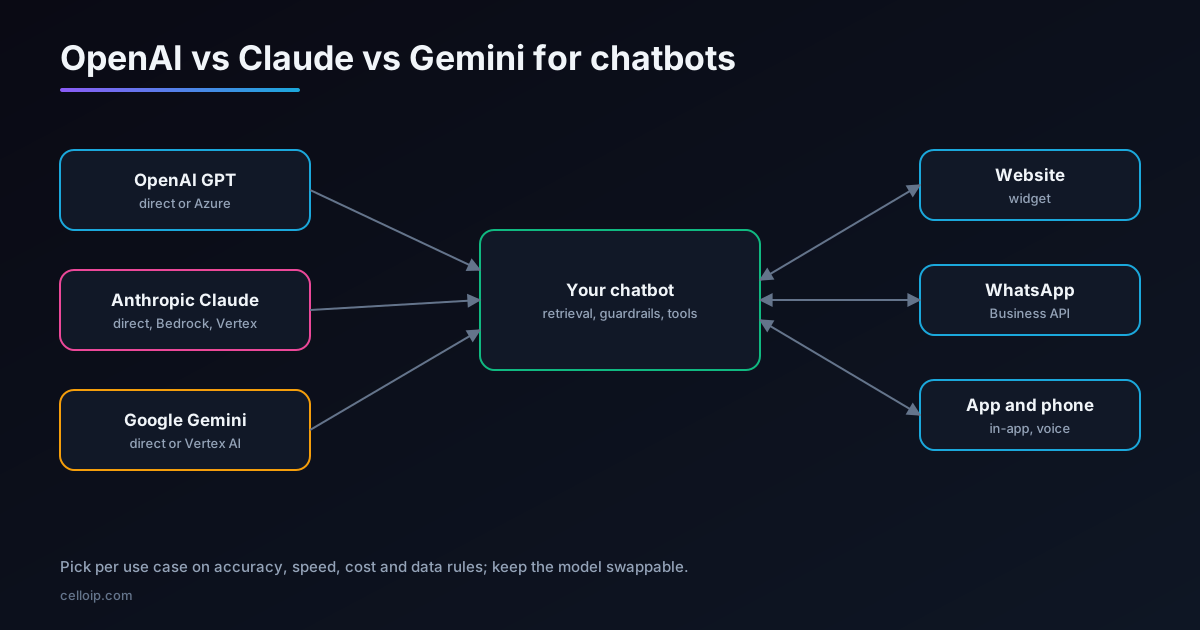
Public benchmarks measure general skills such as coding, maths and reasoning puzzles. A customer-service or knowledge-base chatbot needs something narrower: accurate answers from your documents, sensible refusals, the right tone, fast replies and predictable cost. Several things matter more than which model tops this month's leaderboard.
Grounded accuracy
Does it answer from your documents, cite them and say 'I don't know' when the answer isn't there?
Following instructions
Does it stay in scope, keep your tone and respect guardrails across long conversations?
Speed
How quickly does the first word appear? It matters most for voice and live chat.
Cost per conversation
What does a typical conversation cost at your traffic, including retrieved context?
Languages
How well does it handle each language and dialect your customers use?
Data and access
Where is data processed, for how long is it kept, and can you use it through your existing cloud?
Just as important: most of a chatbot's quality comes from retrieval, prompts and guardrails, not the model. See our RAG chatbot guide.
The three providers
| Provider | Model family | Commonly cited strengths | Ways to access |
|---|---|---|---|
| OpenAI | GPT models, in premium and smaller, faster tiers | Broad ecosystem, mature tool calling, realtime voice options | OpenAI API; Azure OpenAI |
| Anthropic | Claude, in premium and fast tiers | Careful instruction following, long documents, consistent tone | Anthropic API; Amazon Bedrock; Google Vertex AI |
| Gemini, in Pro, Flash and lighter tiers | Long context, multimodal input, low-cost fast tiers | Gemini API; Google Vertex AI |
Model names and versions change several times a year, so this guide compares the providers and their tiers rather than specific versions. Check each provider's current model list when you start a project, and re-test when a new version arrives, because a new version can change accuracy, speed and price in either direction.
Premium vs fast tiers
Each provider offers a premium tier (most capable, slower and more expensive) and one or more fast tiers (quicker and much cheaper). For chatbots, the fast tier is often enough.
| Use | Usually works on | Why |
|---|---|---|
| FAQ and knowledge-base answers with good retrieval | Fast tier | The answer is in the retrieved text; the model mainly phrases it |
| Order status, bookings and simple actions through tools | Fast tier | Short, structured tasks with clear tools |
| Voice agents | Fast tier | Reply speed matters more than depth |
| Long or complex documents, policies and contracts | Premium tier | Needs careful reading and reasoning across long text |
| Ambiguous or multi-step questions | Premium tier, or routed to it | Fewer mistakes on hard cases |
A practical pattern is routing: use a fast model by default, and send questions that fail a confidence check, or match certain topics, to a premium model.
Side by side for chatbot decisions
| Decision factor | OpenAI | Anthropic Claude | Google Gemini |
|---|---|---|---|
| Cloud you already use | Azure | AWS (Bedrock) or Google Cloud (Vertex AI) | Google Cloud (Vertex AI) |
| Voice and realtime | Realtime speech-to-speech API available | Strong as the text model inside a voice pipeline | Live speech-to-speech API available |
| Very long context | Supported on recent models | Supported on recent models | A noted strength |
| Images and documents as input | Supported | Supported | Supported, a noted strength |
| Low-cost tiers for high traffic | Yes | Yes | Yes, often among the lowest published prices |
| Data residency options | Via Azure regions | Via Bedrock and Vertex regions | Via Vertex regions |
Treat this as a starting point. All three improve quickly, and the differences that matter for your chatbot only show up when you test on your own questions.
Cloud access, data and compliance
For many organisations, where a model runs decides the shortlist before quality does.
- If your company standardises on Azure, AWS or Google Cloud, start with the models available in that cloud; billing, security reviews and networking are simpler.
- Check where prompts and responses are processed and stored, for how long, and whether regional processing is available for the models you need.
- Check the provider's API data-use terms for your plan; business APIs generally don't train on your data by default.
- For regulated data, check which agreements each provider and cloud will sign, and keep personal data out of prompts where you can.
- Your compliance team makes the final assessment; build the chatbot so it can meet their requirements.
If data must never leave your servers, consider an open-weight model, covered below, or a hybrid with sensitive steps on your own infrastructure.
What a conversation costs
Language models charge per token, roughly per word, for both input and output. In a RAG chatbot, the input is usually much larger than the output, because every question carries the retrieved passages and conversation history.
| Cost driver | How to control it |
|---|---|
| Retrieved context | Retrieve fewer, better passages; trim them to what matters |
| Conversation history | Summarise long conversations instead of resending everything |
| Model tier | Use the fast tier by default; route only hard questions to premium |
| Repeated questions | Cache answers to frequent questions, with expiry when content changes |
| Output length | Ask for concise answers; they read better on chat and voice anyway |
Illustrative: relative model cost per conversation (fast tier with good retrieval = 1)
Illustrative only, not provider prices: shows how design choices change cost, which often matters more than which provider you pick.
Published per-token prices change often; check each provider's pricing page. For most business chatbots, model usage ends up a small fraction of the cost of the staff time it saves, but it is worth designing for from the start.
Languages
All three handle major languages well, but quality varies by language, dialect and script. Arabic, Hebrew, Hindi and mixed-language messages such as Hinglish deserve their own tests.
- Test each language with real questions written the way your customers write, including mixed languages and transliteration.
- Check that retrieval works across languages: a question in Arabic may need an answer from an English document.
- Check tone and politeness conventions, not just accuracy.
- For voice chatbots, test speech recognition and voices per language separately from the language model.
Guardrails and tools work the same on all three
Much of what makes a chatbot safe and useful sits outside the model, so it carries over whichever provider you choose.
Grounding
Retrieve passages from your documents and instruct the model to answer only from them, citing the source.
Scope rules
A clear list of topics the chatbot handles and declines, checked before and after the model answers.
Tools with checked inputs
All three support function or tool calling; the tools call your own APIs, which validate every input and apply permissions.
Handover
Rules for passing the conversation to a person, with the history attached.
Content checks
Filters for personal data, unsafe content and off-brand replies, applied consistently across models.
Models differ in how reliably they follow these rules, which is exactly what your evaluation set measures. See our AI-to-human handover guide for the handover side.
How to evaluate the models on your own questions
The reliable way to choose is a small, honest test. It takes days, not months, and the same test set protects you every time you change a prompt or a model later.
| Step | What to do |
|---|---|
| 1. Collect questions | 200 or more real questions from tickets, chats, emails and calls, across languages and difficulty |
| 2. Write expected answers | Short reference answers and the source document for each, plus questions the bot must refuse |
| 3. Run each model | Same retrieval, same prompt, same tools; only the model changes |
| 4. Score | Correct and grounded, partly correct, wrong, refused correctly, refused wrongly; plus speed and cost |
| 5. Review failures | Read the wrong answers; many point to retrieval or prompt fixes rather than the model |
| 6. Decide | Pick per use case, possibly a fast model with routing to a premium one |
# Minimal evaluation loop: same retrieval and prompt, only the model changes
import csv, time

def evaluate(model_name, ask, questions):
    results = []
    for q in questions:
        start = time.perf_counter()
        answer = ask(model_name, q["question"])          # your chatbot pipeline
        results.append({
            "model": model_name,
            "question": q["question"],
            "expected": q["expected"],
            "answer": answer.text,
            "cited_source": q["source"] in answer.sources,
            "seconds": round(time.perf_counter() - start, 2),
            "cost_usd": answer.cost_usd,
        })
    return results

rows = []
for model in ["openai-fast", "claude-fast", "gemini-fast"]:   # your configured model IDs
    rows += evaluate(model, ask_chatbot, load_questions("eval_set.csv"))

with open("eval_results.csv", "w", newline="") as f:
    writer = csv.DictWriter(f, fieldnames=rows[0].keys())
    writer.writeheader(); writer.writerows(rows)
# Then score correctness by hand or with a reviewed grading rubric.
Keep the model swappable
Whichever you choose, you will probably change models within a year, because a new version is better, cheaper or available in a region you need. Design for it from the start.
One model layer
All calls go through a small internal interface, so switching provider is a configuration change, not a rewrite.
Prompts in version control
Keep prompts, guardrails and tool definitions in your repository, tested like code.
Provider-neutral tools
Tools call your own APIs; the model only decides when to call them.
Evaluation set
Re-run the same questions before any switch, and compare.
Open-weight models on your own servers
Open-weight models such as Llama, Qwen and Mistral can run on your own GPUs with serving tools such as vLLM. They keep every prompt and answer inside your infrastructure and remove per-token fees, at the cost of hardware and operations.
| Choose open-weight when | Prefer a hosted provider when |
|---|---|
| Data must never leave your servers | You want the strongest general quality with no infrastructure |
| Traffic is high and steady | Traffic is low or very spiky |
| The task is focused and well supported by retrieval | Questions are broad, complex or need long reasoning |
| You have, or have a partner with, GPU operations skills | You'd rather not run GPUs |
Common mistakes when choosing a model
Choosing by leaderboard
General benchmarks rarely reflect your questions, languages or tone. Test on your own data.
Blaming the model for retrieval problems
Most wrong answers come from missing or poorly chunked documents. Fix retrieval before switching models.
Premium tier everywhere
Paying premium prices for simple questions that a fast model answers equally well.
Hard-coding one provider
Provider-specific code scattered through the app makes the next switch slow and risky.
Testing in English only
Quality can drop sharply in other languages and mixed-language messages.
Ignoring speed
A slightly better answer that arrives several seconds later is worse for live chat and voice.
The common thread: treat the model as one replaceable component, measure it on your own conversations, and spend most of your effort on the content, retrieval and guardrails around it. That is where the biggest and most lasting improvements in a business chatbot come from, whichever provider you choose today.
A real example
CelloIP's RAG chatbot for a healthcare provider uses OpenAI GPT models for answers and embeddings, with a Python backend, PostgreSQL with pgvector and a dedicated vector database. It answers on the website, WhatsApp, in the provider's app and by phone, in English, Arabic and a third language, with citations, guardrails, handover to staff and evaluation tests that run in every language before changes go live.
CelloIP project outcome (client kept private)
Evaluation tests are what make model and prompt changes safe: the same real-style questions run in every language before anything reaches patients.
Frequently asked questions
Which is best for a business chatbot: OpenAI, Claude or Gemini?
There is no single winner. All three handle typical customer-service and knowledge-base questions well. The best choice depends on your content, languages, speed and cost targets and data rules, which is why we test candidates on your own questions before choosing.
Should we use the premium or the fast model tier?
Most chatbots run well on the fast, lower-cost tiers when they use good retrieval from your documents. Premium tiers help with complex reasoning, long documents and tricky edge cases. A common pattern is to use a fast model by default and route hard questions to a premium one.
Will the provider train on our chatbot data?
The three providers' business API terms generally state that API data is not used to train their models by default, but check the current terms for the specific product and plan you use, including data retention periods.
Can we keep data in our region or cloud?
Often, yes. Using OpenAI models through Azure, Claude through Amazon Bedrock or Google Vertex AI, and Gemini through Vertex AI lets you work inside a cloud account you already have, often with regional processing options. Availability of specific models varies by region.
What about open-weight models?
Open-weight models such as Llama, Qwen or Mistral can run on your own servers, which keeps all data in-house and avoids per-token fees. They need GPUs and operations work, and usually perform best on focused tasks with good retrieval.
Can we switch models later?
Yes, if the chatbot is built for it. Keep prompts, retrieval, guardrails and tools in your own code, use a thin layer that can call any provider, and keep an evaluation set so you can test a new model before switching.
How much does it cost to build a chatbot?
As a guide, a knowledge-base chatbot MVP on one channel is typically $6,000–$15,000 over 3–5 weeks, and a production RAG chatbot with several sources, channels and integrations $15,000–$40,000 over 6–10 weeks. Model usage is a separate running cost that depends on traffic and the model tier.
Work with CelloIP
Not sure which model fits your chatbot?
CelloIP builds RAG chatbots on OpenAI, Claude, Gemini or open-weight models, tests candidates on your own questions, and keeps the model swappable so you can change later. You own the code.