Voice Agent Testing and Monitoring: A Practical Guide
A voice agent that works in a demo can still fail on real calls: accents it misunderstands, pauses that make callers hang up, a tool that times out under load. This guide shows how to test voice agents before release and monitor them after, so problems are found by you rather than your callers.
Quick answer
How do you test and monitor an AI voice agent?
Test an AI voice agent at four levels before release: unit tests for prompts, tools and rules; simulated conversations with scripted and AI-driven callers; audio tests with real accents, noise and interruptions over the phone network; and load tests at expected peak. In production, monitor turn latency per stage, transcription quality, tool errors, transfers, resolution and cost per call, and turn every failure into a new test.
Why voice agents are harder to test than chatbots
A text chatbot receives exactly what the user typed. A voice agent receives an interpretation of sound, from a phone line, often from a moving car or a noisy shop. Every call passes through several systems in real time, speech recognition, a language model and its tools, speech synthesis and the telephony network, and each can fail independently or add delay.
Timing matters too. A chatbot that takes three seconds to answer is fine; a voice agent that pauses for three seconds makes callers repeat themselves or hang up. Interruptions, background voices, hold music and answering machines all create situations that text testing never sees.
That is why voice agents need a quality process of their own: automated checks for logic, simulations for conversations, real audio for the speech layers, load tests for the infrastructure, and monitoring for everything in production.
The quality loop
Testing and monitoring are one loop rather than two activities. Tests before release catch known problems; monitoring finds new ones; each new problem becomes a test so it never comes back unnoticed.
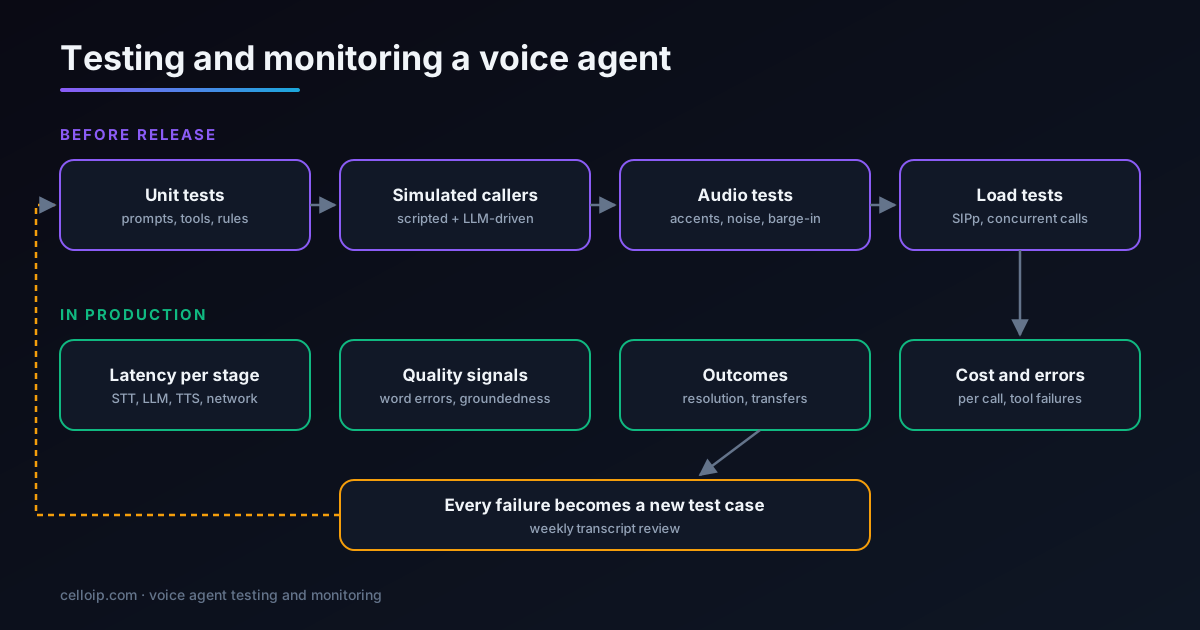
Level 1: unit tests for prompts, tools and rules
Much of a voice agent's behaviour is ordinary code: tools that call your systems, rules about what may be done for whom, and parsing of the model's structured outputs. Test them like any other code, without audio.
- Each tool rejects invalid or missing inputs and never acts outside the authenticated caller's permissions.
- Business rules hold: no booking outside opening hours, no refunds above a limit, no account data before verification.
- Prompts produce the expected structure for known inputs, for example the right tool call for a clear request.
- Fallbacks work: what the agent says when a tool times out or returns an error.
Keep these fast so they run on every change. They catch the majority of regressions caused by prompt edits and model upgrades.
Treat the language model as a dependency that can change behaviour without warning, especially when using hosted models that are updated by the provider. Pin model versions where you can, and run the unit and simulation suites whenever a provider announces a change.
Level 2: simulated callers
Conversations are where most voice agent failures hide: callers who change their mind, give partial information, ask two things at once or go off topic. Simulated callers test those patterns at scale. Each scenario gives a simulated customer a persona, a goal and some difficulty, then scores the result.
# scenarios.yaml: each scenario is run many times with variations
- id: reschedule_vague_time
  persona: "Busy parent, short answers, slightly impatient"
  goal: "Move tomorrow's 10am appointment to next Tuesday afternoon"
  difficulty: ["gives the day before the time", "says 'after lunch' instead of a time"]
  must:
    - tool_called: reschedule_appointment
    - confirms_new_time_before_booking: true
  must_not:
    - books_without_confirmation
    - asks_for_card_details
  max_turns: 12

- id: wants_a_person
  persona: "Elderly caller, unsure, asks for a human on turn 2"
  goal: "Speak to a person about a bill"
  must:
    - transfers_within_turns: 3
    - summary_includes: ["billing"]
Text-level simulation is cheap and fast, so run hundreds of variations on every release. Score with a mix of hard checks (was the right tool called with the right arguments?) and model-graded checks calibrated against human reviewers (did the agent stay polite, accurate and on policy?).
Build your first scenarios from real call recordings or transcripts rather than imagination: the top call reasons, the ways callers phrase them, and the calls that went wrong. Twenty well-chosen scenarios with variations usually reveal more than two hundred invented ones. Add a scenario every time a real call fails, and retire scenarios only when the call type no longer exists.
Level 3: audio tests on real phone lines
Text simulation skips the parts of a voice agent that fail most visibly: hearing and speaking. Audio tests call the agent through the same telephony path real callers use.
Accents and languages
Recordings or live testers covering the accents and languages of your real callers, including mixed-language speech.
Noise and poor lines
Street, car, café and call-centre background noise, plus low-bitrate mobile connections and packet loss.
Interruptions
Callers talking over the agent, short acknowledgements like “yeah” that shouldn't stop it, and long pauses mid-sentence.
Hard content
Names, addresses, email addresses, account numbers, dates and amounts, read back and confirmed correctly.
Measure word error rate on a labelled sample of your own calls rather than relying on a provider's published figures, because accuracy on clean benchmark audio says little about your callers on a phone line.
Level 4: load tests
Voice agents depend on several external services at once, and each has its own capacity limits. Load tests find the weakest link before your busiest Monday morning does. SIPp, the long-standing open-source SIP load generator, can place many concurrent calls that play recorded audio at the agent's SIP endpoint:
# Ramp to 50 concurrent calls at 2 new calls per second, 400 calls in total,
# playing a recorded G.711 caller audio file (uac_pcap built-in scenario).
sipp -sn uac_pcap -s 1000 -r 2 -l 50 -m 400 \
     -i 10.0.0.20 -p 5070 \
     agent-sip.example.internal:5060 \
     -trace_stat -fd 10 -trace_err

# Watch at the same time:
#  - call setup success and SIP errors (SIPp stats file)
#  - turn latency p50/p90/p99 from the agent's traces
#  - speech, model and TTS provider errors and rate-limit responses
#  - CPU, memory and network on media and agent servers
Test at and above expected peak, hold the load long enough to see slow leaks, and include the speech, model and voice providers in the test, because their rate limits are often hit before your own servers are busy.
Monitoring in production: what to measure
Once real calls flow, monitoring tells you how the agent is doing and where to look when something changes. Trace every call and every turn so each metric can be traced back to the conversation that produced it.
| Metric | Why it matters | How to measure |
|---|---|---|
| Turn latency by stage | Long pauses drive hang-ups and interruptions | Timestamps for end of speech, transcript, first token, first audio |
| Transcription quality | Misheard words cause wrong answers | Sampled transcripts compared with human labels |
| Tool and API errors | Failed bookings or lookups break the call | Error rate and latency per tool |
| Interruptions and talk-over | Shows timing or turn-taking problems | Barge-in events per call |
| Transfer rate and reasons | Where the agent gives up, and why | Tagged transfer reasons per call type |
| Resolution rate | Whether calls actually got solved | Outcome confirmed in your systems |
| Caller sentiment and complaints | Early warning of frustration | Sentiment scoring plus complaint tags |
| Cost per call | Keeps the economics in check | Telephony, speech, model and hosting per call |
Example latency budget per stage at the 90th percentile (milliseconds)
Illustrative targets for a well-tuned agent; track averages and high percentiles separately, because occasional long pauses are what callers remember.
Tools commonly combined for this include OpenTelemetry-style tracing, Prometheus and Grafana or a cloud monitoring service for metrics, an LLM tracing tool such as Langfuse for prompts and tool calls, and the call detail records from your telephony layer. The value comes from joining them per call, so one dashboard shows what the caller said, what the agent heard, what it did and how long each step took.
Keep recordings and transcripts linked to traces for a defined period, with personal data redacted, so that when a metric moves you can open the exact calls behind it. Without that link, teams end up guessing at causes from graphs, which slows every investigation and makes fixes less reliable.
Alerts that are worth waking up for
Too many alerts get ignored; too few and callers find the problem first. Alert on changes that affect callers now, and review slower trends in weekly reports.
Latency spike
90th-percentile turn latency above target for several minutes, broken down by stage so you know which provider to check.
Error burst
Tool, speech or voice provider errors above a small threshold, especially rate-limit responses.
Transfer surge
Transfers or hang-ups jump compared with the same hour last week, often the first sign of a broken flow or bad deploy.
Call setup failures
SIP errors or failed answers at the telephony layer, which can stop all calls at once.
Every alert should link to example calls, because seeing three failed conversations explains more than any graph.
Review alert thresholds monthly. As the agent improves and traffic grows, thresholds set at launch become either too noisy or too relaxed, and both lead to missed problems.
Weekly transcript review: the step teams skip
Metrics show that something is wrong; transcripts show what. A short weekly review of a sample of calls, chosen from transfers, low sentiment, long calls and a random set, finds the issues no metric was designed to catch.
- Tag each problem: misheard, missing knowledge, wrong tool, bad timing, policy, or caller confusion.
- Fix the cause: content, prompt, tool, vocabulary or flow, rather than patching one conversation.
- Add the failed conversation as a new simulated test so the fix is protected.
- Track the share of reviewed calls with problems over time; it should fall release by release.
Teams that keep this habit see their agents improve steadily after launch. Teams that skip it usually find quality drifting as content, callers and providers change around an agent nobody is watching.
Release changes gradually as well. Send a small share of real traffic to a new prompt, model or provider first, compare its metrics with the current version for the same call types, and only then roll it out fully. Keep the previous version ready to switch back to in minutes, because a voice agent problem affects live callers immediately.
Testing across languages, channels and providers
A voice agent rarely stays in one language or one configuration for long. Each new language, phone number, speech provider or model version is effectively a new agent that deserves its own tests.
Per-language test sets
Keep separate scenario and audio sets for each language and dialect, with native speakers reviewing results. A combined score hides a weak language.
Per-channel checks
Calls over SIP trunks, WebRTC in the browser and mobile apps behave differently on audio quality and latency; test each path you offer.
Provider changes
When you switch or upgrade a speech, voice or language model provider, re-run the full suite and compare results side by side before switching traffic.
Time and load patterns
Providers can slow down at peak hours in their region. Repeat latency tests at your busiest times, not only during quiet testing windows.
Version everything that affects behaviour, prompts, tool definitions, model and provider settings and knowledge content, so that any change in test results can be traced to the change that caused it.
Common testing mistakes
Most teams do some testing. These are the gaps we find most often when we review voice agents built elsewhere.
Testing only the happy path
Scripts where the caller says exactly the expected thing. Real callers hesitate, correct themselves, ask two things at once and go off topic.
Testing in the browser, not on the phone
Clean browser audio hides the problems of narrowband, noisy phone lines and the extra delay of the telephony network.
Averages instead of percentiles
An average turn time of 800 ms can hide one turn in ten taking three seconds, which is what callers notice.
No baseline for model upgrades
Upgrading a model because it is newer, without running the same tests first, often trades one problem for another.
Ignoring provider limits
Load tests that stop at your own servers miss the speech and model providers' rate limits that fail first under real traffic.
Nobody owns quality after launch
Without a named owner and a weekly review, issues pile up quietly until complaints arrive.
Frequently asked questions
How do you test an AI voice agent?
In layers: unit tests for prompts, tools and business rules; simulated conversations with scripted and AI-driven callers that score whether the task was completed; audio tests with real voices, accents, background noise and interruptions over real phone lines; and load tests that place many concurrent SIP calls. Each layer catches problems the others miss.
What should we monitor in production?
Turn latency broken down by stage (speech-to-text, model, text-to-speech, network), transcription quality, tool and API errors, interruptions, transfer rate and reasons, resolution rate per call type, caller sentiment and cost per call, with alerts when any of them drifts.
What is a simulated caller?
A test harness that plays the customer: either a fixed script or another language model given a persona and goal, such as “reschedule my appointment to next Tuesday, but be vague about the time”. It talks to the agent many times with variations, and the results are scored automatically.
How do we load test a voice agent?
Place realistic concurrent calls with a SIP load tool such as SIPp, playing recorded audio, at and above the expected peak, while measuring call setup success, audio quality, turn latency and errors across the whole pipeline, including speech, model and telephony providers' rate limits.
How often should we re-run tests?
Run the automated suite on every change to prompts, tools, models or providers, and before every release. Re-run audio and load tests when telephony, hosting or speech providers change, and review a sample of real transcripts every week.
Which tools are used for voice agent observability?
A mix: OpenTelemetry-style tracing for each call and turn, metrics in Prometheus and Grafana or a cloud equivalent, LLM tracing tools such as Langfuse for prompts and tool calls, call detail records from the telephony layer, and dashboards that join them per call.
What latency is acceptable?
Aim for about a second or less from the caller finishing speaking to the agent starting to reply, measured on real calls. Track the 90th and 99th percentiles as well as the average, because occasional long pauses are what callers remember.
Can you add testing and monitoring to an agent built elsewhere?
Yes. We regularly add test suites, simulated callers, load tests and observability to existing voice agents on platforms such as Vapi or Retell or on self-hosted LiveKit or Pipecat, then fix the issues they uncover.
Work with CelloIP
Want your voice agent tested properly?
CelloIP builds test suites, simulated callers, audio and load tests and production observability for AI voice agents, whether we built the agent or someone else did, then fixes what they find.