AI Call Center Software: Features, Build Options and Cost
AI is changing contact centres in two ways at once: voice agents take routine calls, and every human-handled call gets transcribed, assisted, summarised and scored. This guide explains each AI layer, how to add them to the contact centre you already run, and what it costs.
Quick answer
What is AI call center software?
AI call center software adds artificial intelligence to the parts of a contact centre that handle calls and messages: AI voice agents that resolve routine calls, live transcription and agent assist for human agents, automatic quality scoring, call summaries, smarter routing and analytics. It can be bought as a platform, added to an existing contact centre, or built custom.
What AI call center software actually is
“AI call center software” is used for very different products: a chatbot on a website, a speech analytics tool, an AI voice agent, or a full contact-centre platform with AI features. It helps to think of it as a set of layers added to the normal contact-centre stack of telephony, routing, agent desktop and reporting.
Some layers replace work: AI voice agents resolve calls without a person, and summaries replace typed notes. Others improve work: transcription, agent assist, automatic QA and analytics make every human call faster, more consistent and easier to learn from.
Almost all of them depend on one thing: reliable access to call audio and a good transcript. That is why the telephony side of a contact centre matters as much as the AI models.
It also helps to separate AI that talks to customers from AI that works behind the scenes. Customer-facing AI, such as voice agents and intent-based routing, changes the caller's experience and needs the most care: clear disclosure, fast handover and careful testing. Behind-the-scenes AI, such as transcription, summaries, QA and analytics, changes how agents and managers work and carries much less risk, which is why it is usually the right place to start.
Finally, AI does not remove the need for good contact-centre basics. Clear call flows, sensible queues, accurate knowledge articles and a reliable phone system make every AI layer work better. Where those basics are weak, fixing them often delivers as much improvement as the AI itself.
How AI fits into a contact centre
Calls and messages come in through telephony and digital channels, are routed, and are handled by an AI agent or a person. Transcription runs alongside every call and feeds the layers that help agents and managers.
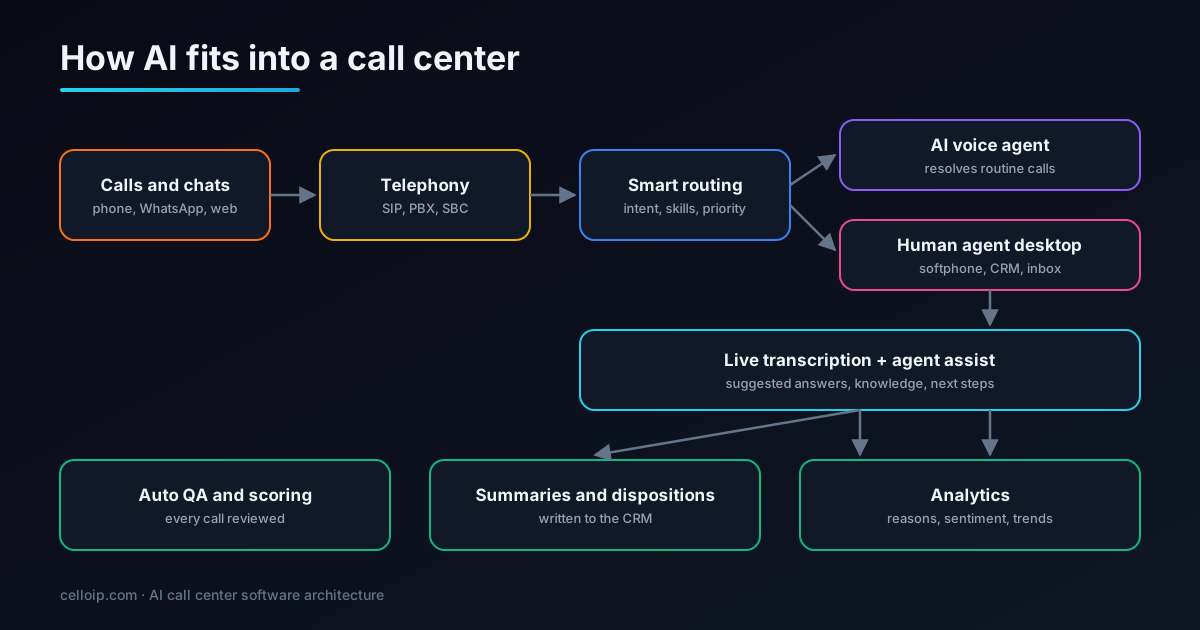
The seven AI layers, what each needs and how to measure it
You don't need all seven. Each has its own data needs and its own measure of success, so plan them one by one.
AI voice agents (self-service)
Answer routine calls end to end: order status, bookings, password resets, payments. Hand everything else to an agent with context.
Needs: Telephony integration, knowledge base, tools into your systems
Measure: Resolution rate, transfer reasons, caller satisfaction
Live transcription
Turns every call into text in real time, which feeds agent assist, QA and analytics.
Needs: Access to call audio (SIP, media fork or recording)
Measure: Word accuracy on your calls, delay
Agent assist
Suggests answers and next steps during the call, pulls up knowledge articles and fills forms from what the customer says.
Needs: Transcription, knowledge base, CRM access
Measure: Handle time, first-contact resolution, adoption by agents
Summaries and dispositions
Writes a short summary and outcome code after each call and saves it to the CRM, instead of the agent typing notes.
Needs: Transcription, CRM integration
Measure: After-call work time, summary accuracy
Automatic QA
Scores every call against your checklist (greeting, verification, compliance statements, resolution) instead of a small sample.
Needs: Transcripts, your QA scorecard
Measure: Agreement with human reviewers, coverage
Intent-based routing
Works out why the customer is calling from the first sentence and routes to the right queue, agent or AI.
Needs: Speech or text understanding at the start of the call
Measure: Transfers between queues, time to the right person
Analytics
Shows why people call, where calls fail, sentiment trends and topics that are rising, across all calls.
Needs: Transcripts and call metadata
Measure: Insights acted on, repeat-call reduction
New platform, AI add-on or custom build?
The biggest decision is not which AI model to use but whether to change your contact-centre platform at all.
| New AI platform | AI added to your contact centre | Custom build | |
|---|---|---|---|
| What it means | Move to a contact-centre platform with built-in AI | Add AI services to the contact centre you already run | Build a contact centre with AI designed in |
| Time to value | Weeks to months (includes migration) | Weeks per feature | Months |
| Disruption to agents | High: new tools and processes | Low: same desktop, new help | Medium: planned roll-out |
| Pricing | Per agent per month, plus AI usage | Build cost plus AI usage | Build cost plus hosting and usage |
| Control of AI models and data | Vendor's choices | Yours | Yours |
| Best fit | Teams replacing an old system anyway | Working contact centre that needs AI | Large, specialised or resold platforms |
If your contact centre works and agents know it, adding AI is usually the fastest route to results. If you were going to replace it anyway, choose a platform or a custom build with AI designed in. If you have many agents or sell contact-centre services to others, a custom build avoids paying per-agent fees forever.
Whichever path you choose, insist on owning your data. Transcripts, summaries and QA scores become one of the most valuable records a contact centre has, and they should be exportable in a usable format whatever happens to the platform or partner.
The technical foundation: getting call audio to the AI
Real-time AI needs a live copy of each call's audio. The main options are SIP-level integration (sending the call to the AI), media forking (copying the audio stream while the call continues normally) and post-call recordings for summaries and QA. On Asterisk, ARI's external media channel is a clean way to fork audio to a transcription service:
# 1. Create an external media channel that sends the call's audio as RTP (ulaw)
#    to a transcription service listening on 10.0.0.5:4000/udp.
curl -s -u ari_user:ari_pass -X POST \
  "http://127.0.0.1:8088/ari/channels/externalMedia?app=transcribe&external_host=10.0.0.5:4000&format=ulaw"

# 2. Put the agent call and the external media channel in the same bridge
#    (your ARI app does this when the call is answered):
curl -s -u ari_user:ari_pass -X POST \
  "http://127.0.0.1:8088/ari/bridges/${BRIDGE_ID}/addChannel?channel=${EXTERNAL_MEDIA_CHANNEL_ID}"
# rtp_receiver.py: receive the RTP stream and pass audio frames to your
# streaming speech-to-text client (stubbed here as send_to_stt).
import socket
RTP_HEADER = 12 # bytes, no extensions or CSRC in Asterisk external media
def send_to_stt(ulaw_frame: bytes) -> None:
... # forward to your streaming STT websocket
sock = socket.socket(socket.AF_INET, socket.SOCK_DGRAM)
sock.bind(("0.0.0.0", 4000))
while True:
packet, _ = sock.recvfrom(2048)
payload = packet[RTP_HEADER:] # 20 ms of 8 kHz u-law = 160 bytes
send_to_stt(payload)FreeSWITCH offers the same pattern with audio-streaming modules, and most commercial platforms expose media forking or real-time recording APIs. Where none of these exist, post-call recordings still support summaries, QA and analytics.
A low-risk roll-out plan
Start with layers that save time without touching customers, use the transcripts they produce to build the next layers, and introduce customer-facing AI last. Phases can overlap.
Example roll-out (typical effort per phase, in weeks)
- Transcription and summaries give agents back after-call time in the first weeks and create the data for everything else.
- Automatic QA turns those transcripts into coaching insights across all calls.
- Agent assist is introduced once knowledge content is clean and agents have seen AI work reliably.
- The first AI voice agent targets one high-volume, simple call type, with fast handover to people.
Data, privacy and compliance
AI turns every call into searchable text, which raises the stakes for privacy. These controls belong in the design.
Recording and analysis notices
Tell callers when calls are recorded or analysed where the law requires it, and honour objections.
Payment card data
Pause recording and transcription during card capture, or use secure payment entry, so card numbers never reach transcripts or AI models.
Personal data in transcripts
Redact names, numbers and identifiers where they aren't needed, and set retention periods for audio and text.
Where data and models run
Choose AI providers and hosting regions that match your obligations, or self-host models for sensitive work.
AI disclosure for voice agents
AI voice agents should say they are AI; outbound AI calls follow consent rules such as the TCPA in the US.
Access and audit
Role-based access to recordings and transcripts, with logs of who viewed or exported what.
How to measure whether the AI is working
Take a baseline before launch and compare like with like: the same queues, call types and time of year.
| Metric | Shows the effect of | Watch out for |
|---|---|---|
| AI resolution rate | Voice agents | Count only calls that were actually resolved, not just ended |
| Average handle time | Agent assist, summaries | Easy calls moving to AI makes human handle time rise |
| After-call work time | Summaries and dispositions | Agents rewriting summaries means accuracy needs work |
| QA coverage and agreement | Automatic QA | Calibrate against human reviewers regularly |
| First-contact resolution | Routing, assist, voice agents | Check repeat calls within a few days |
| Customer satisfaction | Everything | Survey both AI-handled and human-handled calls |
How much does AI call center software cost?
Platform subscriptions charge per agent per month plus AI usage. Custom builds have a one-off cost, then hosting and AI usage. These are typical ranges for custom work, matching our contact centre and voice agent pages.
| Build | Typical range | Timeline |
|---|---|---|
| AI voice agent, managed-platform MVP | $8,000 – $20,000 | 4–6 weeks |
| AI voice agent, custom production build | $25,000 – $60,000 | 8–16 weeks |
| Custom voice call center | $20,000 – $50,000 | 8–14 weeks |
| Omnichannel cloud contact centre | $50,000 – $150,000 | 4–8 months |
| AI services added to an existing contact centre | Scoped after discovery | Weeks per layer |
CelloIP project outcome (client kept private)
We built an omnichannel contact centre with outbound campaigns, WhatsApp, Instagram, email and SMS in one agent desktop, with SLA rules and ticketing: the kind of foundation AI layers plug into.
Common mistakes when adding AI to a contact centre
Most disappointing AI projects in contact centres fail for the same handful of reasons, none of which is the choice of model.
Starting with the hardest use case
Launching a customer-facing voice agent on complex, emotional calls first. Start with summaries, QA and one simple, high-volume call type.
Poor knowledge content
Agent assist and voice agents are only as good as the articles behind them. Outdated, conflicting knowledge produces confident wrong answers.
Ignoring agents
Tools agents don't trust get ignored. Involve team leaders early, show accuracy openly and let agents flag bad suggestions.
No baseline
Without measurements from before launch, nobody can prove the AI helped, and budgets disappear at the next review.
Weak audio access
Transcription built on low-quality or partial audio caps the accuracy of every layer above it. Fix the media path first.
Treating it as a one-off project
Models, prompts and knowledge need weekly tuning from transcripts. Plan ownership and time for that after launch.
Questions to ask before you buy or build
Use these with platform vendors, with build partners and inside your own team. Vague answers are a warning sign.
- Can it work with our current telephony and CRM, or does it require a migration?
- How is call audio captured, and what transcription accuracy do we get on our own recordings?
- Which AI models are used, can we change them, and where is our data processed and stored?
- How are payment card details kept out of recordings, transcripts and models?
- How do voice agents hand over to people, and what context do agents see?
- How is automatic QA calibrated against our human reviewers?
- What does pricing look like at our call volume in two years, including AI usage?
- Who owns the prompts, configuration and code, and what happens if we leave?
Frequently asked questions
What is AI call center software?
It is software that adds AI to a contact centre's work: voice agents that resolve routine calls, live transcription and agent assist for human agents, automatic QA scoring, call summaries, intent-based routing and analytics. It can be a full platform or a set of AI services connected to the contact centre you already have.
Can we add AI without replacing our contact centre?
Usually yes. If your platform can fork call audio or connect over SIP, and your CRM has an API, transcription, summaries, QA, agent assist and AI voice agents can be added alongside it. That avoids a disruptive migration.
Which AI feature should we start with?
Start where the data is easiest and the risk is lowest: transcription and summaries, then automatic QA. They save agent time quickly and build the transcript data that agent assist and voice agents need. Add a voice agent for one high-volume, simple call type after that.
Will AI replace call center agents?
It takes over routine, repetitive calls and after-call work, which changes what agents do rather than removing the need for them. Complex, sensitive and high-value conversations still need people, now with better tools and context.
How much does AI call center software cost to build?
As a guide, a custom voice call center is typically $20,000–$50,000 and an omnichannel cloud contact centre $50,000–$150,000. An AI voice agent is typically $8,000–$20,000 as a managed-platform MVP or $25,000–$60,000 as a custom build. Adding AI services to an existing contact centre is scoped after discovery. AI usage and hosting are running costs.
Is call transcription and AI analysis legal?
Generally yes, with the right notices. Callers must be told when calls are recorded or analysed where the law requires it, card details must be kept out of recordings and transcripts, and data must be stored in line with privacy laws such as GDPR, the DPDP Act or the UAE PDPL.
How accurate is automatic QA compared with human reviewers?
It depends on the scorecard and the transcripts. Objective checks (greeting, verification, required statements) can be scored reliably; subjective ones need calibration. We measure agreement with your human reviewers before relying on it, and keep humans reviewing a sample.
Do we need a specific contact-centre platform?
No. We connect AI to Asterisk, FreeSWITCH and many commercial platforms through SIP, media forking, recording APIs and CRM integrations. If you are building new, we can design the contact centre and AI together.
Work with CelloIP
Add AI to your contact centre
CelloIP builds contact centres and the AI layers on top of them: voice agents, transcription, agent assist, QA and analytics, connected to the platform you already use or built new. You own the code.
Fixed-scope project
One AI layer or a full contact centre, delivered against agreed scope and acceptance tests.
Dedicated developer
A contact-centre and AI engineer inside your team, backed by a 30-day money-back guarantee.
Build, then run
We build it, then monitor, tune models and add the next layer.