Case Study: Omnichannel Contact Centre for a SaaS Company
A European SaaS company wanted to offer its customers a complete contact centre: calls, campaigns, WhatsApp, social messaging, email, SMS and web chat in one desktop, with SLAs, tickets and supervisor tools. CelloIP designed and built the platform on FreeSWITCH as a multi-tenant product, and still maintains it. This is how it is put together.
Quick answer
What did CelloIP build in this contact centre project?
CelloIP built a multi-tenant omnichannel contact centre platform for a European SaaS company, which offers it to its own customers. Voice runs on FreeSWITCH with IVR, skills routing, recording and predictive, progressive, preview and manual dialing. WhatsApp, Instagram, Facebook Messenger, email, SMS and web chat arrive in the same agent desktop, with SLA rules, ticketing, supervisor tools, reports and CRM and helpdesk integration. It serves 100 to 500 agent seats, was built in six to twelve months and is maintained by CelloIP.
Project summary
| Details | |
|---|---|
| Client | SaaS company, Europe/UK (name confidential) |
| Platform | Multi-tenant omnichannel contact centre, offered by the client to its own customers |
| Scale | 100–500 agent seats |
| Telephony | FreeSWITCH |
| Channels | Voice (inbound and outbound), WhatsApp, Instagram, Facebook Messenger, email, SMS, web chat |
| Dialers | Predictive, progressive (power), preview, manual and click-to-call |
| Features | IVR and skills routing, call recording, SLA rules, ticketing, supervisor tools, reports and analytics |
| Integrations | CRM and helpdesk |
| Timeline | First production version in six to twelve months |
| Status | Live, maintained and extended by CelloIP |
The client sells software to businesses and wanted a contact centre as part of its own product, under its own brand and control, rather than reselling a third-party CCaaS service. That meant building a full platform: telephony, messaging, routing, the agent desktop, supervisor tools and reporting, all designed to serve many customers at once.
The challenge
Contact centres used to be about phone calls. Today customers write on WhatsApp, message on Instagram or Facebook, send emails, reply to SMS and open a chat on the website, often about the same issue. Agents juggling separate tools lose context, customers repeat themselves, and managers can't see the whole picture.
The client needed every channel in one place, with one routing engine deciding who handles what, one set of SLA rules and one history per customer. Outbound work mattered as much as inbound: the client's customers run sales and service campaigns that need different dialing modes. And because the platform would be sold to many businesses, every customer had to be kept separate, with its own agents, numbers, channels and data.
- Seven channels in a single agent desktop, with a shared conversation history.
- One routing engine for calls and messages, using skills, queues and priorities.
- Four dialer modes for different kinds of outbound campaign.
- SLA rules and ticketing, so nothing is forgotten after a conversation ends.
- Supervisor tools for real-time oversight, and reports for managers.
- CRM and helpdesk integration for the client's customers.
- Multi-tenancy from day one, so the platform can be sold to many businesses.
Architecture
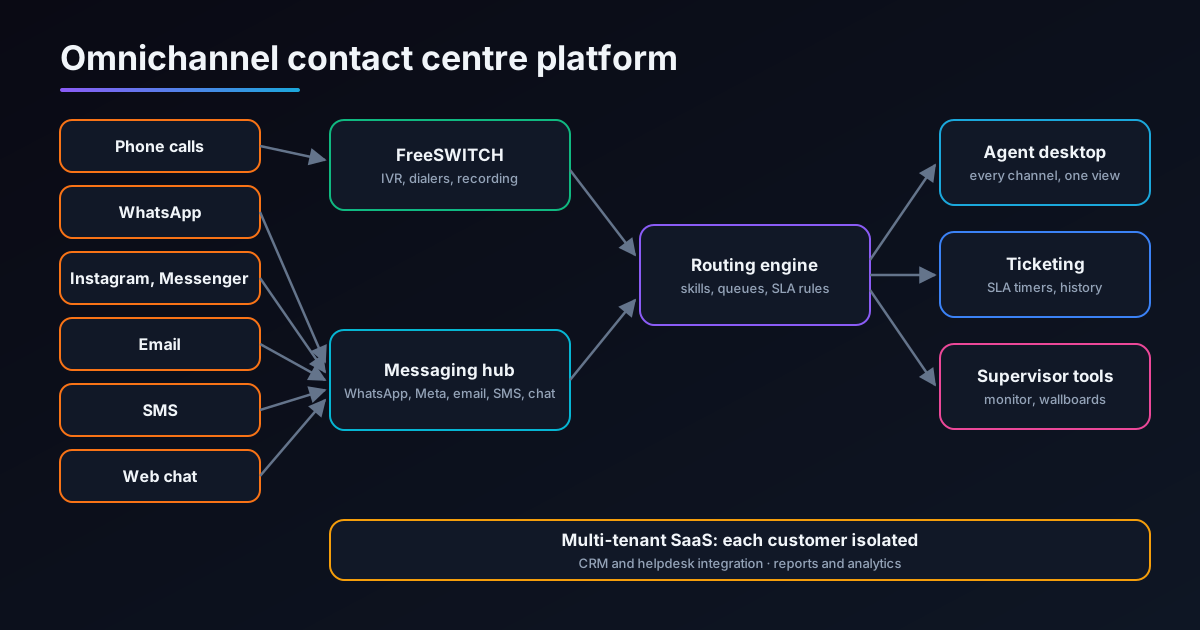
Voice layer (FreeSWITCH)
Handles inbound and outbound calls, IVR menus, call recording and the media side of the dialers, controlled by the platform's application layer.
Messaging hub
Connects WhatsApp, Instagram, Facebook Messenger, email, SMS and web chat, normalising every message into one conversation model.
Routing engine
Decides which agent or queue handles each call or conversation, using skills, availability, priority and SLA rules.
Agent desktop
One web application where agents handle calls and messages, see customer history and work tickets.
Ticketing and SLAs
Turns conversations into trackable work with timers and escalation, so follow-ups don't get lost.
Supervisor tools and reports
Real-time views of queues and agents for supervisors, and historical reports and analytics for managers.
The key design choice was a single conversation model. Whether a customer calls, messages on WhatsApp or sends an email, the platform treats it as part of one customer's history, so routing, SLAs, tickets and reports work the same way across every channel.
Seven channels in one desktop
| Channel | How it connects | What agents can do |
|---|---|---|
| Voice | SIP trunks into FreeSWITCH | Answer and make calls, transfer, see IVR choices and caller history |
| WhatsApp Business Platform | Reply within the service window, send approved templates outside it, share media | |
| Meta messaging APIs | Reply to direct messages from the same desktop | |
| Facebook Messenger | Meta messaging APIs | Reply to Messenger conversations alongside other channels |
| Mailbox integration | Handle emails as conversations with threading and tickets | |
| SMS | SMS gateway | Send and receive texts, including campaign replies |
| Web chat | Website chat widget | Chat with website visitors in real time |
Each channel has its own rules. WhatsApp, for example, allows free-form replies only within a service window after the customer's last message, and needs approved templates outside it; the desktop handles this for agents. Our WhatsApp guide explains those rules in more detail.
Four dialer modes
Predictive
Dials ahead of agent availability, using answer rates and handling times to keep agents busy, with abandoned-call limits enforced. Suited to large outbound campaigns.
Progressive (power)
Dials the next number as soon as an agent becomes free. No abandoned calls, steadier pace; suited to smaller teams and sensitive campaigns.
Preview
Shows the agent the customer record first, and the agent decides when to dial. Suited to complex or high-value calls.
Manual and click-to-call
Agents dial from the desktop or from the CRM with one click, for follow-ups and one-off calls.
In the UK and Europe, outbound calling is regulated. Ofcom has rules on abandoned and silent calls, and data protection law applies to calling lists and recordings, so the dialers are built for those rules, with abandoned-call limits, information messages and do-not-call handling configurable per tenant. Our predictive dialer guide explains how each mode works and when to use it.
Routing, SLAs and ticketing
- IVR menus for calls, with routing by choice, language or caller.
- Skills-based routing for calls and messages: product, language, customer type or priority.
- Queues with priorities, overflow and out-of-hours handling per tenant.
- SLA rules for first response and resolution times, with timers visible to agents and supervisors.
- Escalation when an SLA is about to be missed, to another agent, team or supervisor.
- Tickets created from conversations, so follow-up work stays tracked after the chat or call ends.
- One customer history across all channels, so the next agent sees what happened before.
Putting calls and messages through the same routing engine was what made the platform genuinely omnichannel rather than several tools in one window. An agent with the right skill can take the next piece of work regardless of channel, and supervisors see a single picture of demand.
Supervisor tools, recording and reports
Real-time views
Live queue and agent status across channels, so supervisors can move people where demand is.
Call monitoring
Tools for supervisors to listen to calls and support agents as they work.
Call recording
Recordings with playback for quality assurance and training, kept per tenant.
Reports and analytics
Historical reports on calls, conversations, tickets, SLAs, campaigns and agent performance.
CRM and helpdesk integration
Customer records and tickets in sync with the client's customers' own systems.
Tenant administration
Each tenant manages its own agents, queues, channels, campaigns and settings.
Built for multi-tenancy
Because the client sells the platform to other businesses, tenant separation was designed into every layer:
| Area | How tenants are kept separate |
|---|---|
| Agents and supervisors | Users belong to one tenant and see only that tenant's work and data |
| Numbers and channels | Phone numbers, WhatsApp numbers, social accounts, mailboxes and chat widgets are linked to one tenant |
| Routing and campaigns | Queues, skills, SLA rules, IVRs and dialer campaigns are configured per tenant |
| Data | Conversations, tickets, recordings and reports are stored and queried per tenant |
| Integrations | Each tenant connects its own CRM or helpdesk |
The same principles we used in our multi-tenant hosted PBX case study apply here: isolate at every layer, not just in the user interface.
Delivery
The first production version was built in six to twelve months, in stages:
| Stage | What was built |
|---|---|
| 1. Voice core | FreeSWITCH, SIP trunks, IVR, queues, recording and the tenant model |
| 2. Agent desktop and routing | The web desktop, skills routing and queue management for calls |
| 3. Messaging channels | WhatsApp, Instagram, Messenger, email, SMS and web chat in the same desktop and routing |
| 4. Outbound | Predictive, progressive, preview and manual dialing with campaign management |
| 5. Service management | SLA rules, ticketing and escalation |
| 6. Oversight and integration | Supervisor tools, reports and analytics, CRM and helpdesk integration |
| 7. Production and support | Go-live with the client's customers, then ongoing maintenance and new features by CelloIP |
Lessons for anyone building a contact centre platform
- Design one conversation model across channels first; bolting channels on later creates separate silos.
- Use one routing engine for calls and messages, or the platform will never feel truly omnichannel.
- Respect each channel's rules, such as WhatsApp's service window and templates, inside the product so agents don't have to remember them.
- Offer several dialer modes; different campaigns need different trade-offs between pace and caller experience.
- Build outbound rules in as configuration per tenant, because rules differ by country and campaign.
- Make multi-tenancy part of the foundation if you plan to sell the platform.
Thinking about adding AI agents to a contact centre like this? Our AI call centre software guide and AI to human handover guide cover how voice and chat agents fit alongside human teams.
Frequently asked questions
What did CelloIP build?
A complete omnichannel contact centre platform: voice with IVR, skills routing, recording and four dialer modes on FreeSWITCH; WhatsApp, Instagram, Facebook Messenger, email, SMS and web chat in one agent desktop; SLA rules and ticketing; supervisor tools; reports and analytics; and CRM and helpdesk integration. It is multi-tenant, so the client can run it for many customers.
Who is the client?
A European SaaS company that offers the platform to its own business customers. Its name is confidential under our agreement.
How big is it, and how long did it take?
The platform serves 100 to 500 agent seats. The first production version was built in six to twelve months, and CelloIP continues to maintain and extend it.
Which dialer modes are included?
Predictive, progressive (power), preview and manual or click-to-call dialing, so each campaign can use the mode that suits it.
Why FreeSWITCH?
FreeSWITCH handles high call volumes well, has strong support for conferencing, recording and media control, and can be driven from an application through its event socket, which suits a platform where routing and campaigns are controlled by software.
How are the client's customers kept separate?
Each customer is a separate tenant with its own agents, queues, channels, numbers, campaigns, tickets, recordings and reports. Supervisors and agents see only their own tenant's data.
What would a similar platform cost?
As a guide, an omnichannel cloud contact centre with campaigns, WhatsApp, email, SMS, SLAs and ticketing typically costs $50,000–$150,000 over four to eight months. Larger multi-tenant SaaS platforms like this one are scoped after discovery. Hosting, SIP trunks and channel fees are separate running costs.
Work with CelloIP
Planning your own contact centre platform?
CelloIP designs and builds omnichannel contact centres on FreeSWITCH and Asterisk, with dialers, WhatsApp and social channels, email, SMS, web chat, SLAs, ticketing, supervisor tools and CRM integration, for your own team or as a product you sell. You own the code.