WhatsApp AI Chatbot: How to Build One on the WhatsApp Business Platform
For many businesses, especially in India, the Middle East, Africa, Latin America and Europe, WhatsApp is where customers already talk. This guide explains how WhatsApp AI chatbots work, the platform rules that shape them, Meta's 2026 policy on AI, and how to build one that answers accurately and hands over cleanly.
Quick answer
How does a WhatsApp AI chatbot work?
A WhatsApp AI chatbot connects to the WhatsApp Business Platform's Cloud API, receives customer messages through a webhook, answers them with a language model grounded in your own content and tools, and hands over to agents when needed. It must follow WhatsApp's rules: free-form replies within 24 hours of the customer's last message, approved templates and opt-in for messages you start, and, since January 2026, business-focused AI only.
What a WhatsApp AI chatbot is, and isn't
A WhatsApp AI chatbot is your business's assistant on WhatsApp. Customers message your business number; the bot understands free-text questions, answers from your own information, takes actions such as checking an order or booking a slot, and passes the conversation to your team when needed.
It runs on the WhatsApp Business Platform, the API version of WhatsApp for businesses, not the WhatsApp Business app on a phone. The platform gives programmatic access to messages, templates, interactive buttons and lists, and media, which is what makes automation possible at scale.
What it is not, since January 2026, is a general-purpose AI assistant offered to the public through WhatsApp. Meta's terms now restrict the Business Platform to AI that serves a business's own customers, which is exactly the use case most companies want anyway.
Most businesses use a WhatsApp AI chatbot for three jobs: answering customer questions at any hour, handling simple tasks such as order tracking, bookings and payment links without an agent, and sending timely notifications that customers have asked for. The best results come from starting with one of these, measuring it, and adding the next once it works well.
The WhatsApp platform rules that shape every bot
WhatsApp is strict about protecting users from spam, and the rules directly affect how a bot is designed.
| Rule | What it means | How the bot handles it |
|---|---|---|
| 24-hour customer service window | Free-form replies are allowed for 24 hours after the customer's last message | The bot tracks each customer's window and switches to templates when it closes |
| Templates for business-initiated messages | Messages you start, or send outside the window, must use an approved template | Templates for reminders, order updates, passcodes and offers, submitted for approval in advance |
| Opt-in | Customers must agree to receive messages from you before you message them first | Opt-in captured and stored with time and source; opt-outs honoured at once |
| Template categories | Marketing, utility and authentication templates have different rules and prices | Each message uses the right category; marketing is never disguised as utility |
| Quality and messaging limits | Blocks and reports lower your number's quality rating and can limit sending | Relevant, expected messages only; monitor quality rating |
The practical effect: a WhatsApp bot is mostly reactive and conversational inside the window, and uses a small set of well-designed templates to start conversations that customers actually want, such as delivery updates, appointment reminders and payment confirmations.
Meta's 2026 policy on AI chatbots
In October 2025 Meta changed the WhatsApp Business Solution terms to stop AI providers distributing general-purpose assistants through the Business Platform. The change applied to new users from mid-October 2025 and to all existing users from 15 January 2026, and services such as public ChatGPT-style bots on WhatsApp stopped working.
Still allowed
AI that serves your own customers: support, sales, bookings, order tracking, notifications and other business tasks, even when it uses a large language model behind the scenes.
Not allowed
Offering a general-purpose AI assistant, where the AI itself is the product and answers open-ended questions for anyone, through the WhatsApp Business Platform.
Design implication
Keep the bot focused on your business: scope prompts and retrieval to your products and services, and politely decline unrelated requests.
Keep watching
Meta has adjusted rules for specific markets since, so check the current WhatsApp Business terms before launch and at each review.
For most businesses this policy changes little in practice, but it is a good reason to document what your bot is for, which topics it covers and how it declines others, so the design is easy to explain if Meta or your own compliance team asks.
WhatsApp AI chatbot architecture
A production WhatsApp bot is a small service between the WhatsApp Cloud API and your systems, with an AI layer and an agent inbox.
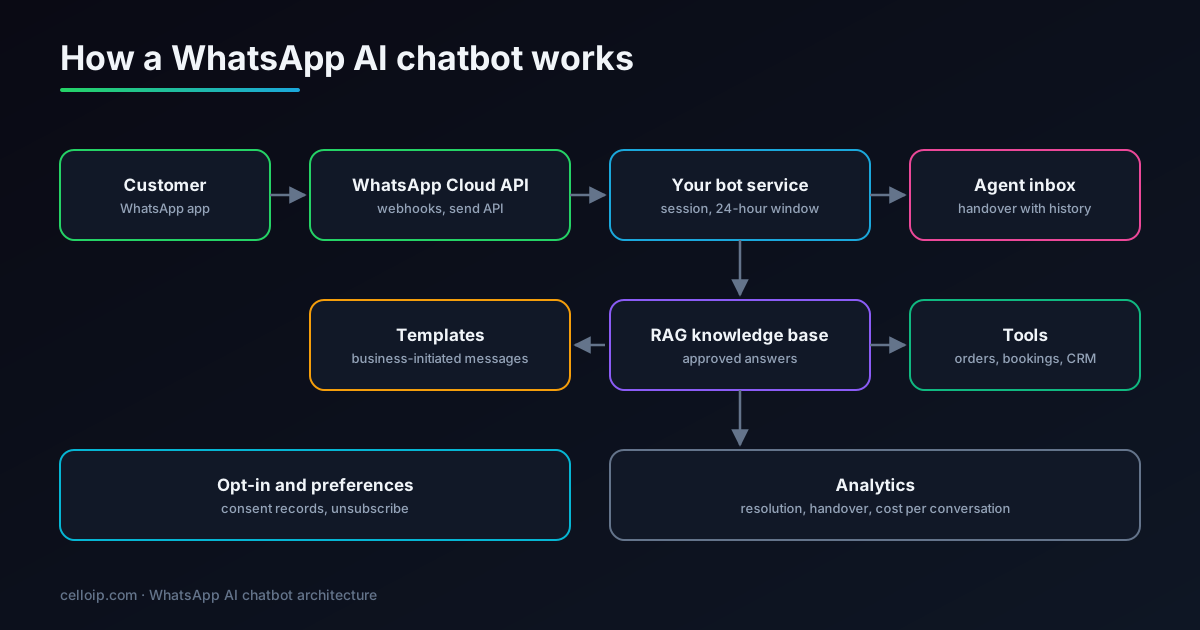
- Webhook endpoint: receives messages and delivery statuses, verifies Meta's signature and responds quickly.
- Conversation store: history, the 24-hour window, opt-in status and whether a human has taken over.
- AI layer: retrieval from approved content plus tools for orders, bookings and CRM, with guardrails.
- Template sender: business-initiated messages through approved templates with variables.
- Agent inbox: handover with history and summary, and a way to hand back to the bot.
A minimal webhook: receive a message and reply
This is the core of a WhatsApp bot using the Cloud API: verify the webhook, check the request signature, read the incoming text and send a reply. The answer function is where your RAG chatbot plugs in.
# app.py — pip install flask requests
import hashlib, hmac, os
import requests
from flask import Flask, request, abort

app = Flask(__name__)
VERIFY_TOKEN = os.environ["WA_VERIFY_TOKEN"]      # you choose this in the Meta app settings
APP_SECRET = os.environ["META_APP_SECRET"].encode()
TOKEN = os.environ["WA_ACCESS_TOKEN"]
PHONE_NUMBER_ID = os.environ["WA_PHONE_NUMBER_ID"]
GRAPH = f"https://graph.facebook.com/v21.0/{PHONE_NUMBER_ID}/messages"

@app.get("/webhook")
def verify():
    if request.args.get("hub.verify_token") == VERIFY_TOKEN:
        return request.args.get("hub.challenge", "")
    abort(403)

def valid_signature(req) -> bool:
    sent = req.headers.get("X-Hub-Signature-256", "").removeprefix("sha256=")
    expected = hmac.new(APP_SECRET, req.get_data(), hashlib.sha256).hexdigest()
    return hmac.compare_digest(sent, expected)

def answer(user_id: str, text: str) -> str:
    # Plug in your RAG chatbot here: retrieve approved content, call tools,
    # keep answers about your business, and offer a human when unsure.
    return "Thanks! I can help with orders, bookings and account questions."

@app.post("/webhook")
def incoming():
    if not valid_signature(request):
        abort(401)
    for entry in request.json.get("entry", []):
        for change in entry.get("changes", []):
            for msg in change.get("value", {}).get("messages", []):
                if msg.get("type") != "text":
                    continue
                reply = answer(msg["from"], msg["text"]["body"])
                requests.post(GRAPH, timeout=10,
                    headers={"Authorization": f"Bearer {TOKEN}"},
                    json={"messaging_product": "whatsapp", "to": msg["from"],
                          "type": "text", "text": {"body": reply}})
    return "ok", 200
In production, acknowledge the webhook immediately and process messages in a queue, deduplicate by message ID because webhooks can be retried, and store each customer's last-message time to know when the 24-hour window closes.
Message types that make bots easier to use
Pure free text works, but WhatsApp's interactive features make bots faster and less error-prone, especially on small screens.
| Feature | Good for | Tip |
|---|---|---|
| Reply buttons | Quick choices: confirm, reschedule, talk to a person | Use for the two or three most likely next steps |
| List messages | Choosing from several options such as services, branches or time slots | Short, scannable labels |
| WhatsApp Flows | Structured forms such as booking details, applications or surveys | Use when you need several fields at once |
| Media and documents | Invoices, tickets, product images, location pins | Send documents the customer will want to keep |
| Templates with variables | Reminders, order and delivery updates, passcodes | One clear purpose per template |
Let customers type freely at any point, though. A good bot treats buttons as shortcuts, not as the only way to talk, and the AI layer understands the free-text version of every choice.
Keep a consistent tone across buttons, lists and free-text replies, and make sure every interactive message still makes sense if read out of context in the chat history, because customers often scroll back days later to find an order number or booking time.
Making the AI answers reliable
WhatsApp conversations feel personal, so wrong answers do more damage than on a website widget. The same principles as any RAG chatbot apply, with a few WhatsApp-specific ones:
Grounded in your content
Answers come from retrieved, approved content and live tool results, not the model's general knowledge, with a clear “let me check with the team” when unsure.
Stay on topic
Scope the assistant to your business and decline unrelated requests politely, which also keeps you within Meta's business-AI policy.
Short and mobile-friendly
Brief messages, one question at a time, and buttons for common next steps rather than long paragraphs.
Language and script
Answer in the customer's language, including mixed languages such as Hinglish and right-to-left scripts like Arabic.
Safe actions
Refunds, cancellations and account changes go through your code with limits and confirmations, never directly from the model.
Privacy
Don't ask for card numbers or passwords in chat; send secure links or hand over to a protected flow instead.
Handing over to people
The best WhatsApp bots are judged as much by how they hand over as by what they answer. Customers should never feel stuck with a bot.
- Offer a person whenever the customer asks, the bot isn't confident, or the topic is sensitive (complaints, payments, cancellations).
- Pass the full history and a short summary so the agent doesn't ask the customer to repeat themselves.
- Pause automatic replies while an agent is handling the conversation, and hand back to the bot when the agent closes it.
- Tell customers honestly when a person will reply, especially outside working hours.
- Track handover reasons; they are the best list of what to improve next.
Illustrative example: typical sources of handovers in a support bot (share of handovers)
An illustration of how tagged handover reasons guide improvements, not measured data; your own breakdown will differ.
Set expectations for response times by channel and hour. A bot that says a person will reply within minutes, when the team is offline until morning, damages trust more than an honest message about when someone will be available.
What a WhatsApp AI chatbot costs
There are two kinds of cost: building the bot, and running it. Running costs include Meta's charges for template messages, which vary by category and country, AI model usage, hosting, and any business solution provider's fees. Replies inside the 24-hour customer service window are generally not charged by Meta, which makes reactive support bots inexpensive to run; check Meta's current pricing before you plan volumes.
| Build | Typical range | Timeline |
|---|---|---|
| Knowledge-base chatbot MVP on WhatsApp | $6,000 – $15,000 | 3–5 weeks |
| Production RAG chatbot on WhatsApp and other channels | $15,000 – $40,000 | 6–10 weeks |
| Enterprise or self-hosted assistant, chat and voice | Scoped after discovery | Agreed in the plan |
Ranges match our AI chatbot development page. You get a fixed quote after a discovery call.
CelloIP project outcome (client kept private)
We built a business chat and calling app now live on Google Play, and an omnichannel contact centre that handles WhatsApp, Instagram, email and SMS in one agent desktop with SLA rules and ticketing.
Launch checklist
WhatsApp numbers carry a quality rating, and a poor launch can limit how many customers you can message. Work through this list before the bot meets real customers.
- Business verified, display name approved and the phone number registered on the Cloud API.
- Opt-in collected where customers expect it (checkout, account settings, forms) with clear wording, and stored with time and source.
- Templates submitted for the messages you will start: order updates, reminders, passcodes, with the right category for each.
- Webhook signature checks, retries, deduplication and a queue in place, and alerts if replies start failing.
- Answers tested on real customer questions in every language you support, including questions the bot should decline.
- Handover to the agent inbox tested end to end, including outside working hours.
- Privacy notice updated to explain the use of AI and how chat data is stored and for how long.
Common WhatsApp chatbot mistakes
These are the issues we most often see when businesses come to us to fix an existing WhatsApp bot.
Menu bots pretending to be AI
Rigid number menus frustrate customers who just want to type their question. Use buttons as shortcuts and understand free text everywhere.
Marketing in utility templates
Sneaking promotions into utility templates risks template rejection and damages your number's quality rating.
Messaging without opt-in
Starting conversations with people who never agreed leads to blocks and reports, which can restrict your sending.
No way out to a person
Customers who can't reach a human leave or complain publicly. Always offer handover, and honour it quickly.
Ignoring the 24-hour window
Bots that try to send free-form follow-ups after the window closes fail silently. Track the window and switch to templates.
Answers from the model's memory
Letting the AI answer product, price or policy questions from general knowledge produces confident errors. Ground every answer in your content.
Frequently asked questions
Can I put an AI chatbot on WhatsApp?
Yes, for business purposes such as customer support, sales, bookings and notifications. Since 15 January 2026 Meta's WhatsApp Business terms bar general-purpose AI assistants, the ChatGPT-style bots that answer any question, from the Business Platform, while AI that serves a business's own customers remains allowed.
What is the WhatsApp 24-hour window?
When a customer messages your business, you can reply with free-form messages, including AI-generated answers, for 24 hours after their last message. Outside that window, you can only start a conversation with an approved message template, and only with people who have opted in.
Do I need message templates?
Only for messages your business starts or sends outside the 24-hour window, such as order updates, reminders, one-time passcodes or marketing. Templates are submitted to Meta for approval and fall into categories such as marketing, utility and authentication, each priced differently.
How much does a WhatsApp chatbot cost to run?
Meta charges per template message, with rates that depend on the template category and the customer's country; replies within the 24-hour customer service window are generally not charged by Meta. Check Meta's current pricing page. On top of that come AI model usage, hosting and any business solution provider fees.
How much does it cost to build a WhatsApp AI chatbot?
As a guide, a knowledge-base chatbot MVP on one channel such as WhatsApp is typically $6,000–$15,000 over 3–5 weeks, and a production RAG chatbot across WhatsApp and other channels with integrations, actions and evaluation $15,000–$40,000 over 6–10 weeks.
Can the bot hand over to a human agent?
Yes. The bot can pass the conversation to an agent inbox or contact-centre platform with the full history and a summary, and pause automatic replies while the agent is handling it.
Should we use a provider or connect to the Cloud API directly?
Business solution providers offer ready-made inboxes and onboarding help, while connecting directly to Meta's Cloud API gives you full control and no extra platform fee. Many custom builds use the Cloud API directly, or a provider for numbers and inbox with a custom AI layer.
Can the same bot work on our website and Instagram?
Yes. The knowledge base, retrieval and guardrails are shared, and each channel is a connector. The same knowledge can also power an AI voice agent on your phone line.
Work with CelloIP
Want a WhatsApp AI chatbot that customers trust?
CelloIP builds WhatsApp AI chatbots on the WhatsApp Business Platform with grounded answers, templates, opt-in handling, clean handover to your agents and analytics, plus the same assistant on your website and phone line. You own the code.