Voice AI Latency: Budget, Turn-Taking and Barge-in
A voice agent can give perfect answers and still fail if it pauses too long or keeps talking when the caller interrupts. On a phone call, timing is part of quality. This guide breaks latency into its stages, shows where the time really goes, and explains how to tune turn detection and handle barge-in, with code.
Quick answer
How do you reduce latency in an AI voice agent?
Voice AI latency is the time from when a caller stops speaking to when they hear the agent's first word. On phone calls, aim for well under one second at the median. It is the sum of end-of-turn detection, final speech-to-text, the language model's first token, text-to-speech's first audio and the network and telephony path. The biggest gains come from smarter turn detection, streaming every stage, keeping all components in one region near your SIP trunk, and handling barge-in by stopping playback the moment the caller speaks.
What voice AI latency actually means
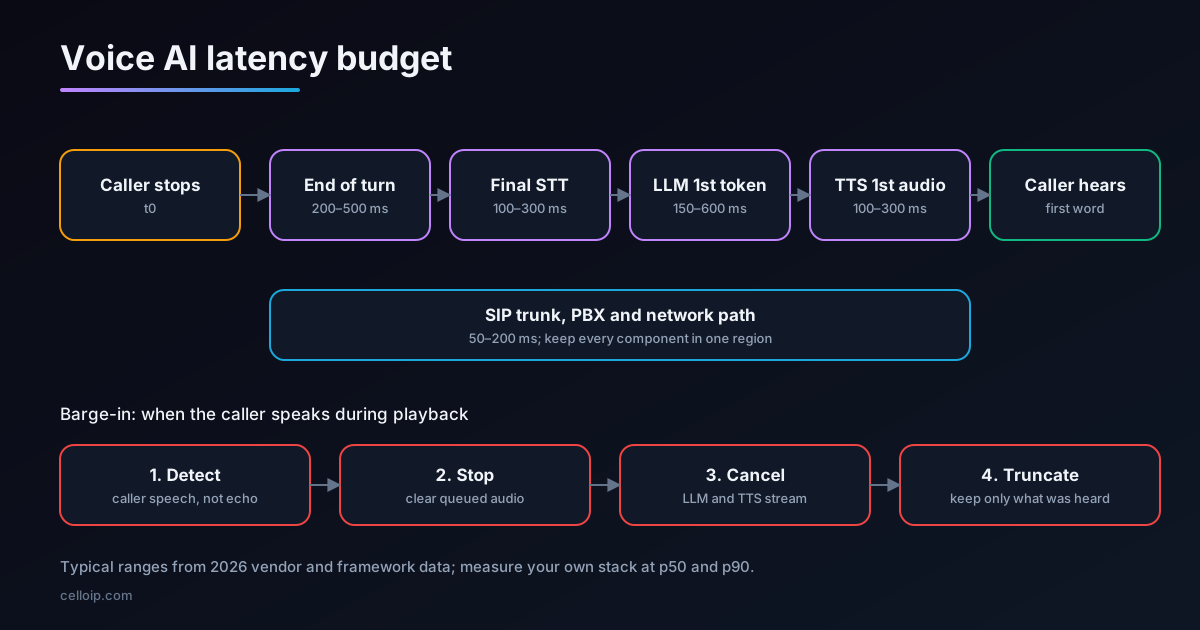
The number that matters is voice-to-voice latency: the time from when the caller stops talking to when they hear the agent start to reply. It is not the language model's response time, and it is not the speed of any single API. It is everything in between, added together, on a real phone line.
People are very sensitive to this gap. In a study of ten languages published in PNAS in 2009, Stivers and colleagues found that conversations everywhere avoid overlapping talk and keep silences between turns short, with average gaps varying only modestly between languages. A voice agent will not match human timing, but every few hundred milliseconds of extra silence makes callers repeat themselves, talk over the agent or assume the line has dropped.
Two problems usually travel together. The first is latency: the agent is slow to start speaking. The second is turn-taking: the agent jumps in while the caller is still thinking, or keeps talking when the caller interrupts. Fixing one without the other rarely makes a call feel natural.
The latency budget, stage by stage
Every cascaded voice agent (speech-to-text, then a language model, then text-to-speech) spends time in the same five places. The ranges below are typical figures reported by framework and speech vendors in 2026. They vary with providers, models, languages and load, so measure your own.
| Stage | What happens | Typical range | Main levers |
|---|---|---|---|
| 1. End-of-turn detection | Deciding the caller has finished, not just paused | 200–500 ms or more | Semantic or audio turn models, endpointing delays |
| 2. Final transcript | Speech-to-text finalising the last words | 100–300 ms | Streaming STT, model choice, region |
| 3. Model first token | The language model starting its reply | 150–600 ms | Model size, prompt length, region, tool calls |
| 4. Speech first audio | Text-to-speech producing the first audio | 100–300 ms | Streaming TTS, voice choice, sentence chunking |
| 5. Network and telephony | Hops between services, packetisation, jitter buffers | 50–200 ms | One region, close to the SIP trunk or PBX |
Illustrative voice-to-voice budget at the median, tuned vs untuned (milliseconds)
Illustrative only, based on the typical ranges above. Untuned: silence-only endpointing, non-streaming steps and services in different regions. Tuned: turn-detection model, streaming throughout and one region. Measure your own stack.
Two lessons stand out. First, end-of-turn detection is often the single largest slice, so it deserves as much attention as the model. Second, stages add up only if they run one after another; streaming lets them overlap, which is where most real savings come from.
Turn detection: the biggest lever
The simplest way to decide that a caller has finished is to wait for a fixed period of silence. It is also the worst. Set it short and the agent interrupts people who pause mid-sentence, for example while reading out a card number or thinking of a date. Set it long and every reply starts late.
| Approach | How it decides | Trade-off |
|---|---|---|
| Silence timeout (VAD only) | No speech for a fixed time, e.g. 500–800 ms | Simple; either slow or interrupts people |
| Semantic turn detection | A model reads the words so far and judges if the sentence is complete | Faster on complete sentences, waits longer on half-finished ones |
| Audio turn detection | A model listens to intonation, rhythm and words together | Works without waiting for a transcript; needs a supported language |
| STT with built-in end of turn | The speech model signals end of turn itself, sometimes with an early 'eager' signal | Fewer moving parts; tied to that speech provider |
Modern frameworks let you combine these. A turn model judges whether the caller has finished, and two delays bound its decision: a minimum delay before the agent may reply even when the model is confident, and a maximum delay after which it replies anyway. Tune these for your callers: an older audience or a use case full of numbers needs a longer minimum than a quick status check.
- Start with your framework's turn-detection model, not a bare silence timeout.
- Check the model supports your callers' language; fall back to longer delays where it does not.
- Raise the minimum delay for steps where callers read out numbers, addresses or reference codes.
- Use early or eager end-of-turn signals to start the model speculatively, and discard the work if the caller keeps talking.
- Review recordings where the agent cut in early; they show exactly where the delays are wrong.
Stream every stage
In a non-streaming pipeline each stage waits for the previous one to finish: the full transcript, then the full reply, then the full audio. In a streaming pipeline each stage starts as soon as it has something to work with.
Streaming speech-to-text
Send audio continuously and receive partial transcripts, so the final transcript arrives almost as the caller stops.
Streaming model output
Start text-to-speech on the first complete sentence or clause, not the full answer.
Streaming speech output
Play the first audio chunk to the caller while later chunks are still being synthesised.
Short first sentence
Prompt the model to open with a short sentence, so the first audio can start sooner.
Warm connections
Keep WebSocket or HTTP/2 connections to speech and model providers open between turns, instead of reconnecting.
Lean prompts
Very long system prompts and histories slow the first token; summarise older turns.
Tool calls deserve special care. If the agent must look up an order before answering, the lookup sits directly in the latency path. Make tool APIs fast, cache what you can, and let the agent say a short, natural acknowledgement while a slow lookup runs.
Region, telephony and the phone network
On phone calls there is a path many browser demos never test: carrier to SIP trunk, SIP trunk to your PBX or SIP edge, PBX to the agent, agent to speech and model providers, and back again. Each hop adds delay, and crossing an ocean adds a lot.
| Factor | What to do |
|---|---|
| Region | Run the agent, speech and model endpoints in one cloud region, close to where calls enter your network |
| SIP trunk location | Choose trunk points of presence near your callers and your agent's region |
| Codec and packet size | G.711 with 20 ms packets is standard; avoid unnecessary transcoding between codecs |
| Jitter buffers | Keep them adaptive and modest; large fixed buffers add delay to every packet |
| Media path | Avoid hair-pinning audio through extra servers or regions just for recording or monitoring |
| Model region | Check where your model provider actually serves requests, not only where your account is |
Our guides to connecting a SIP trunk to an AI voice agent and OpenAI Realtime native SIP vs an Asterisk bridge cover the telephony side in more depth.
Barge-in: letting callers interrupt
Callers interrupt for good reasons: the agent misunderstood, the answer is too long, or they already know what it is about to say. An agent that keeps talking feels robotic. Good barge-in handling does four things, quickly:
| Step | What the agent does | Why it matters |
|---|---|---|
| 1. Detect | Notice the caller speaking while agent audio is playing | Must ignore the agent's own voice echoing back |
| 2. Stop | Stop playback immediately and clear any queued audio | Even half a second of extra speech feels rude |
| 3. Cancel | Cancel the reply still being generated or synthesised | Saves cost and avoids stale audio resuming later |
| 4. Truncate | Record only the part of the reply the caller actually heard | The model must not assume the caller heard the rest |
The hard part is telling real interruptions from noise. Coughs, a television in the background and short acknowledgements such as "uh-huh" or "okay" should not stop the agent. Most frameworks let you require a minimum duration of speech or a minimum number of recognised words before treating it as an interruption, and some can resume a reply if an interruption turns out to be false.
Echo is the other trap. On some phone lines and speakerphones, the agent hears its own voice coming back and interrupts itself. Echo cancellation on the client or media server, and ignoring speech that matches the agent's own output, prevent this.
Barge-in in code
Frameworks such as LiveKit Agents and Pipecat handle barge-in for you, but it helps to see the logic. This framework-agnostic Python sketch plays the agent's reply as a task that can be cancelled, and keeps track of how much audio the caller actually heard.
import asyncio, time

FRAME_MS = 20                 # one 20 ms audio frame per send
MIN_INTERRUPT_MS = 500        # ignore shorter blips (coughs, "uh-huh")

class Turn:
    def __init__(self, send_audio):
        self.send_audio = send_audio      # async fn: sends one frame to the caller
        self.playback: asyncio.Task | None = None
        self.played_ms = 0
        self.speech_started: float | None = None

    async def speak(self, frames):
        """Play TTS frames; can be cancelled at any frame."""
        self.played_ms = 0
        for frame in frames:
            await self.send_audio(frame)
            self.played_ms += FRAME_MS
            await asyncio.sleep(FRAME_MS / 1000)   # pace at real time

    def start_reply(self, frames):
        self.playback = asyncio.create_task(self.speak(frames))

    def on_vad(self, caller_is_speaking: bool) -> int | None:
        """Call on every VAD update. Returns ms heard if we barged in."""
        now = time.monotonic()
        if not caller_is_speaking:
            self.speech_started = None
            return None
        self.speech_started = self.speech_started or now
        long_enough = (now - self.speech_started) * 1000 >= MIN_INTERRUPT_MS
        if long_enough and self.playback and not self.playback.done():
            self.playback.cancel()            # 1. stop audio at once
            return self.played_ms             # 2. caller heard only this much
        return None

# On barge-in: cancel the LLM/TTS stream too, then truncate the assistant's
# last message in the history to roughly 'played_ms' worth of text, so the
# model knows what the caller actually heard before it replies again.
With OpenAI's Realtime API the truncation step has a direct equivalent: when the caller interrupts, you tell the session how many milliseconds of the assistant's audio were played, and it trims the stored transcript to match. On a PBX, stopping playback means interrupting the media the PBX is playing, for example stopping a playback on an Asterisk channel through ARI or breaking the current audio on a FreeSWITCH channel with uuid_break.
Settings in LiveKit Agents and OpenAI Realtime
LiveKit Agents. Recent releases (livekit-agents 1.6.1 or later for Python) include an audio turn detector that combines what the caller says with how they say it, and enable it by default in an AgentSession. LiveKit's documentation lists default endpointing delays of 0.3 seconds minimum and 2.5 seconds maximum with the audio turn detector, against 0.5 and 3.0 seconds without it, and requires voice activity detection with a minimum silence of at least 0.25 seconds. Older releases used a text-based turn detector and different parameter names, so check the documentation for your version.
# LiveKit Agents (Python, 1.6.1+): audio turn detector, per LiveKit's docs
from livekit.agents import AgentSession, TurnHandlingOptions, inference

session = AgentSession(
    turn_handling=TurnHandlingOptions(
        turn_detection=inference.TurnDetector(),   # or TurnDetector(version="v1-mini") on CPU
    ),
    # stt=..., llm=..., tts=..., vad=...
)
OpenAI Realtime API. Turn detection is configured on the session. server_vad uses silence-based detection with settings such as prefix padding and silence duration; semantic_vad uses a model to judge whether the caller has finished, with an eagerness setting. The values below are the example values used in OpenAI's own guide, not recommendations for every use case.
// OpenAI Realtime: two ways to configure turn detection (session.update)
{ "turn_detection": { "type": "server_vad", "threshold": 0.5,
                      "prefix_padding_ms": 300, "silence_duration_ms": 500 } }

{ "turn_detection": { "type": "semantic_vad", "eagerness": "medium" } }
Field names and defaults change between API versions, so confirm them against the current reference before deploying. Our LiveKit vs Pipecat comparison covers how each framework approaches turn-taking.
Measuring latency properly
You cannot tune what you do not measure. Log a timestamp at each boundary of every turn and store it with the call record:
| Timestamp | Marks | Derived metric |
|---|---|---|
| t0 | Caller's speech ends (VAD) | Start of the clock |
| t1 | End of turn decided | Endpointing delay = t1 − t0 |
| t2 | Final transcript received | STT finalisation = t2 − t0 |
| t3 | First model token | Model time to first token = t3 − t1 |
| t4 | First TTS audio byte | TTS time to first byte = t4 − t3 |
| t5 | First audio packet sent to the caller | Voice-to-voice latency = t5 − t0 |
- Report the median and the 90th percentile; averages hide the slow calls callers remember.
- Break results down by provider, model, region, language and time of day.
- Test over real phone lines with a SIP load tool, not only in a browser.
- Alert when the 90th percentile drifts, for example after a provider or prompt change.
- Listen to the slowest calls each week; they often reveal a slow tool or a turn-detection fault.
Our voice agent testing and monitoring guide covers test levels, load testing and production alerts in detail.
Reducing perceived latency
Some delay cannot be removed, but it can be made to feel shorter. Used carefully, these techniques help; overused, they sound scripted.
Acknowledge before slow work
"Let me check that order for you" while a lookup runs feels natural; silence does not.
Short opening sentences
A short first clause lets audio start sooner, and the rest streams behind it.
Confirm key details
Reading back a date or number gives the caller a natural moment while the next step runs.
Avoid fake fillers
Random 'umm' sounds annoy callers quickly; use real, relevant acknowledgements instead.
A real example: voice AI through an existing contact centre
CelloIP's AI voice agent for a North American contact centre handles inbound support, outbound calls and appointment booking in English and Spanish. Calls run through the centre's own FreeSWITCH platform, which connects over SIP to an agent built on LiveKit Agents using hosted speech-to-text, language model and text-to-speech APIs, with handover to human agents when needed.
In a set-up like this, the telephony path, the turn-detection settings for each language and the speed of CRM and booking lookups all sit in the latency budget, which is why they are designed and tested together rather than one at a time.
CelloIP project outcome (client kept private)
English and Spanish voice agent over SIP from FreeSWITCH to LiveKit Agents, integrated with the CRM, booking system and helpdesk, with handover to human agents. Built in three to six months and maintained by CelloIP.
Latency and barge-in checklist
- Voice-to-voice latency is measured per stage, at the median and 90th percentile, on real phone lines.
- A turn-detection model is used, with minimum and maximum delays tuned per use case and language.
- Speech-to-text, the model and text-to-speech all stream; speech starts on the first sentence.
- Agent, speech and model endpoints run in one region near the SIP trunk or PBX.
- Tool calls are fast, cached where possible, and covered by a natural acknowledgement when slow.
- Barge-in stops audio at once, cancels generation and truncates the history to what was heard.
- Short noises and acknowledgements do not interrupt the agent; echo is cancelled.
- Latency alerts catch regressions after model, prompt or provider changes.
Frequently asked questions
What is a good latency for an AI voice agent?
Measured from the end of the caller's speech to the first audio they hear, most teams aim for well under one second at the median and watch the 90th percentile closely. Human conversation has much shorter gaps: a 2009 study across ten languages found people typically avoid long silences and overlapping talk, with short gaps between turns. Voice agents cannot match that yet, but sub-second replies feel natural enough on a phone call.
What causes the most latency in a voice agent?
Usually end-of-turn detection, because the agent has to wait to be sure the caller has finished. After that come the language model's time to first token, text-to-speech start-up and any extra network hops between regions. Telephony adds a smaller, fixed amount for packetisation and jitter buffers.
What is barge-in?
Barge-in means the caller can interrupt the agent while it is speaking. The agent must detect the caller's speech, stop its own audio at once, cancel the reply it was generating and update the conversation so the model knows which part of its answer was actually heard.
How do I stop background noise from interrupting the agent?
Require a minimum amount of speech before treating it as an interruption, for example half a second or at least one recognised word, use noise suppression on the input, and resume or repeat the reply if the 'interruption' turns out to be noise or a short acknowledgement such as 'uh-huh'.
Does a speech-to-speech model like OpenAI Realtime remove latency?
It removes some hand-offs, because speech recognition, reasoning and speech output happen in one model, and it handles turn detection for you. You still pay for turn detection, network distance and the telephony path, and you trade some control over each stage. Many production systems use either approach successfully.
Does SIP or the phone network add latency?
Yes, but less than most people think. Audio is sent in small packets, typically 20 milliseconds each, and jitter buffers at each end add some delay. The bigger telephony risk is routing: sending audio across continents to reach a model region can add far more than the codec does.
How do I measure voice agent latency properly?
Timestamp each stage of every turn: end of speech, final transcript, first model token, first audio byte from text-to-speech and first audio packet sent to the caller. Track the median and 90th percentile per stage, per provider and per region, and record test calls over real phone lines, not only browser tests.
Work with CelloIP
Is your voice agent too slow?
CelloIP builds and tunes AI voice agents on LiveKit, Pipecat and OpenAI Realtime, connected to Asterisk, FreeSWITCH and SIP trunks. We can measure your latency stage by stage and fix what is slowing it down. We reply within one business day, and you own the code.