LiveKit vs Pipecat: Choosing an Open-Source Voice AI Framework
If you have outgrown managed voice AI platforms, or want control of your stack from the start, the two open-source frameworks most teams compare are LiveKit Agents and Pipecat. Both are capable; they make different trade-offs. This guide explains them from a builder's point of view.
Quick answer
LiveKit or Pipecat: which should I use for voice AI agents?
LiveKit Agents and Pipecat are both open-source frameworks for building real-time voice AI agents with any speech, language and voice models. LiveKit Agents is tied to LiveKit's WebRTC media server and includes LiveKit SIP for phone calls, which suits production systems that need rooms, scale and telephony in one stack. Pipecat is a transport-agnostic Python pipeline that fits well when you want maximum flexibility or already have your own media layer.
Two frameworks, two philosophies
Both frameworks solve the same core problem: keeping a real-time conversation flowing between a person and an AI, with streaming speech recognition, a language model that can call tools, streaming speech synthesis, and handling of interruptions and turn-taking. Both let you choose your own providers for each stage, and both support speech-to-speech models as an alternative to the separate stages.
The difference is in what surrounds that core. LiveKit Agents is part of a larger real-time platform: the LiveKit media server, client SDKs for web and mobile, and LiveKit SIP for phone calls. An agent is a worker that joins a room like any other participant. Pipecat is a focused Python framework: you build a pipeline of processors and choose a transport to connect it to users, whether that is WebRTC, a WebSocket from a telephony provider or a bridge from your PBX.
Put simply, LiveKit gives you a full stack with strong opinions about media; Pipecat gives you a flexible pipeline that fits into whatever media stack you already have.
Both communities are active and both frameworks release often, adding new model integrations, better turn detection and new deployment options every few months. That pace is good news for capability but means you should pin versions in production, read release notes before upgrading, and keep a test suite that tells you whether an upgrade changed behaviour.
How each one is built
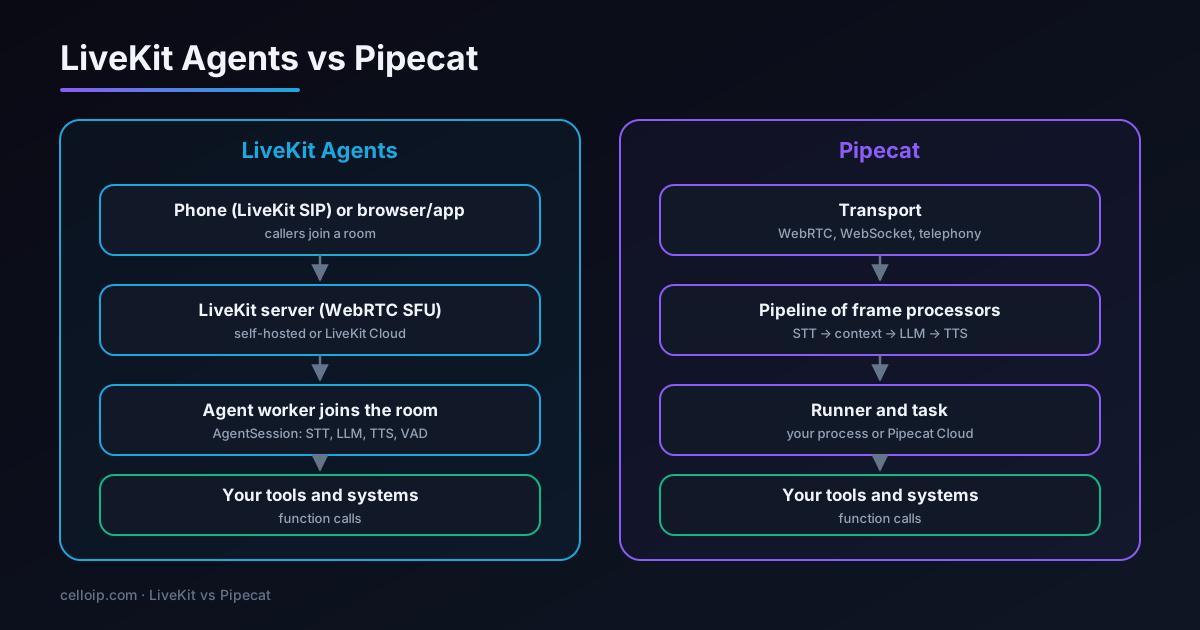
LiveKit Agents
Agent workers register with a LiveKit server and are dispatched into rooms when a caller or user joins. Inside, an agent session wires speech-to-text, the language model, text-to-speech and voice activity detection together, with tools as Python or Node functions.
Pipecat
A pipeline passes frames, audio, text and control signals, through a chain of processors: input transport, speech-to-text, context aggregation, language model, text-to-speech and output transport. You run the pipeline in your own process or on Pipecat Cloud.
LiveKit Agents vs Pipecat, side by side
| LiveKit Agents | Pipecat | |
|---|---|---|
| Licence | Open source (Apache 2.0) | Open source (BSD-2-Clause) |
| Languages | Python and Node.js | Python |
| Media layer | LiveKit WebRTC server (self-hosted or LiveKit Cloud) | Pluggable transports: WebRTC, WebSocket, telephony media streams |
| Phone calls | LiveKit SIP connects carriers and PBXs to rooms | Telephony provider media streams or a PBX bridge |
| Client SDKs | Web, iOS, Android, Flutter, React Native and more | Depends on transport; client SDKs available for some transports |
| Multi-party rooms | Native: agents and many humans in one room | Possible with a suitable transport, less central to the design |
| Model providers | Many plugins for STT, LLM, TTS and realtime models | Many service integrations for STT, LLM, TTS and realtime models |
| Structured flows | Agents and handoffs between agents | Pipecat Flows for structured conversations |
| Managed hosting | LiveKit Cloud | Pipecat Cloud |
| Scaling model | Workers dispatched by the server; scales with rooms | Scale your pipeline processes or use the managed cloud |
| Best fit | One stack for web, mobile and phone with production scaling | Maximum flexibility and fitting into an existing media stack |
| Learning curve | Learn LiveKit's room model as well as the agent API | Learn the pipeline and frame model |
Both projects move quickly, so check current documentation for specifics such as supported providers and features before committing.
Telephony: the deciding factor for many teams
For voice agents that answer phone calls, how each framework reaches the phone network often decides the choice.
LiveKit SIP
Inbound and outbound SIP trunks connect directly to LiveKit, and dispatch rules put each call in a room with an agent. Transfers, DTMF and outbound calling are handled in the same platform, and the same agent can serve phone and web users.
Pipecat with a provider stream
Many telephony providers can stream call audio over a WebSocket. Pipecat includes serializers for common providers, so a call can be connected to a pipeline with little code.
Pipecat with your PBX
Asterisk AudioSocket or FreeSWITCH audio streaming can bridge calls from an existing PBX to a Pipecat pipeline, keeping your numbers, queues and routing.
LiveKit with your PBX
Your PBX can send selected calls to LiveKit SIP over a SIP trunk, and LiveKit can transfer calls back to your queues.
Detailed walk-throughs: LiveKit with Asterisk and FreeSWITCH and Pipecat with Asterisk and FreeSWITCH.
What the code looks like
A minimal LiveKit agent: a worker that joins a room, greets the user and runs a speech-to-text, language model and text-to-speech session.
# agent.py — pip install "livekit-agents[openai,deepgram,cartesia,silero]"
from livekit import agents
from livekit.agents import Agent, AgentSession
from livekit.plugins import cartesia, deepgram, openai, silero

class Receptionist(Agent):
    def __init__(self) -> None:
        super().__init__(instructions="You are a friendly receptionist for Acme Dental. Keep replies short.")

async def entrypoint(ctx: agents.JobContext):
    session = AgentSession(
        stt=deepgram.STT(),
        llm=openai.LLM(model="gpt-4o-mini"),
        tts=cartesia.TTS(),
        vad=silero.VAD.load(),
    )
    await session.start(room=ctx.room, agent=Receptionist())
    await session.generate_reply(instructions="Greet the caller and ask how you can help.")

if __name__ == "__main__":
    agents.cli.run_app(agents.WorkerOptions(entrypoint_fnc=entrypoint))
A minimal Pipecat pipeline does the same with an explicit chain of processors. The transport here is a placeholder for whichever one you use: WebRTC, a telephony WebSocket or a PBX bridge.
# bot.py — pip install "pipecat-ai[deepgram,openai,cartesia,silero]"
# Import paths vary between Pipecat releases; check them against your version.
from pipecat.pipeline.pipeline import Pipeline
from pipecat.pipeline.runner import PipelineRunner
from pipecat.pipeline.task import PipelineTask
from pipecat.processors.aggregators.openai_llm_context import OpenAILLMContext
from pipecat.services.cartesia.tts import CartesiaTTSService
from pipecat.services.deepgram.stt import DeepgramSTTService
from pipecat.services.openai.llm import OpenAILLMService

async def run_bot(transport):  # transport created for WebRTC, telephony or a PBX bridge
    stt = DeepgramSTTService(api_key=DEEPGRAM_KEY)
    llm = OpenAILLMService(api_key=OPENAI_KEY, model="gpt-4o-mini")
    tts = CartesiaTTSService(api_key=CARTESIA_KEY, voice_id=VOICE_ID)

    context = OpenAILLMContext([{"role": "system",
        "content": "You are a friendly receptionist for Acme Dental. Keep replies short."}])
    agg = llm.create_context_aggregator(context)

    pipeline = Pipeline([
        transport.input(), stt, agg.user(), llm, tts, transport.output(), agg.assistant(),
    ])
    await PipelineRunner().run(PipelineTask(pipeline))
The shapes reveal the philosophies: LiveKit hides the plumbing behind a session that lives in a room; Pipecat exposes the pipeline so you can insert your own processors anywhere, for example a custom filter between the language model and speech synthesis.
Turn-taking, interruptions and latency
The hardest part of any voice agent is deciding when the caller has finished speaking and handling interruptions gracefully. Both frameworks provide voice activity detection, interruption handling and options for smarter end-of-turn detection, and both stream every stage to keep latency down.
- Latency is dominated by model choice, streaming settings and hosting location, not by the framework.
- Tune end-of-turn detection for your callers: too eager and the agent interrupts, too patient and it feels slow.
- Decide how short acknowledgements like “yeah” or “okay” are treated, so they don't stop the agent mid-sentence.
- Measure turn latency on real phone calls at the 90th percentile, with your chosen providers, before choosing.
Our voice agent testing and monitoring guide covers how to measure this properly.
Speech-to-speech models, where one model listens and speaks directly, are available in both frameworks and can reduce latency further. They trade some control, for example over the exact voice, retrieval and tool behaviour, for speed and natural-sounding conversation, so test them on your own use case rather than assuming they are always better.
Hosting, scaling and operations
Self-hosted LiveKit
Run the LiveKit server, SIP service and agent workers on your own infrastructure. You operate a media server cluster, TURN, and worker autoscaling, in exchange for full control and no platform fees.
LiveKit Cloud
LiveKit runs the media and SIP layers; you deploy agents. Faster to production, with usage-based pricing.
Self-hosted Pipecat
Pipelines are Python processes you run in containers behind your transport. Simple to start; you design scaling, session routing and media handling yourself.
Pipecat Cloud
Managed hosting for Pipecat agents from Daily, with scaling handled for you and Daily's WebRTC available as a transport.
For teams that already operate WebRTC or SIP infrastructure, self-hosting either is routine. For teams without that experience, a managed option for the media layer, or a partner who runs it, avoids a steep learning curve. See our self-hosted LiveKit deployment guide.
Whichever you choose, plan for regional deployment early if you serve callers in several countries. Placing media servers or pipeline processes close to your carriers and callers reduces latency, and some data rules require audio to stay in a particular region.
Which one should you choose?
Choose LiveKit Agents if
- You want one stack for phone, web and mobile users
- You need multi-party rooms, for example agent, customer and supervisor
- You want built-in SIP with transfers and outbound calling
- You expect large scale and want worker dispatch handled for you
- Your team uses Node.js as well as Python
Choose Pipecat if
- You already have a media layer or telephony provider you want to keep
- You want fine-grained control of every step in the pipeline
- Your calls come through a PBX bridge or provider WebSocket
- You prefer a lighter footprint with no media server to run
- Your team is Python-first
Many teams could succeed with either. The better question is often which one your team can operate confidently in production, and which fits the telephony and client apps you already have.
Keeping your options open
Whichever you choose, a few design habits make it far easier to switch frameworks, or move from a managed platform, later:
- Keep prompts, tool definitions and business logic in your own modules, not spread through framework callbacks.
- Put your systems behind your own API layer so tools don't depend on the framework.
- Store transcripts, outcomes and metrics in your own database in a framework-neutral format.
- Keep a test suite of simulated conversations you can run against any implementation.
With those in place, the framework becomes a replaceable component rather than a long-term lock-in, which is one of the main reasons to choose open source in the first place.
It is also worth revisiting the choice as your product grows. A team that starts with Pipecat behind a telephony provider may later want multi-party rooms and mobile apps, which favour LiveKit; a team on LiveKit may want a lighter footprint for one simple phone line. Neither choice is permanent if the business logic stays your own.
Common production requirements, and how each handles them
Most voice agent projects end up needing the same handful of capabilities beyond the core conversation. Both frameworks can meet them; the effort and the approach differ.
| Requirement | LiveKit Agents | Pipecat |
|---|---|---|
| Transfer to a human | SIP transfer or bringing an agent into the room | Through the telephony provider or PBX the transport connects to |
| DTMF (keypad input) | Supported through LiveKit SIP | Depends on the transport and provider |
| Call recording | Room recording and egress services | Your transport, provider or a recording processor in the pipeline |
| Outbound calls | Outbound SIP calls placed into rooms | Through the telephony provider's API, then connected to the pipeline |
| Several languages | Per-session choice of speech and voice plugins | Per-pipeline choice of services, or switching processors |
| Supervisor listen-in | Natural in rooms: a supervisor can join silently | Needs extra work unless the transport supports it |
| Metrics and tracing | Built-in metrics events plus your observability stack | Built-in metrics frames plus your observability stack |
If several of these matter, especially supervisor listen-in, transfers and outbound calling across phone and web, LiveKit's room model tends to make them simpler. If your provider or PBX already handles them, Pipecat lets you keep that and focus on the conversation itself.
What each approach costs
Neither framework charges for the software itself. The cost differences come from what you run around it and how much engineering it takes.
Engineering effort
LiveKit gives you more of the platform out of the box, especially telephony and multi-party media, which can reduce build time for phone-heavy projects. Pipecat can be quicker for a single channel through an existing provider.
Infrastructure
Self-hosted LiveKit means running media servers, SIP and TURN as well as agents. Self-hosted Pipecat means running pipeline processes, plus whatever media or provider layer the transport uses.
Managed options
LiveKit Cloud and Pipecat Cloud both charge for usage in exchange for running infrastructure for you. Compare them at your expected volume.
Provider usage
Speech, language and voice providers cost the same whichever framework calls them, and they are usually the largest running cost.
For a full breakdown of build and per-minute costs, see our AI voice agent cost guide. In most projects we see, the choice between LiveKit and Pipecat changes total cost far less than choices about models, voice tiers, call length and hosting.
Frequently asked questions
What is the difference between LiveKit and Pipecat?
LiveKit Agents is a framework for agents that join rooms on a LiveKit WebRTC server, with LiveKit SIP handling phone calls, so media, scaling and telephony come from one platform. Pipecat is a Python framework that builds a pipeline of processors and connects to users through pluggable transports such as WebRTC, WebSockets or telephony providers' media streams.
Which is better for phone calls?
Both can handle phone calls. LiveKit has its own SIP service that connects carriers and PBXs directly to rooms. Pipecat usually connects through a telephony provider's media stream or a bridge from Asterisk or FreeSWITCH. If you want a single stack for SIP and WebRTC, LiveKit is simpler; if you already run a PBX or provider integration, Pipecat fits in easily.
Are LiveKit Agents and Pipecat free?
Both frameworks are open source and free to use. You pay for the speech, language and voice providers you choose, for hosting, and optionally for managed services such as LiveKit Cloud or Pipecat Cloud.
Can I self-host both?
Yes. LiveKit's server and agents can run on your own infrastructure, and Pipecat runs anywhere Python runs. Self-hosting keeps audio and data in your environment and removes per-minute platform fees.
Which has better latency?
Latency depends far more on the chosen models, streaming configuration, turn detection and hosting location than on the framework. Both support streaming at every stage. Measure on your own calls with your chosen providers.
Should I use a managed platform like Vapi instead?
Managed platforms are faster to start and need less engineering. Frameworks like LiveKit and Pipecat cost more to build but give full control, no platform fee per minute and self-hosting. Many teams start managed and move to a framework as volume or data requirements grow.
Can CelloIP build on either?
Yes. We build production voice agents on both, choose between them per project, and connect either to Asterisk, FreeSWITCH, carriers and existing contact centres.
Work with CelloIP
Building a voice agent on LiveKit or Pipecat?
CelloIP builds production voice agents on both frameworks, connects them to SIP carriers, Asterisk, FreeSWITCH and contact centres, and runs them self-hosted or on managed clouds. You own the code.