AI Receptionist: How It Works and When to Build a Custom One
An AI receptionist answers your business calls, books appointments and passes the right calls to your team, at any hour. This guide explains how it works, what it does well and badly, what it costs, and when a custom build makes more sense than an off-the-shelf app.
Quick answer
What is an AI receptionist?
An AI receptionist is software that answers a business's phone calls in natural speech. It greets callers, answers common questions from your own information, books or changes appointments in your calendar, takes messages, and transfers calls to staff when needed, 24 hours a day and in any language you set up.
What an AI receptionist does
A receptionist's phone work is mostly the same few jobs repeated all day: answer, find out what the caller wants, give an answer or book something, and pass anything else to the right person. An AI receptionist does those jobs with the same building blocks as any modern AI voice agent, but tuned for the front desk: short calls, many callers, and a lot of calendar work.
The difference between a good and a bad one is not the voice. It is whether it has the right information, the right connections to your systems, and sensible rules for when to stop and hand the call to a person.
Answers every call
Picks up on the first ring, day or night, including several calls at once, so nobody hits voicemail or a busy tone.
Answers common questions
Opening hours, location, prices, services, policies and order or booking status, taken from your own approved information.
Books and changes appointments
Checks real availability in your calendar or booking system, offers slots, confirms, reschedules and cancels.
Transfers to the right person
Hands the call to staff by department, urgency or caller, with a short summary so nobody asks the caller to repeat themselves.
Qualifies and captures leads
Asks the questions your team would ask, records the answers in your CRM and flags hot leads for a call back.
Speaks the caller's language
Greets and continues in the caller's language, including mixed languages such as Hinglish, if you set those languages up.
AI receptionist vs human receptionist, voicemail and IVR
An AI receptionist is not a straight replacement for any one of these. It sits between a phone menu and a person: it understands people like a person does for routine requests, and it scales like a phone system does.
| AI receptionist | Human receptionist | Voicemail | IVR menu | |
|---|---|---|---|---|
| Availability | 24/7, including holidays | Working hours, plus cover for breaks and leave | 24/7, but nothing gets resolved | 24/7 |
| Calls at the same time | Many at once | One per person | Unlimited messages | Many at once |
| Understands free speech | Yes | Yes | No | Keywords at best |
| Books appointments | Yes, through your calendar | Yes | No | Rarely |
| Handles unusual or emotional calls | Transfers them | Best option | No | No |
| Cost as call volume grows | Rises slowly (usage) | Rises in steps (more staff) | Flat | Flat |
| Caller experience | Natural if well built | Best | Poor | Often frustrating |
The usual pattern is a mix: the AI receptionist takes after-hours, overflow and routine calls, and people take the calls that need judgement.
How an AI receptionist works
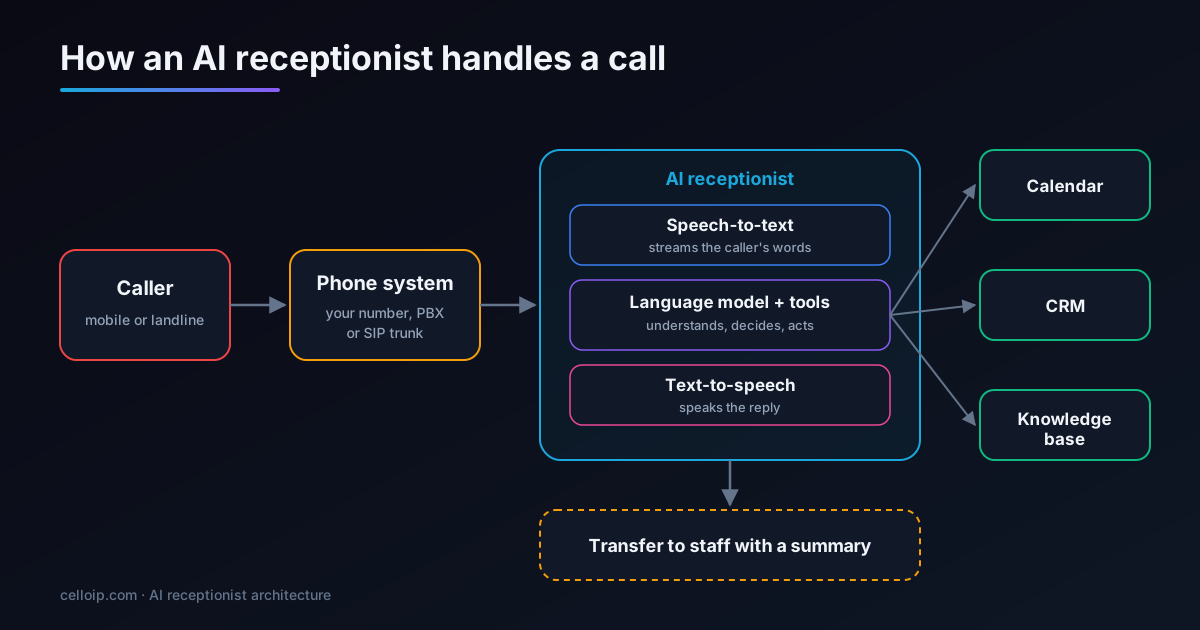
Every call passes through the same five stages. Understanding them helps you judge any product or proposal, because each stage is a place where quality, speed or cost is won or lost.
- 1
Telephony: getting the call to the AI
Your number rings on your phone system as usual. A routing rule sends the call to the AI receptionist, either through a SIP connection from your PBX or carrier, or through a voice-AI platform's own number. This is also where after-hours and overflow rules live.
- 2
Speech-to-text: hearing the caller
The caller's audio is streamed to a speech recognition model that turns it into text as they speak. Voice activity detection works out when they have finished a sentence, which matters for both speed and interruptions.
- 3
Language model and tools: deciding what to do
A large language model reads the conversation, your instructions and your approved information, then decides on the reply. When it needs to act, it calls a tool: check the calendar, book a slot, look up an order, create a CRM record or transfer the call.
- 4
Text-to-speech: replying
The reply is turned into speech and streamed back to the caller, starting as soon as the first words are ready rather than waiting for the full sentence.
- 5
Handover and follow-up
When the call needs a person, the receptionist transfers it with a short summary. After the call it can send a confirmation text or email, log the outcome and add a transcript for your team.
Why response speed decides whether callers trust it
In conversation, people expect a reply within about a second. Longer pauses make callers talk over the system or assume it has failed. The total delay is the sum of the stages above. These are typical ranges we design for; real numbers depend on the models, the hosting region and the carrier, so we measure them on real calls.
Typical delay per stage (milliseconds)
Target total: about one second per turn or less. Streaming every stage, choosing fast models and hosting close to your carrier keep it there. Callers can also interrupt: the receptionist stops speaking the moment they talk.
What an AI receptionist does well, and what it shouldn't do
Being honest about the limits is what makes a deployment work. The best results come from giving the AI a clear, narrow job and fast routes to a person for everything else.
Good at
- Repetitive questions with clear answers
- Booking, rescheduling and cancelling
- Taking structured details: name, number, reason, address
- Covering nights, weekends and busy periods
- Speaking several languages consistently
- Never forgetting to log the call
Should hand over
- Complaints and upset callers
- Medical, legal or financial advice
- Emergencies (it should route these immediately)
- Negotiation and exceptions to your policies
- Anything it isn't sure about
- Callers who ask for a person
The other common failure is wrong information. A language model will fill gaps confidently if you let it, so the receptionist should answer only from your approved information and say it will check with the team when it doesn't know. That is the same principle we use for RAG chatbots.
Off-the-shelf AI receptionist app or a custom build?
For a single small office with simple needs, an off-the-shelf app is often the right first step: quick to try and easy to cancel. A custom build earns its cost when the receptionist has to fit your phone system, your software and your rules rather than the other way round.
| Off-the-shelf app | Custom AI receptionist | |
|---|---|---|
| Time to go live | Hours to days | Usually 4–16 weeks |
| Pricing model | Monthly plan or per-minute fee | One-off build, then usage and hosting |
| Your phone system | Often a new number or call forwarding | Connects to your existing PBX or SIP trunk |
| Integrations | The connectors the app offers | Any system with an API, including in-house tools |
| Call logic | Templates and settings | Anything you can describe, per department or caller |
| Languages and voice | The app's list | Chosen per language and tested with your callers |
| Where call data lives | The vendor's cloud | Your cloud or servers, in the region you choose |
| Ownership | You rent the product | You own the code and prompts |
Signs you need a custom AI receptionist
- You want to keep your existing numbers, PBX or call-centre setup
- It must book into a system the apps don't support, such as an in-house or industry-specific one
- You handle a high volume of calls, so per-minute fees add up
- Calls and recordings must stay in a particular country or on your servers
- You need languages, dialects or a voice the apps don't offer
- You run several sites or departments with different rules
- You want to resell the receptionist to your own customers
- The same assistant should also answer chat and WhatsApp
Connecting the receptionist to your phone line and calendar
Two connections do most of the work. The first sends calls to the AI at the right times. The second gives the AI safe, limited tools to act in your systems.
1. After-hours and overflow routing on Asterisk
On an Asterisk PBX, a few dialplan lines send calls to staff during opening hours and to the AI receptionist otherwise, or when nobody answers within 20 seconds. The AI endpoint here is a SIP trunk namedai-receptionist; it could equally be an AudioSocket or LiveKit SIP connection.
; extensions.conf — main number context
[from-trunk-main]
exten => _X.,1,NoOp(Inbound call from ${CALLERID(num)})
 same => n,Set(CHANNEL(language)=en)
 ; Mon–Fri 09:00–18:00 and Sat 10:00–14:00 ring the front desk first
 same => n,GotoIfTime(09:00-18:00,mon-fri,*,*?office)
 same => n,GotoIfTime(10:00-14:00,sat,*,*?office)
 same => n,Goto(ai,1)

 same => n(office),Dial(PJSIP/frontdesk1&PJSIP/frontdesk2,20,tT)
 ; nobody answered in 20 s, or all lines busy: send to the AI receptionist
 same => n,Goto(ai,1)

exten => ai,1,NoOp(Routing to AI receptionist)
 same => n,Set(PJSIP_HEADER(add,X-Caller-Number)=${CALLERID(num)})
 same => n,Set(PJSIP_HEADER(add,X-Route-Reason)=${IF(${EXISTS(${DIALSTATUS})}?${DIALSTATUS}:AFTER_HOURS)})
 same => n,Dial(PJSIP/receptionist@ai-receptionist,,tT)
 ; if the AI endpoint is down, fall back to voicemail
 same => n,VoiceMail(100@default,u)
 same => n,Hangup()
2. A booking tool the AI can call
The language model never writes to your calendar directly. It calls a tool you define, and your code checks the request, applies your rules and talks to the calendar API. This is the tool definition in the JSON Schema format that OpenAI-compatible and most other LLM APIs accept:
{
  "type": "function",
  "function": {
    "name": "book_appointment",
    "description": "Book an appointment after the caller has confirmed the service, date and time. Only call this with a slot returned by check_availability.",
    "parameters": {
      "type": "object",
      "properties": {
        "service": { "type": "string", "enum": ["consultation", "follow_up", "cleaning", "emergency"] },
        "slot_start": { "type": "string", "format": "date-time", "description": "ISO 8601 start time in the business time zone" },
        "caller_name": { "type": "string" },
        "caller_phone": { "type": "string", "description": "E.164 format, e.g. +14155550123" },
        "notes": { "type": "string", "maxLength": 300 }
      },
      "required": ["service", "slot_start", "caller_name", "caller_phone"],
      "additionalProperties": false
    }
  }
}
Your handler then books through Google Calendar, Microsoft 365, a booking platform or your practice-management system, sends a confirmation and returns a short result the AI reads back to the caller. Keeping the logic in your code, not in the prompt, is what makes the receptionist safe to give real access.
How to set up an AI receptionist in six steps
Whether you buy an app or build a custom system, the same steps decide whether it works.
Map your calls
List the top reasons people call, what a good outcome is for each, and which calls must always go to a person. Recordings or call logs from a typical week are the best source.
Write the knowledge it can use
Collect approved answers: hours, services, prices, policies and directions. Keep them in one place that your team can update, because the receptionist only knows what you give it.
Connect the phone line
Route calls from your existing number, PBX or SIP trunk to the AI receptionist, for example after hours first, or when staff don't answer within a few rings.
Connect calendar and CRM
Give it the tools to check availability, book, update records and send confirmations, with limits on what it is allowed to change.
Test with real scenarios
Run scripted and live test calls with different accents, background noise, interruptions and awkward requests, then fix the gaps before real callers hear it.
Launch in stages and review
Start with after-hours or overflow calls, review transcripts every week, and widen its role as the numbers show it is handling calls well.
Where AI receptionists are used
Any business that misses calls or ties staff to the phone can use one. These are the settings where the fit is strongest.
Clinics and dental practices
Appointment booking, reminders, new-patient questions and routing urgent calls to staff, built privacy-first.
Law firms
New-enquiry intake, conflict-check questions, booking consultations and passing urgent matters to a lawyer.
Real estate
Answering listing enquiries, qualifying buyers and renters, and booking viewings around agents' calendars.
Home services
Taking job details, giving booking windows, handling after-hours emergencies and dispatching to the on-call technician.
Hotels and hospitality
Reservations, amenities, directions and requests in several languages, at any hour.
Automotive
Service bookings, parts and status calls, and passing sales leads to the showroom.
Salons and wellness
Booking, rescheduling and cancellations without interrupting staff with a client.
Multi-site businesses
One number that routes callers to the right branch, team or language.
Related: AI voice agents for insurance · healthcare communication software · real estate
How much does an AI receptionist cost?
There are two different cost shapes. Apps charge a monthly plan or a per-minute fee, which is simple and cheap at low volume. A custom receptionist has a one-off build cost, then running costs that you pay directly to the telephony, speech and model providers, with no platform markup if it is self-hosted.
| Type of custom build | Typical scope | Typical range | Timeline |
|---|---|---|---|
| Managed-platform MVP | One location, one language, calendar and CRM connection, after-hours routing | $8,000 – $20,000 | 4–6 weeks |
| Custom production receptionist | Self-hosted, your choice of models, PBX integration, several departments, monitoring | $25,000 – $60,000 | 8–16 weeks |
| Multi-site or multilingual estate | Many locations or languages, on-premise hosting, chat and voice together | Scoped after discovery | Agreed in the plan |
What makes up the running cost
- Phone minutes and numbers from your carrier or SIP trunk
- Speech-to-text, billed by audio minute
- Language model usage, billed by tokens
- Text-to-speech, billed by characters or minutes
- Hosting for the agent and media servers if self-hosted
- Monitoring, transcript storage and occasional prompt updates
Ranges match our AI voice agent development page. You get a fixed quote after a discovery call.
Disclosure, recording and data
Callers accept AI receptionists when they are told what they are talking to and can reach a person easily. The rules on recording and data vary by country and industry, so build them in from the start.
Say it is AI
Open with a short line such as “I'm the practice's AI assistant.” Several jurisdictions require AI disclosure, and it builds trust everywhere.
Recording consent
Some places require every party's consent to record a call, for example several US states. Play a recording notice where needed, or don't record.
Outbound calls are different
If the receptionist also makes calls, outbound rules apply. In the US the FCC treats AI-generated voices as artificial voices under the TCPA, so prior consent is needed for most calls.
Where data lives
Choose providers and hosting regions that match your obligations, or self-host. Redact card numbers and sensitive details from transcripts.
More detail: TCPA and AI outbound calling · HIPAA requirements for voice AI agents
Frequently asked questions
What is an AI receptionist?
An AI receptionist is software that answers a business's phone calls in natural speech. It greets callers, answers common questions from your own information, books appointments, takes messages and transfers calls to staff when needed, at any hour and in the languages you set up.
How does an AI receptionist work?
The call reaches your phone system and is routed to the AI receptionist. Speech-to-text turns the caller's words into text, a language model decides what to say or do and uses tools such as your calendar or CRM, and text-to-speech speaks the reply. A well-built system replies in about a second and lets callers interrupt.
Can an AI receptionist replace a human receptionist?
For routine calls such as hours, directions, bookings and simple questions, it can handle most of the work. It should not replace people for complex, sensitive or emotional calls; a good AI receptionist recognises those and transfers them to staff with a summary. Most businesses use it to cover after-hours and overflow calls and free their team for in-person work.
How much does an AI receptionist cost?
Off-the-shelf apps usually charge a monthly plan or a per-minute fee. A custom AI receptionist built by CelloIP is typically $8,000–$20,000 on a managed voice-AI platform, or $25,000–$60,000 as a custom production build on self-hosted infrastructure, plus running costs for calls, speech and model usage.
Will callers know they are talking to AI?
They should. We recommend, and in some places the law requires, that the receptionist says it is an AI assistant at the start of the call. Clear disclosure, a natural voice and a fast way to reach a person keep callers comfortable.
Can it work with my existing phone number and system?
Yes. A custom AI receptionist connects to your existing number through your PBX or SIP trunk, for example Asterisk, FreeSWITCH, a hosted PBX or your carrier. You can send it only after-hours calls, only unanswered calls, or all calls.
Which languages can an AI receptionist speak?
Any language you need. Speech recognition, the language model and the voice are chosen per language and tested with real callers, including mixed languages such as Hindi and English, Arabic dialects and right-to-left scripts like Hebrew.
Is an AI receptionist safe for healthcare and legal calls?
It can be, if it is designed for the rules you work under: data kept in the right region or on your servers, recordings and transcripts protected, access controlled, and sensitive requests passed to staff. Your compliance team should confirm the final setup. See our guide to HIPAA requirements for voice AI agents for healthcare specifics.
Work with CelloIP
Need an AI receptionist built around your business?
CelloIP has built VoIP and calling systems since 2017 and now builds AI voice agents and AI receptionists that run on your existing phone system, in any language, with code you own. Tell us about your calls and we'll recommend an approach and a fixed quote.
Fixed-scope project
A defined receptionist delivered against agreed scope, milestones and acceptance tests.
Dedicated voice AI developer
A CelloIP engineer inside your team, backed by a 30-day money-back guarantee.
Build, then run
We build it, then monitor calls, update prompts and models, and add new tasks.