Add AI Voice Agents to Your Existing Phone System
You don't need a new phone system to use an AI voice agent. The PBX you already run can keep your numbers, queues and staff while the agent takes the calls you choose. This guide covers the routing patterns, how each common phone system connects, how calls get back to people, and a rollout plan that keeps risk low.
Quick answer
Can you add an AI voice agent without replacing your phone system?
You can add an AI voice agent without replacing your phone system. Your PBX keeps your numbers, queues and staff; you add the agent as one more destination, usually over a SIP trunk, and route chosen calls to it: after hours, when queues overflow, or first for every call with a quick path to a person. The agent hands calls back by transfer, with a summary. Asterisk, FreeSWITCH, 3CX, Teams Phone (through Direct Routing or Operator Connect) and most business phone systems can do this.
Why add AI to the phone system you have, instead of replacing it
Many AI voice products assume you will move your numbers to them, or forward every call to a new platform. For a small business with one line that can be fine. For anyone with a working PBX, it is usually the wrong first move.
Your phone system already does a lot: it owns your numbers and carrier contracts, routes calls to queues and extensions, records calls, feeds reports, and connects to desk phones, softphones and perhaps a CRM. Staff know how it works. Replacing it to add AI means re-creating all of that, retraining people and accepting risk on every call while you do.
Adding the agent to the existing system turns AI into one more destination, like a queue or an extension. You decide which calls reach it, you can switch it off by changing one route, and the rest of your telephony keeps working exactly as before. That makes it far easier to start small, measure, and grow only when the results are clear.
CelloIP project outcome (client kept private)
CelloIP built an AI voice agent for a North American contact centre this way: the centre's FreeSWITCH platform kept its trunks, queues and reporting, and sends chosen calls to the agent over SIP, with handover back to human agents.
What changes and what stays the same
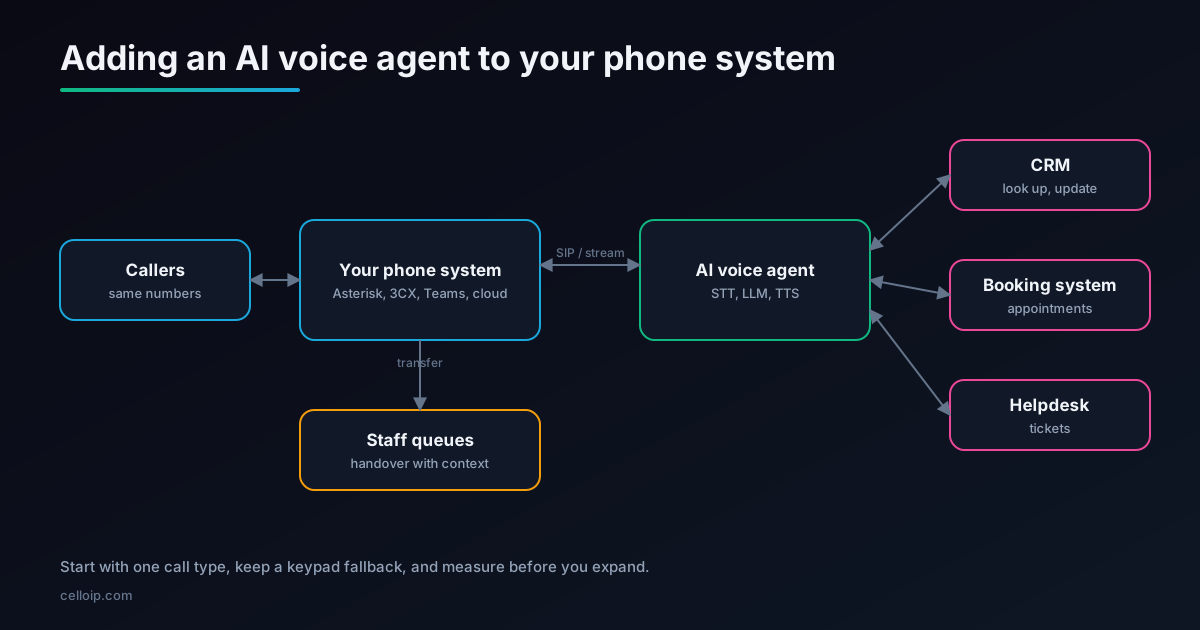
| Part of your telephony | With an AI agent added |
|---|---|
| Phone numbers and carrier | Unchanged: calls still arrive on your numbers through your carrier |
| PBX, queues, extensions | Unchanged, plus one new destination: the AI agent |
| Routing rules | A few new rules decide which calls go to the agent and when |
| Desk phones and softphones | Unchanged; staff receive transferred calls as normal |
| Call recording and reports | Unchanged on the PBX; the agent adds transcripts and summaries |
| CRM, booking, helpdesk | The agent reads and writes through defined tools |
| Callers | Same number; the AI answers the calls you choose and passes on the rest |
Four routing patterns, from lowest risk to highest reach
The first decision is which calls the agent gets. These four patterns cover almost every deployment, and many businesses move from the first to the last over a few months.
| Pattern | How it works | Best for | Watch out for |
|---|---|---|---|
| After hours | Outside opening hours, calls go to the agent instead of voicemail | Booking, messages, urgent triage | Clear handling of genuine emergencies |
| Overflow | When a queue waits too long or nobody answers, the call goes to the agent | Peak times, small teams | Callers who already waited; keep the AI brief and helpful |
| One call type | An IVR option or dedicated number routes one kind of call to the agent | Order status, appointments, payments | Making the option easy to find |
| AI first | The agent answers every call, resolves what it can and transfers the rest | High volume of routine calls | Fast, reliable handover and a keypad fallback |
A fifth, quieter option is to let the AI listen rather than talk: real-time transcription, summaries and agent assist on calls your staff handle. That is AI VoIP integration rather than a voice agent, and it is often a sensible first step. See our AI VoIP integration page.
How each kind of phone system connects
Almost every modern business phone system can send a call to another SIP destination. The details differ, and a few systems have limits worth knowing before you plan.
| Phone system | Usual connection | Notes |
|---|---|---|
| Asterisk and FreePBX | PJSIP trunk or endpoint to the agent; or AudioSocket for audio streaming | Full control in the dialplan; easy overflow and time-based routing |
| FreeSWITCH and FusionPBX | SIP gateway to the agent; or mod_audio_stream with the Event Socket | Per-tenant routing on multi-tenant platforms |
| 3CX | Generic SIP trunk pointing at the agent | Check authentication: some AI platforms expect credentials while 3CX trunks often use IP-based authentication, so a carrier or Asterisk in between may be needed |
| Microsoft Teams Phone | Direct Routing through your session border controller, or Operator Connect | A Microsoft Calling Plan alone does not allow this; Auto Attendant or Call Queue external transfer is another route |
| Cisco, Avaya and other on-premise PBXs | SIP trunk, often through the existing session border controller | Test transfers back, which vary by model and configuration |
| Cloud PBXs | SIP routing where offered; otherwise forwarding to the agent's number | Forwarding works but can make transfers back and caller ID harder |
| Contact-centre platforms | SIP or bring-your-own-carrier connection to the agent | Return calls to the right skill or queue, with context |
Our SIP trunk to AI voice agent guide covers trunk configuration in detail, and LiveKit with Asterisk and FreeSWITCH walks through a self-hosted set-up.
Example: after-hours and overflow routing on Asterisk
This dialplan sends calls to the AI agent outside business hours, and during business hours tries the support queue first, overflowing to the agent if nobody answers in time. The agent is a PJSIP endpoint named ai-agent.
; extensions.conf
[from-carrier]
exten => _X.,1,NoOp(Inbound call from ${CALLERID(num)})
 same => n,Set(__ORIGINAL_DID=${EXTEN})
 same => n,GotoIfTime(09:00-18:00,mon-fri,*,*?open)
 ; closed: AI agent takes the call
 same => n,Set(__ROUTE=after-hours)
 same => n,Dial(PJSIP/${EXTEN}@ai-agent,,b(add-context^s^1))
 same => n,Goto(voicemail,s,1)              ; fallback if the agent is down
 same => n(open),Queue(support,t,,,25)      ; staff first, 25 seconds
 ; overflow: nobody answered, AI agent takes it
 same => n,Set(__ROUTE=overflow)
 same => n,Dial(PJSIP/${EXTEN}@ai-agent,,b(add-context^s^1))
 same => n,Goto(voicemail,s,1)

[add-context]
; runs on the outbound channel: pass details to the agent as SIP headers
exten => s,1,Set(PJSIP_HEADER(add,X-Original-DID)=${ORIGINAL_DID})
 same => n,Set(PJSIP_HEADER(add,X-Route-Reason)=${ROUTE})
 same => n,Return()
Two details matter in production. First, always keep a fallback (voicemail or a queue) for when the agent is unreachable. Second, tell the agent why it got the call: an overflow caller who has already waited needs a different greeting from an after-hours caller.
Handing calls back to your staff
Handover is where AI deployments are judged. Callers forgive an AI that says "let me get a colleague"; they do not forgive repeating everything to that colleague.
Transfer with SIP REFER
The agent asks your PBX to transfer the call to a queue or extension. Clean and standard, but check your PBX and session border controller support it.
Bridge through the PBX
The PBX keeps control of the call and connects the caller to staff when the agent finishes. Reliable where REFER is not supported.
Pass the context
Send a short summary and the caller's details in SIP headers, or write them to the CRM or helpdesk so they pop up when staff answer.
Return to the right queue
Route by reason: billing to billing, urgent to the priority queue, VIPs to their account manager.
Our AI-to-human handover guide compares the methods in more depth.
Numbers, caller ID, recording and calling rules
- Numbers: keep them on your carrier and PBX; route to the agent rather than porting numbers to an AI vendor.
- Caller ID: make sure the caller's number reaches the agent, so it can look up the customer; forwarding sometimes replaces it.
- Recording: record on the PBX as you do today, and store the agent's transcripts under the same retention rules.
- Disclosure: tell callers they are speaking with an AI assistant where the law or your policy requires it, and how to reach a person.
- Outbound calls: AI-voiced outbound calls are regulated in many countries, including consent rules in the US under the TCPA; check each country you call.
- Data: decide where audio and transcripts are processed and stored, and whether a self-hosted option is needed.
See our guide to TCPA rules for AI outbound calling, and self-hosted vs managed voice AI for where call data goes.
Audio quality and latency
Routing through your PBX adds very little delay. The things that make an agent feel slow are elsewhere, and most can be fixed in design.
| Factor | What to do |
|---|---|
| Distance | Host the agent in the same region as your PBX or carrier; every extra network hop adds delay |
| Codec | Use G.711 between the PBX and the agent; avoid transcoding through several low-bitrate codecs |
| Reply time | Stream speech-to-text, the language model and text-to-speech; aim for replies starting about a second after the caller stops |
| Interruptions | Let callers barge in; make sure the PBX passes audio both ways continuously |
| Keypad input | Pass DTMF (RFC 2833 / RFC 4733) so callers can still press keys for account numbers or menu choices |
| Noise and accents | Test with real recordings from your lines, not studio audio |
A six-step rollout plan
| Step | What happens | Typical time |
|---|---|---|
| 1. Choose the slice | Pick one call type and one routing pattern; agree success measures | Week 1 |
| 2. Connect over SIP | Add the agent as a trunk or endpoint, with authentication and encryption | Week 1–2 |
| 3. Test internally | Route an internal test number; check audio, latency, DTMF and transfers | Week 2–3 |
| 4. Build handover | Transfers back to queues with summaries through headers, CRM or helpdesk | Week 3–4 |
| 5. Pilot | Route a small share of real calls; review transcripts daily and fix gaps | Week 4–6 |
| 6. Expand | Increase the share and add call types as the numbers allow | Ongoing |
Illustrative rollout: share of eligible calls routed to the AI agent
Illustrative only, not data from a specific deployment. The pace depends on your results at each stage.
Measuring whether it works
Resolution rate
Share of calls the agent completes without a person, measured per call reason.
Transfer reasons
Why calls are handed over: caller asked, out of scope, low confidence or failure. Each points to a different fix.
Task success
For bookings, payments and updates, check the system of record, not just the transcript.
Caller experience
Hang-ups during the AI part, repeat calls within a day, and short post-call surveys.
Queue impact
Wait times and abandoned calls for your human queues before and after.
Cost per resolved call
Telephony, speech and model usage per resolved call, compared with staff-handled calls.
Our voice agent testing and monitoring guide covers how to collect these numbers.
A real example
CelloIP built an AI voice agent for a contact centre in North America that already ran FreeSWITCH. Nothing in the existing telephony was replaced:
- FreeSWITCH kept the carrier trunks, inbound routing, outbound dialing, queues and human agents.
- Chosen calls go to a LiveKit Agents voice agent over SIP, and return to FreeSWITCH queues for handover, with a summary.
- The agent handles inbound support, outbound calls and appointment booking in English and Spanish.
- It works with the contact centre's CRM, booking system and helpdesk through defined tools.
What it costs
| Build | Typical range | Timeline |
|---|---|---|
| Managed-platform MVP, one use case, connected to your PBX | $8,000 – $20,000 | 4–6 weeks |
| Custom production agent with telephony and integrations | $25,000 – $60,000 | 8–16 weeks |
| Several call types, languages or on-premise hosting | Scoped after discovery | Agreed in the plan |
Ranges match our AI voice agent development page. Running costs (telephony, speech and model usage, hosting) are separate; see our AI voice agent cost guide.
Common mistakes
Porting numbers to start
Moving numbers to an AI vendor before proving the agent adds risk and makes it hard to go back. Route instead.
No fallback
If the agent is down, calls must still reach a queue or voicemail.
Losing caller ID
Forwarding that drops the caller's number stops the agent recognising customers.
Blind transfers
Transfers without context make callers repeat themselves, which undoes the benefit.
Starting with everything
AI-first on all calls from day one hides which call types work and which don't.
Ignoring DTMF
Some callers and some tasks still need the keypad; pass it through.
Frequently asked questions
Do we have to replace our phone system to use an AI voice agent?
No. In most cases the agent is added as another destination on your existing PBX, usually over a SIP trunk. Your numbers, queues, extensions and call records stay where they are, and you choose which calls go to the agent.
Can we keep our existing phone numbers?
Yes. Calls still arrive on your numbers through your current carrier and PBX, which then routes the ones you choose to the agent. Callers see no change, and you can switch the routing back at any time.
Which phone systems can work with an AI voice agent?
Open-source PBXs such as Asterisk, FreePBX, FreeSWITCH and FusionPBX connect directly over SIP. 3CX can add the agent as a generic SIP trunk. Microsoft Teams Phone connects through Direct Routing or Operator Connect, not a Microsoft Calling Plan. Cisco, Avaya and similar on-premise systems usually connect through their SIP trunk or session border controller. Cloud PBXs vary: some allow SIP routing, others only call forwarding to a number.
How does the AI hand a call back to our staff?
Usually with a SIP transfer (REFER) back to a queue or extension on your PBX, or by the PBX bridging the call to an agent. The AI passes a summary and the caller's details, in SIP headers or through your CRM or helpdesk, so the caller doesn't repeat themselves.
Should the AI answer every call, or only some?
Most businesses start with a narrow slice: after-hours calls, overflow when queues are long, or one call type such as appointment booking. Once the numbers look good, they widen it. Putting the AI first for every call works well when it can resolve a large share and hand over quickly.
Will callers notice extra delay?
Not if it's built well. Routing through your PBX adds very little. What matters is the agent's own reply time, which should start about a second after the caller stops speaking, helped by hosting the agent close to your PBX and using a standard codec such as G.711.
How much does it cost?
As a guide, a managed-platform MVP for one use case is typically $8,000–$20,000 over 4–6 weeks, and a custom production agent with telephony and business-system integrations $25,000–$60,000 over 8–16 weeks. Telephony, speech and model usage are separate running costs.
Work with CelloIP
Want to add an AI agent to your phone system?
CelloIP adds AI voice agents to Asterisk, FreeSWITCH, 3CX, Teams Phone and other systems without replacing them, with routing, handover and integrations built around how your team already works. You own the code.