Contact Center CRM Integration: A CTI Guide for Salesforce, HubSpot, Zendesk and Dynamics 365
Agents waste minutes on every call searching for the customer, copying notes and logging outcomes by hand. CRM integration removes that work: the record opens as the phone rings, calls are dialled from the CRM, and every call, recording and outcome lands on the timeline. This guide compares the integration frameworks of the major CRMs, explains what Salesforce's Open CTI retirement means, and shows how to build an integration that survives a change of phone system or CRM.
Quick answer
How do you integrate a contact centre with a CRM?
Contact centre CRM integration, often called CTI, connects your phone system to your CRM so agents see the caller's record when the phone rings, dial with one click, and have every call, recording and outcome logged automatically. Each CRM has its own framework: Salesforce Voice (Open CTI retires in February 2028), HubSpot's Calling Extensions SDK, Zendesk's Talk Partner Edition API and Dynamics 365 Channel Integration Framework 2.0. A middleware layer between the PBX and these frameworks keeps the integration maintainable.
What contact centre CRM integration does
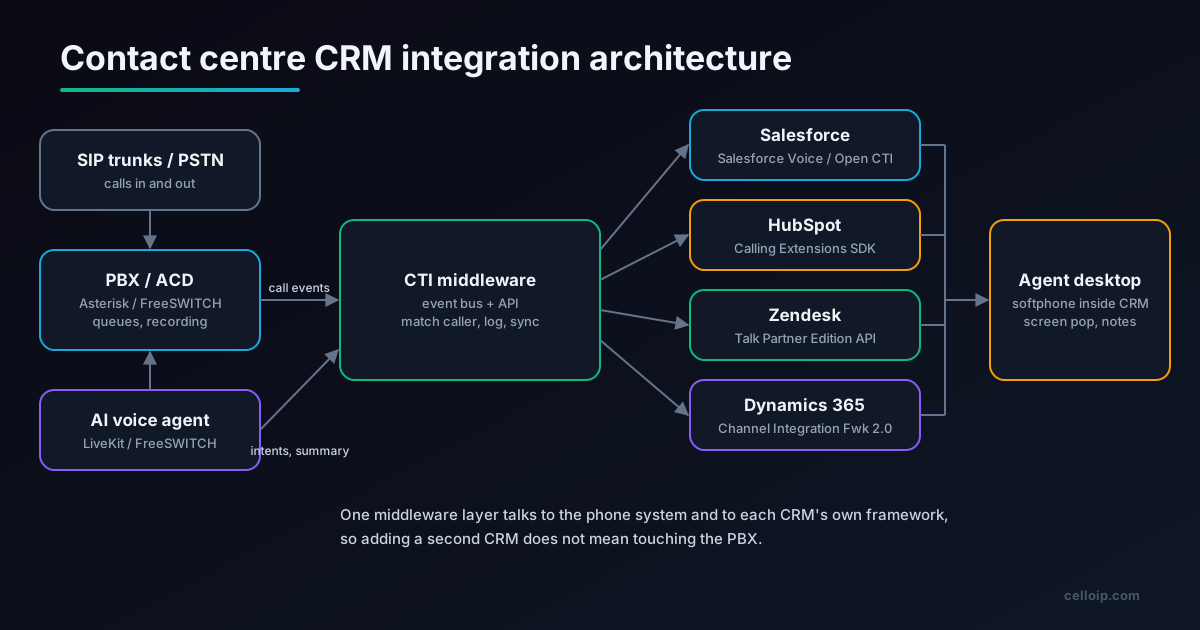
A contact centre runs on two systems that were never designed together. The phone system (a PBX or ACD with queues, IVR, recording and diallers) knows who is calling, who answered and how long the call lasted. The CRM or helpdesk knows who the customer is, what they bought and what is still open. CRM integration, traditionally called computer telephony integration (CTI), connects the two so that information flows in both directions without the agent copying it by hand.
The benefits are concrete. Agents greet callers by name because the record is already open. Supervisors report on calls by customer segment, product or campaign because every call is attached to a record. Sales teams dial from lists without typing numbers. Compliance teams find the recording of any call from the customer's timeline. And AI features such as call summaries and field extraction have somewhere to write their results.
CRM integration matters whether you run a commercial contact centre platform or your own. With CCaaS products, you depend on the vendor's connector for your CRM. With a custom contact centre on Asterisk or FreeSWITCH, you build the connector yourself, which gives more control and more work. Our custom contact centre vs CCaaS guide covers that wider decision.
The 8 core functions of a CRM integration
| Function | What the agent or manager sees | Data that moves | Priority |
|---|---|---|---|
| Screen pop | The customer's record opens as the call rings | Caller ID → CRM search → record ID | Must have |
| Click-to-dial | Click a number in the CRM to call it | CRM → softphone → PBX originate | Must have |
| Automatic call logging | Every call appears on the timeline with time, duration and agent | PBX events → call or activity record | Must have |
| Disposition and notes | Agent picks an outcome and adds notes at wrap-up | Softphone form → CRM fields | Must have |
| Recording link | Play the recording from the record | Recording URL → call record | Should have |
| Routing on CRM data | VIP or open-case callers go to the right queue | IVR or ACD → CRM lookup → queue | Should have |
| Omnichannel threading | Calls, WhatsApp, email and chat on one ticket | Channel events → ticket or case | Should have |
| AI summary and fields | A summary and extracted fields after each call | Transcript → LLM → CRM fields | Increasingly expected |
Start with the first four. They deliver most of the agent time saving and every later feature builds on them. Routing on CRM data is the step that usually changes customer experience the most, because it lets your IVR or AI voice agent treat a caller with an open complaint differently from a new prospect.
CRM integration frameworks compared
Every major CRM provides its own way for telephony to plug in. They differ in where the softphone runs, how calls are logged and what the CRM vendor expects you to use.
| CRM | Integration framework | Softphone location | Call logging | Notes |
|---|---|---|---|---|
| Salesforce | Salesforce Voice (formerly Service Cloud Voice), with Amazon Connect or partner telephony; Open CTI until it retires | Omni-Channel utility bar in Lightning | Voice Call records | Open CTI end of life: 28 February 2028 |
| HubSpot | Calling Extensions SDK (JavaScript) | Calling widget inside HubSpot | Call engagements on the timeline | Numbers must be E.164; finalizeEngagement replaces publishToChannel |
| Zendesk | Talk Partner Edition API | Your softphone or Zendesk Talk Partner apps | Tickets with voice comments | Needs a plan that includes Talk Partner Edition |
| Dynamics 365 | Channel Integration Framework 2.0 | Communication panel in multi-session apps | Activities and conversation records | Built for Customer Service workspace multi-session apps |
| Zoho CRM | PhoneBridge | Zoho CRM call bar | Call activities | Check current API scope for your edition |
Typical relative integration effort by CRM (illustrative)
Illustrative relative effort for screen pop, click-to-dial, logging and dispositions on a custom contact centre. It varies with your edition, existing apps and how much of the CRM's own telephony you adopt.
Salesforce scores highest on effort not because it is poorly documented, but because the target is moving: Open CTI integrations need a migration plan, and Salesforce Voice brings its own licensing and architecture decisions.
Salesforce Open CTI retirement: what to do
Open CTI has been the standard way to embed a third-party softphone in Salesforce for years, and most CTI apps on AppExchange were built on it. Salesforce has now announced its retirement. According to Salesforce's help documentation, Open CTI reaches end of life on 28 February 2028. It is in final maintenance, new Agentforce Service orgs cannot implement it, and legacy connectors will stop working on that date. Salesforce recommends Salesforce Voice, formerly Service Cloud Voice.
Option 1: Salesforce Voice with Amazon Connect
Salesforce's own path. Good when you want Salesforce to own the agent experience and are willing to run telephony on Amazon Connect.
Option 2: Salesforce Voice with partner telephony
Keep a contact centre partner that supports Salesforce Voice. Check that your partner has a supported, dated plan.
Option 3: Keep your own platform, integrate at the data layer
For custom Asterisk or FreeSWITCH contact centres: log calls, recordings and outcomes through Salesforce APIs and agree with Salesforce how the agent softphone will be presented after Open CTI.
Whatever you choose, start the inventory now: which Salesforce orgs use Open CTI, which connectors, which custom screen pop rules, and which reports depend on the logged fields. A 2028 date sounds distant, but contact centre migrations involve licences, training and a cutover window, and they compete with everything else on the roadmap.
A call's journey through the CRM
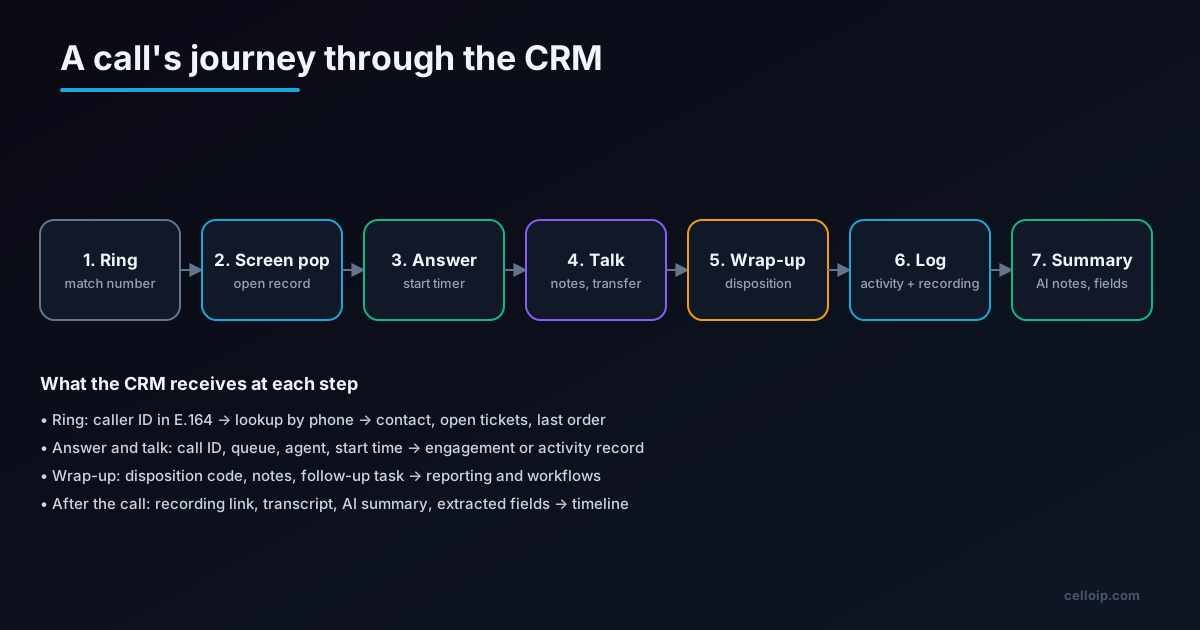
Every integration, whatever the CRM, handles the same sequence. The phone rings and the integration looks up the caller ID. The matching record opens as a screen pop, or a choice list appears if several records match, or a new-contact form appears if none do. The agent answers and the integration records the start. During the call, the agent may transfer, hold or conference, and the record should follow the call to whoever ends up handling it. At wrap-up, the agent sets a disposition and adds notes. After the call, the integration writes the activity, attaches the recording link and, increasingly, posts an AI summary.
The hardest step is the first one. Caller matching fails more often than any other part, usually because numbers are stored in different formats: some with country codes, some without, some with spaces or brackets. Normalise every number to E.164 at the point of entry and store it that way in the CRM, and most matching problems disappear. HubSpot's documentation makes the point explicitly: numbers must be in E.164 format, and a misformatted number silently prevents caller ID matching.
Architecture: put middleware between the PBX and the CRM
It is tempting to wire the PBX straight into the CRM's API. That works for one CRM and one phone system, and becomes painful when either changes. A small middleware service between the two keeps each side simple.
| Layer | Responsibility | Typical technology |
|---|---|---|
| Telephony | Calls, queues, recording, dialler; emits call events | Asterisk (ARI/AMI), FreeSWITCH (ESL), Kamailio |
| Event bus | Buffers and replays call events; decouples slow CRM APIs from real-time calls | Redis Streams, RabbitMQ, Kafka |
| CTI middleware | Normalises numbers, matches customers, maps events to CRM objects, retries | Node.js or Python service |
| CRM adapter | One adapter per CRM framework and API | Salesforce, HubSpot, Zendesk, Dynamics adapters |
| Agent softphone | Embedded in the CRM; WebRTC to the PBX; shows screen pop and wrap-up form | WebRTC client in the CRM's framework |
Three design rules prevent most production problems. First, never block a call on a CRM API: if the CRM is slow or down, the call must still ring, and the log can be written later from the event bus. Second, make every write idempotent, keyed on your own call ID, so retries never create duplicate activities. Third, keep one call ID from the first ring to the final log, across transfers and conferences, so every event lands on the same record. The FreeSWITCH event socket makes this straightforward; our FreeSWITCH ESL with Node.js guide shows how to consume those events.
Example: a HubSpot calling widget
HubSpot's Calling Extensions SDK runs your softphone as a widget inside HubSpot. The app reports the call lifecycle to HubSpot, which creates and completes the call engagement. The example below follows the methods and events in HubSpot's documentation; the softphone object stands for your WebRTC client.
import CallingExtensions from "@hubspot/calling-extensions-sdk";

let activeCall = null;                                      // the call in progress in this widget

const extensions = new CallingExtensions({
  debugMode: false,
  eventHandlers: {
    onReady: () => {
      extensions.initialized({ isLoggedIn: true });
    },
    // User clicked a phone number in HubSpot
    onDialNumber: async (event) => {
      const { phoneNumber, dialingContext } = event;          // E.164, e.g. +15551234567
      const call = await softphone.dial(phoneNumber);          // your WebRTC client → PBX
      activeCall = call;
      extensions.outgoingCall({
        externalCallId: call.id,                                // your call ID, used everywhere
        toNumber: phoneNumber,
        fromNumber: call.callerId,
        callStartTime: Date.now(),
        createEngagement: true,
        dialingContext,                                         // pass back unmodified
      });
      call.on("answered", () => extensions.callAnswered({ externalCallId: call.id }));
      call.on("ended", (status) => {
        extensions.callEnded({
          externalCallId: call.id,
          engagementId: call.engagementId,
          callEndStatus: status,                                // COMPLETED, BUSY, NO_ANSWER...
        });
      });
    },
    onCreateEngagementSucceeded: (event) => {
      if (activeCall) activeCall.engagementId = event.engagementId;
    },
  },
});

// After wrap-up: disposition and notes saved, close the call in HubSpot
function completeCall(call) {
  extensions.callCompleted({ externalCallId: call.id, engagementId: call.engagementId, hideWidget: false });
}
If you create engagements yourself through HubSpot's APIs rather than through the SDK, or want call events in HubSpot workflows, HubSpot's documentation points to finalizeEngagement, which replaces the deprecated publishToChannel. Check the event handler names against the current SDK version before you ship.
Server-side logging from the PBX
The widget covers calls the agent places from the CRM. Calls that arrive through queues, go to AI agents or are placed by a dialler should be logged from the server side, so nothing depends on a browser tab being open. The pattern is the same for every CRM: consume the call-ended event, normalise the number, find the customer, and write the activity with your call ID as the idempotency key.
// Node.js: log a finished call from PBX events (shape shown for any CRM adapter)
import { parsePhoneNumberFromString } from "libphonenumber-js";

export async function onCallEnded(evt, crm) {
  const num = parsePhoneNumberFromString(evt.remoteNumber, evt.defaultCountry ?? "US");
  if (!num?.isValid()) return crm.logUnmatched(evt);           // keep, review later

  const e164 = num.number;                                       // "+15551234567"
  const customer = await crm.findCustomerByPhone(e164);          // cached lookup

  await crm.upsertCallActivity({
    externalId: evt.callId,                                      // idempotency key
    customerId: customer?.id ?? null,
    direction: evt.direction,                                    // INBOUND / OUTBOUND
    startedAt: evt.answeredAt ?? evt.startedAt,
    durationSec: evt.billsec,
    agent: evt.agentEmail,
    queue: evt.queue,
    disposition: evt.disposition,
    recordingUrl: evt.recordingUrl,                              // signed link to your storage
    summary: evt.aiSummary ?? null,
  });
}
Each CRM adapter then maps upsertCallActivity to the right object: a call engagement in HubSpot, a ticket with a voice comment through Zendesk's Talk Partner Edition API, a phone call activity in Dynamics 365, or a voice call or task in Salesforce. Keeping the mapping in the adapter is what lets you add a second CRM later without touching the PBX side.
AI voice agents, summaries and CRM fields
AI has changed what a CRM integration is expected to do. Two patterns are now common.
AI summaries and field extraction
After a human-handled call, the transcript goes to an LLM that writes a short summary and extracts fields such as reason for call, product, next step and sentiment. The middleware writes these to the record, cutting the manual typing agents do at wrap-up.
AI voice agents that use the CRM
An AI agent answering calls looks up the customer, checks orders or appointments and creates tickets during the conversation through a small set of tools exposed by your middleware. See our AI-to-human handover guide for passing context to agents.
Give the AI agent narrow tools, not CRM credentials: "find customer by phone", "get open tickets", "create ticket", "book appointment". That keeps permissions tight and gives you one audit trail. Our AI-to-human handover guide explains how to pass the AI agent's context to a human agent's screen pop, and the AI voice agent contact centre case study shows an agent working with a CRM, a booking system and a helpdesk.
Data, privacy and recording
| Data | Recommended handling |
|---|---|
| Call metadata (time, duration, agent, queue) | Sync to the CRM; low risk and high value for reporting |
| Recordings | Keep in your own controlled storage; put a signed, expiring link in the CRM |
| Transcripts | Store with the recording; push only the summary and extracted fields to the CRM |
| Payment card details spoken on calls | Pause or mask recording during payment; never write to the CRM |
| Authentication answers | Never store; record only that verification passed |
| Consent and opt-outs | Sync to the CRM so diallers and AI agents respect them |
Retention rules differ by industry and region, so agree them with your compliance team before launch. If you run outbound campaigns, consent data in the CRM is what keeps your dialler and AI agents within the rules covered in our TCPA compliance guide.
Build or buy the integration
| Situation | Usual answer |
|---|---|
| You use a CCaaS product with a certified connector for your CRM | Use the connector; customise only reports and fields |
| You run a custom Asterisk or FreeSWITCH contact centre | Build a middleware service with one adapter per CRM |
| You need routing on CRM data or AI agents that act on CRM data | Build at least the middleware and tools, even if a connector handles the softphone |
| You use Salesforce Open CTI today | Plan the move to Salesforce Voice or a supported partner before February 2028 |
As a guide from our call center software development service, a voice call centre with queues, IVR, recording and one CRM integration is typically $20,000 to $50,000 over 8 to 14 weeks, and an omnichannel contact centre with WhatsApp, email, SMS, SLAs and ticketing is typically $50,000 to $150,000 over four to eight months. Adding CRM integration to an existing platform is scoped after a short discovery.
CRM integration checklist
- List the CRMs, editions and objects (contact, account, ticket, case) involved
- Store every phone number in E.164 in both the PBX and the CRM
- Decide what happens when a number matches zero, one or several records
- Use one call ID from first ring to final log, across transfers
- Never block call setup on a CRM API call
- Make every CRM write idempotent and retry from an event bus
- Log calls server-side for queues, diallers and AI agents
- Keep recordings in your storage and link them from the CRM
- Define dispositions with the people who will report on them
- Give AI agents narrow tools, not CRM credentials
- Plan Salesforce Open CTI migration before 28 February 2028
- Test with real data: duplicates, international numbers, withheld caller ID
A real example: an omnichannel contact centre
CelloIP built an omnichannel contact centre platform that brings voice, WhatsApp and social channels, email, SMS and web chat into one agent desktop, with SLA rules, ticketing, supervisor tools, reports and CRM and helpdesk integration. A shared middleware layer is what made it possible to connect each client's CRM without changing the voice platform underneath.
CelloIP project outcome (client kept private)
Voice, WhatsApp, email, SMS and web chat in one agent desktop, with ticketing, SLA rules and CRM and helpdesk integration, delivered as a custom platform the client owns.
Frequently asked questions
What is CTI in a contact centre?
CTI, computer telephony integration, links the phone system with business software, usually the CRM or helpdesk. In practice it means screen pops when a call arrives, click-to-dial from a record, a softphone inside the CRM, and automatic logging of calls, recordings and dispositions.
Is Salesforce Open CTI being retired?
Yes. Salesforce has announced that Open CTI reaches end of life on 28 February 2028. It is in final maintenance, new Agentforce Service orgs cannot implement it, and legacy connectors stop working on that date. Salesforce recommends moving to Salesforce Voice, formerly Service Cloud Voice, which supports Amazon Connect and partner telephony.
How does HubSpot calling integration work?
HubSpot's Calling Extensions SDK lets a calling app run inside HubSpot as a widget. The app tells HubSpot when calls start, are answered, end and complete, and HubSpot logs the call as an engagement on the contact's timeline. Phone numbers must be in E.164 format or caller matching fails silently.
Can I integrate my own Asterisk or FreeSWITCH system with Zendesk?
Yes. Zendesk's Talk Partner Edition lets third-party telephony systems open user profiles and tickets in the agent's browser and create tickets from calls through the Talk Partner Edition API. You need a Zendesk plan that includes Talk Partner Edition.
What is the Dynamics 365 Channel Integration Framework?
It is Microsoft's framework for embedding a telephony provider's softphone in Dynamics 365 model-driven apps. Version 2.0 supports multi-session apps such as Customer Service workspace, so agents can handle several conversations in separate sessions with their own context.
How long does a CRM integration take to build?
A single CRM with screen pop, click-to-dial and call logging is typically a few weeks of work on an existing contact centre. Adding recording links, dispositions, routing on CRM data, AI summaries and a second CRM adds time. As a guide, a voice call centre build with one CRM integration is typically $20,000 to $50,000 over 8 to 14 weeks.
Should the AI voice agent write to the CRM directly?
It is usually better for the AI agent to call your middleware or a small set of tools, such as look up customer, create ticket or book appointment, rather than call the CRM API directly. That keeps permissions narrow, gives you one audit log and lets you change CRM without retraining the agent's tools.
What data should not go into the CRM?
Avoid storing full payment card numbers, authentication answers or other sensitive data captured during calls. Mask or pause recording during payments, store recordings in controlled storage with a link in the CRM, and follow the data retention rules that apply to your industry and region.
Work with CelloIP
Connecting your contact centre to your CRM?
CelloIP builds contact centres and CTI integrations on Asterisk, FreeSWITCH and WebRTC, with Salesforce, HubSpot, Zendesk and Dynamics 365 integrations and AI voice agents that work with your CRM. We reply within one business day, and you own the code.