AI IVR: Replacing Touch-Tone Menus with Conversation
Few things frustrate callers more than a long phone menu that doesn't have their option. A conversational AI IVR lets them say what they need, routes them correctly the first time and solves simple requests on the spot. This guide explains how it works, how to design it, and how to replace an existing IVR without disrupting your contact centre.
Quick answer
What is an AI IVR?
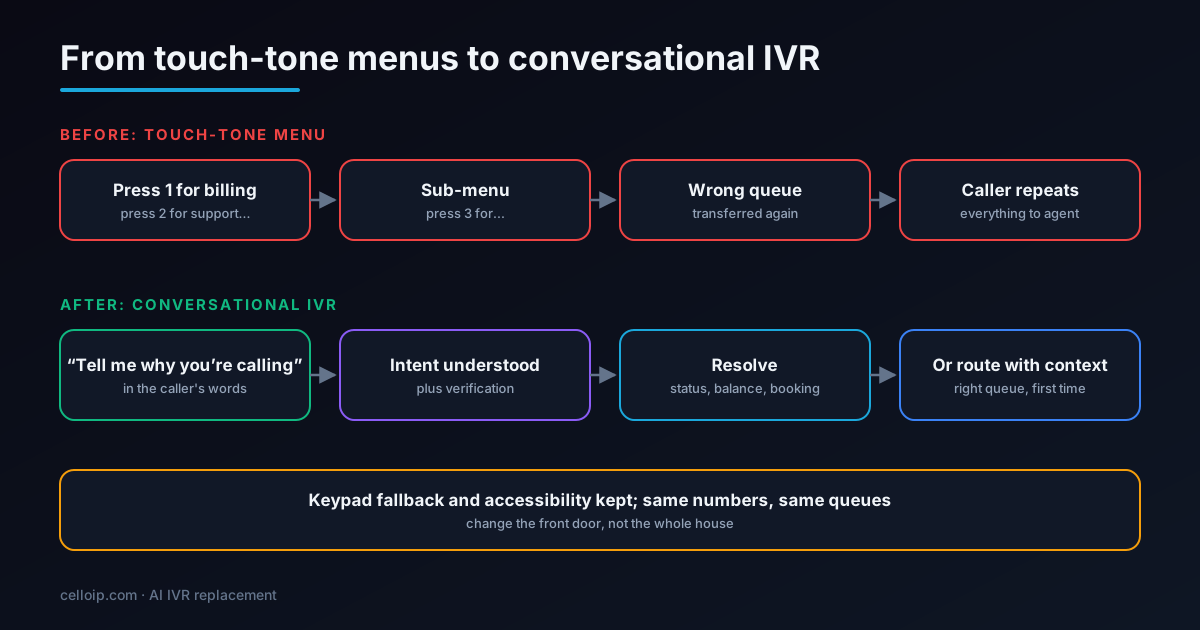
An AI IVR replaces “press 1 for billing” menus with a conversation: callers say why they are calling in their own words, the AI understands the intent, verifies them if needed, and either resolves the request or routes them to the right queue with context. It can sit in front of your existing phone system and queues, with a keypad fallback kept for accessibility.
Why touch-tone IVRs are being replaced
Touch-tone IVRs were designed when the alternative was a switchboard operator. They work by forcing callers to translate their need into a numbered option, often several layers deep. Callers who can't find their option press zero, choose something close, or hang up. Many end up in the wrong queue and get transferred, repeating themselves each time.
Menus also age badly. Every new product or team adds an option until the menu is too long to remember, and changing it requires careful testing because one wrong branch can strand callers. Meanwhile, data about why people actually call stays hidden behind menu choices that don't quite match reality.
Conversational AI changes the model. The caller states the need in a sentence, the system understands it, and the routing logic works from intents rather than menu trees. That is easier for callers and easier to change for the business.
There is also a cost to the business beyond caller frustration. Every misrouted call takes agent time twice, inflates queue times for everyone else and hides the real reasons customers call, which makes it harder to fix the underlying problems that generate calls in the first place.
How a conversational IVR works
- The call arrives on your existing number and PBX or contact-centre platform as today.
- The AI greets the caller and asks an open question: “In a few words, what are you calling about?”
- Speech recognition and a language model work out the intent, asking a short clarifying question if needed.
- If the request needs identity, the AI verifies the caller using your existing methods.
- Simple requests are resolved with integrations; everything else is routed to the right queue with intent and details attached.
Because the AI sits at the front door, it also becomes a rich source of insight. Every call produces a short, structured record of why the caller rang, which helps product, operations and marketing teams understand demand in a way menu statistics never could.
Touch-tone IVR vs AI IVR
| Touch-tone IVR | AI IVR | |
|---|---|---|
| How callers choose | Keypad menus, often several levels | Say the reason in their own words, keypad still available |
| Handling unusual requests | No matching option; caller guesses or presses 0 | Understands free-form requests and asks to clarify |
| Routing accuracy | Depends on callers picking the right option | Based on understood intent and caller data |
| Self-service | Fixed flows such as balance by keypad | Conversational tasks through integrations |
| Context for agents | Menu path, if anything | Intent, verification status and summary |
| Changing the design | Re-record prompts, rebuild trees, retest | Update intents, prompts and routing rules |
| Insight into call reasons | Limited to menu choices | Actual reasons in callers' words |
The biggest practical difference is maintenance. Adding a new product or team to a touch-tone menu often means re-recording prompts and rebuilding branches; with a conversational IVR it usually means adding an intent, updating routing rules and testing with example phrases.
Designing the front door
The first ten seconds decide whether callers trust the AI IVR. A few design choices make the difference.
A short, open opening
Greet, say it's an automated assistant, and ask one open question. Avoid long introductions or listing everything the system can do.
Intents from real calls
Build the intent list from recordings and queue data, not from the org chart. Callers think in problems, not departments.
Clarify, don't guess
If the request is ambiguous, ask one short question with likely options. After two failed attempts, route to a general team rather than looping.
Use what you know
Recognise returning callers from their number, check open orders or tickets, and anticipate the likely reason, while still letting them say something else.
Always an exit
Callers who ask for a person, or press zero where allowed, get one, with the context passed along.
Keep it short
The goal is to get the caller to the answer or the right person faster than the old menu, not to keep them talking to the AI.
Test the opening with real callers before launch. Small changes in wording, such as asking “what are you calling about today?” rather than “how can I help?”, can noticeably change how clearly callers state their reason, and that clarity drives routing accuracy.
Route or resolve: deciding what the AI should handle
Not every intent should be resolved by the AI. Start by routing well, then add self-service where it is safe and valuable.
| Intent type | Example | Recommended handling |
|---|---|---|
| Informational | Opening hours, branch locations, outage status | Resolve with approved content |
| Simple status | Order or ticket status, appointment time | Resolve after light verification |
| Simple change | Reschedule, update address, block a card | Resolve with strong verification and tool limits |
| Complex or advisory | Technical faults, financial advice, complaints | Route to specialists with context |
| Sensitive | Bereavement, hardship, emergencies | Route immediately to trained staff or emergency instructions |
Even routing-only AI IVRs deliver value: fewer misroutes, shorter handling because agents see the reason up front, and much better data about why people call.
Review the split between routing and resolving every few months. As integrations mature and the AI proves reliable on a call type, more intents can move from routing to self-service, while any intent that generates complaints can move back to people.
Example: an AI front door on Asterisk
Here the AI runs over Asterisk's AudioSocket. It captures the intent, writes the details under the call's ID and returns. The dialplan then routes on the intent, with a keypad fallback if the AI service is unavailable.
; extensions.conf (simplified)
[ivr-main]
exten => s,1,Answer()
 same => n,Set(CALL_REF=${UNIQUEID})
 ; Conversational front door; on failure, fall back to the keypad menu
 same => n,AudioSocket(${CALL_REF},10.0.0.40:9092)
 same => n,Set(INTENT=${CURL(http://10.0.0.40:8080/intent/${CALL_REF})})
 same => n,GotoIf($["${INTENT}" = ""]?keypad,1)
 same => n,Set(PJSIP_HEADER(add,X-Call-Ref)=${CALL_REF})
 same => n,Goto(route-${INTENT},1)

exten => route-billing,1,Queue(billing,tT,,,300)
exten => route-tech_support,1,Queue(support,tT,,,300)
exten => route-sales,1,Queue(sales,tT,,,300)
exten => route-resolved,1,Hangup()
exten => route-agent,1,Queue(general,tT,,,300)

; keypad fallback keeps working if the AI is down
exten => keypad,1,Background(main-menu)
 same => n,WaitExten(5)
exten => 1,1,Goto(route-billing,1)
exten => 2,1,Goto(route-tech_support,1)
exten => 3,1,Goto(route-sales,1)
exten => 0,1,Goto(route-agent,1)
The same pattern applies to FreeSWITCH, to commercial contact-centre platforms with SIP or audio-streaming hooks, and to LiveKit SIP: the AI decides the intent and writes context; your platform keeps doing what it does well, which is queuing and delivering calls to agents.
Migrating from Avaya, Cisco, Genesys or an older Asterisk IVR
Replacing an IVR is less risky than it sounds if you change the front door first and leave queues, agents and reporting alone.
- Analyse current calls: menu choices, misroutes, transfers between queues, abandonment and recordings of the top call reasons.
- Define intents and target outcomes for each, and map each intent to an existing queue or self-service flow.
- Connect the AI IVR in front of the current platform over SIP, passing intent and context into the existing queues.
- Run in parallel: send a share of calls, or one phone number, through the AI IVR and the rest through the old menu.
- Compare routing accuracy, time to agent, transfers and caller satisfaction; tune, then widen the roll-out.
- Retire old menu branches only once the AI handles their calls well, keeping the keypad fallback.
Legacy IVRs often contain business rules nobody remembers writing, such as holiday schedules, VIP routing and emergency announcements. Inventory them before switching so they are rebuilt in the new routing rather than lost.
Communicate the change to staff as well as callers. Agents should know what context they will now receive, supervisors should know how routing decisions are made, and everyone should know how to report a misroute so it can be fixed quickly.
Accessibility and inclusion
A conversational IVR should work for everyone, including callers who find speech systems harder to use.
Keypad alongside speech
Accept keypad input at every step for callers with speech difficulties, strong background noise or a preference for buttons.
Accents and languages
Test with the accents and languages your callers actually use, and offer language choice early.
Pace and repetition
Allow callers to ask the system to repeat or slow down, and avoid cutting them off during pauses.
Easy route to a person
Make reaching a human simple for callers who struggle with automated systems, including older and vulnerable callers.
Review accessibility with real users, not only with internal testers. Short sessions with callers who rely on keypad input, use hearing aids or speak English as a second language reveal problems that are easy to fix once seen.
Metrics that show it's working
Measure the old IVR first so you have a fair baseline, then compare the same call types after the change.
| Metric | What it shows |
|---|---|
| Routing accuracy / misroutes | Whether callers reach the right team first time |
| Transfers between queues | Hidden cost of wrong routing |
| Time to reach the right agent | Whether the front door is faster than menus |
| Self-service resolution by intent | How much the AI completes without a person |
| Abandonment in the IVR | Whether callers give up before reaching help |
| Caller satisfaction | How the new experience feels |
| Agent handle time | Whether context reduces time spent per call |
Illustrative example: where time goes for a misrouted call (seconds)
An illustration of how misroutes add time, not measured data; measure your own baseline from IVR and queue logs.
Misroutes are where conversational IVRs usually pay back first: every caller who reaches the right team first time saves a transfer, a second wait and a repeated explanation.
Share the results with agents and supervisors as well as management. When agents see misroutes falling and context improving, they become advocates for the new front door and report issues quickly.
What an AI IVR costs
As a guide, matching our voice agent cost ranges:
| Build | Typical range | Timeline |
|---|---|---|
| Managed-platform MVP: intent capture and routing | $8,000 – $20,000 | 4–6 weeks |
| Custom AI IVR with verification, self-service and contact-centre integration | $25,000 – $60,000 | 8–16 weeks |
| Large multi-line or multi-country estates | Scoped after discovery | Agreed in the plan |
Running costs are per minute for speech, model and voice while callers are in the IVR, which is usually short for routing. Self-service flows run longer but replace agent time.
CelloIP project outcome (client kept private)
We built a custom PBX platform handling 1,000+ concurrent channels, 50,000+ extensions and 50,000+ DIDs, and an omnichannel contact centre with queues, SLA rules and ticketing: the platforms conversational IVRs sit in front of.
Most of the value comes from routing accuracy and context, so even a routing-only first phase usually pays for itself before any self-service is added.
Common AI IVR mistakes
Conversational IVRs fail in predictable ways. Avoiding these gets most projects most of the way to success.
Recreating the old menu in speech
Asking “Say billing, support or sales” is a menu with extra steps. Ask an open question and let the AI work out the intent.
Too many intents at launch
Hundreds of fine-grained intents confuse the AI and the routing. Start with the top call reasons and a sensible catch-all.
Endless clarification loops
Asking callers to rephrase three times is worse than any menu. After two attempts, route to a general team with what you have.
Removing the keypad
Some callers will always prefer buttons, and some environments make speech impossible. Keep the fallback.
Routing without context
If agents don't see the intent and details, callers still repeat themselves and much of the value is lost.
Big-bang cutover
Switching every line at once leaves no comparison and no safety net. Roll out gradually and compare with the old IVR.
Frequently asked questions
What is an AI IVR?
An AI IVR, or conversational IVR, is a phone front door that understands natural speech. Instead of navigating menus, callers say what they need; the system works out the intent, can verify the caller, answer or complete simple requests, and route other calls to the right team with the details already captured.
How is it different from a speech-enabled IVR?
Older speech IVRs recognised a few keywords or fixed phrases, effectively a menu you speak instead of press. An AI IVR understands free-form sentences, handles follow-up questions and corrections, and can complete tasks through integrations, not just route.
Do we have to replace our phone system?
No. The AI IVR can sit in front of your existing PBX or contact-centre platform, for example Avaya, Cisco, Genesys or Asterisk, through SIP. Numbers, queues and agent tools stay as they are; only the front door changes.
Should we keep keypad options?
Yes. Keep a keypad fallback for callers who prefer it, for noisy environments, for accessibility and for quick paths such as “press 0 for an operator” where your policy allows. The AI should accept both speech and keypad input.
Will it route calls better than our current menus?
It usually reduces misrouted calls because callers describe their need rather than guessing which menu option fits. Measure misroutes, transfers between queues and time to the right agent before and after to confirm it for your callers.
How long does an IVR replacement take?
Routing-only replacements for a few intents can go live in weeks. Adding self-service tasks, verification and many integrations takes longer. A staged roll-out, starting with part of your traffic, keeps risk low.
How much does an AI IVR cost?
As a guide, a managed-platform MVP that captures intent and routes is typically $8,000–$20,000, and a custom production AI IVR with verification, self-service tasks and integration into your contact centre $25,000–$60,000. Large multi-line or multi-country estates are scoped after discovery.
Work with CelloIP
Ready to replace your phone menu?
CelloIP builds conversational AI IVRs that sit in front of your existing PBX or contact centre, route callers correctly, resolve simple requests, keep a keypad fallback and pass context to your agents. You own the code.