MultilingualAI ChatbotRAGArabicHindiLocalization

Multilingual AI Chatbot Development: Architecture, RAG, Costs and Testing

Customers trust answers in their own language, and most businesses serve people in more than one. Large language models make a multilingual chatbot far easier than it was, but easy demos hide hard problems: retrieval that misses non-English questions, answers that switch language halfway through, broken right-to-left layouts and quality that nobody checked in the third language. This guide covers the architecture choices, language detection, multilingual RAG, token costs we measured ourselves, interface details and how to test each language.

Kaushik ParmarFounder & VoIP Architect · 12+ years in telecom and VoIP 14 min read
3
Architectures compared
8
Languages we measured
1.34×
Hindi vs English tokens (o200k_base)
6
Steps to test each language

Quick answer

How do you build a multilingual AI chatbot?

A multilingual AI chatbot detects the language of each message, retrieves knowledge across languages using multilingual embeddings, and answers in the user's own language and script. Most production systems use a modern multilingual LLM natively for major languages, with machine translation or human review for less common ones. The work that decides quality is language-aware retrieval, right-to-left and script handling in the interface, and testing every language separately with native speakers.

What makes a chatbot truly multilingual

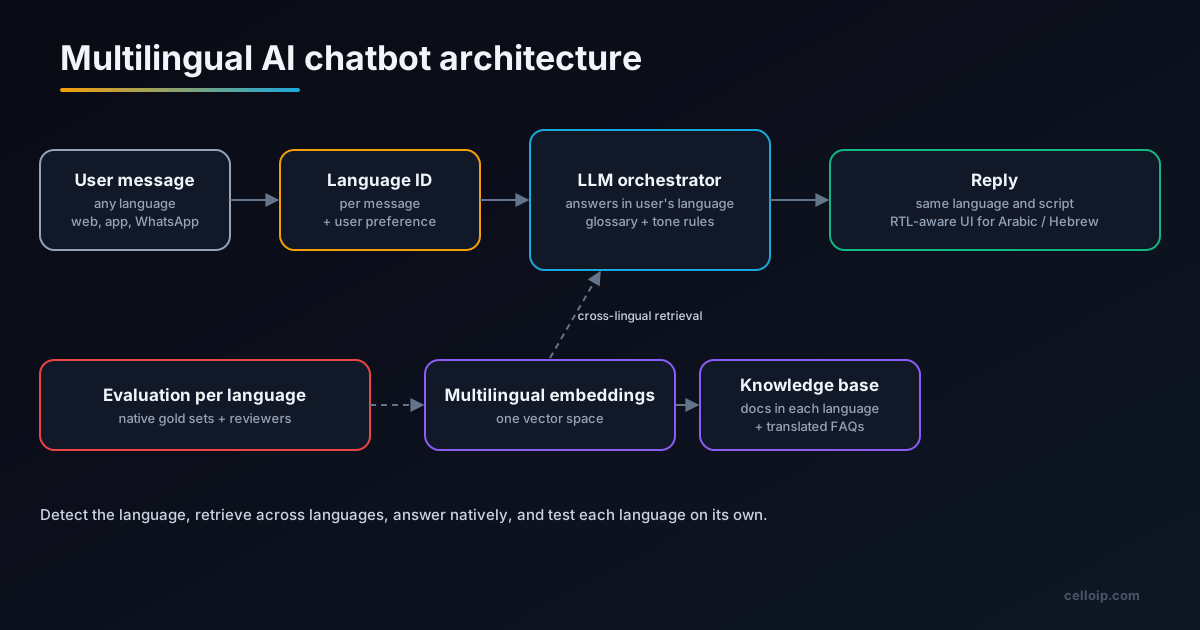
Multilingual AI chatbot architecture: a user message in any language goes through language identification to an LLM orchestrator that answers in the user's language; retrieval uses multilingual embeddings over a knowledge base in several languages; each language is evaluated with native gold sets.
Detect the language, retrieve across languages, answer natively, and test each language on its own.

A chatbot that can produce text in several languages is not the same as a multilingual chatbot. A truly multilingual chatbot does five things well: it recognises the language and script of each message, including mixed messages; it finds the right knowledge whatever language the question and the source documents are in; it answers in the user's language, with the right tone and correct domain terms; its interface displays every script properly, including right-to-left scripts; and its quality has been checked in every language it offers.

Large language models solved the hardest part, generating fluent text in many languages, almost overnight. What they did not solve is the business-specific part: your product names, your policies written in English only, your customers who switch between Hindi and English mid-sentence, and your support team who can only review answers in two of the five languages on offer. That is where the engineering goes.

It is also why the decision is a business one first. Start from evidence about which languages your customers actually use: support tickets, website language settings, WhatsApp conversations and call recordings. Launch with the languages that cover most of them, then add more.

Three ways to build a multilingual chatbot

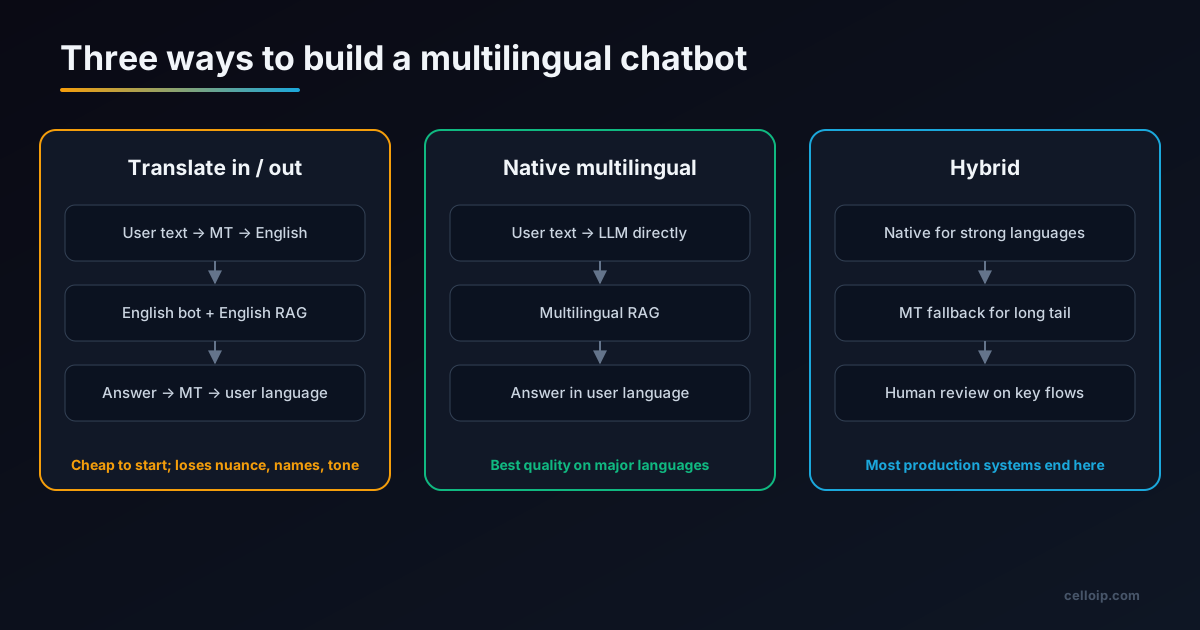
Three multilingual chatbot architectures: translate in and out around an English bot, a native multilingual model with multilingual retrieval, and a hybrid of the two.
Most production systems start native for major languages and add translation for the long tail.
FactorTranslate in / outNative multilingualHybrid
How it worksMachine-translate the user's message to English, answer in English, translate backThe LLM reads and answers in the user's language directlyNative for strong languages; translation or human review for others
Answer qualityLoses nuance, names and tone; errors compoundHigh on major languagesHigh where it matters most
LatencyTwo extra translation callsLowestLow for most traffic
Knowledge baseEnglish onlyMultilingual retrievalMultilingual, with key content translated
Cost to startLowMediumMedium
Best forQuick pilots and rare languagesMost business chatbotsProduction systems with many languages

The translate-in, translate-out pattern made sense when language models were weak outside English. Today it mainly survives as a fallback for languages where the model is clearly weaker, or where regulated wording must come from a professionally translated source. For most new builds, start native and add translation only where testing shows a need.

Language detection and switching

Language detection sounds trivial until you look at real messages. Users write "hi" in every language, send order numbers with no words at all, write Hindi or Arabic in Latin letters, and switch language halfway through a conversation. A robust approach combines several signals.

SignalUse it forWatch out for
User's chosen language (app setting, WhatsApp template choice)The default for the conversationPeople choose English and then write in another language
Per-message language identificationFollowing switches mid-conversationVery short messages, numbers and names
Script detection (Devanagari, Arabic, Latin...)Choosing fonts and text directionRomanised Hindi or Arabic written in Latin script
The LLM itselfFinal decision on mixed or ambiguous messagesCost and latency if used for every message
# Python: decide the reply language for each message
import fasttext                      # lid.176 model identifies 176 languages
lid = fasttext.load_model("lid.176.ftz")

SUPPORTED = {"en", "ar", "hi", "es", "fr"}

def reply_language(text: str, session_lang: str) -> str:
    clean = text.replace("\n", " ").strip()
    if len(clean) < 12 or clean.isdigit():          # "hi", "ok", order numbers
        return session_lang                          # keep the conversation's language
    labels, probs = lid.predict(clean, k=1)
    lang = labels[0].replace("__label__", "")
    if probs[0] >= 0.80 and lang in SUPPORTED:
        return lang                                  # confident switch
    return session_lang                              # unsure: do not flip-flop

# Then tell the model explicitly:
# "Reply in {lang_name}. Keep product names, order IDs and prices exactly as written."

Two rules prevent most complaints. Do not switch language on a short or uncertain message; keep the conversation's language until you are confident. And tell the model the reply language explicitly in the instructions rather than hoping it mirrors the user, because models sometimes drift back to English when the retrieved documents are in English.

Multilingual RAG: retrieval across languages

Most business chatbots answer from company documents using retrieval-augmented generation (RAG): the question is turned into an embedding, similar passages are found in a vector database, and the model answers from those passages. Our RAG chatbot guide covers the full pipeline. In a multilingual chatbot, retrieval is where quality most often breaks.

Use multilingual embeddings

Models such as BGE-M3 (100+ languages), Cohere's multilingual embeddings and OpenAI's text-embedding-3 models place text from different languages in one vector space, so an Arabic question can find an English passage. OpenAI reported a large jump on the MIRACL multilingual retrieval benchmark when it moved from ada-002 to text-embedding-3-large.

Prefer cross-lingual retrieval over query translation

A 2025 study of multilingual RAG for knowledge-intensive tasks found that retrieving across languages generally beat both monolingual retrieval and translating the query first. Test it on your data, but start there.

Chunk by language-aware rules

Sentence splitting differs by script: Arabic, Hindi, Thai and Japanese punctuation and spacing do not follow English rules. Use a splitter that understands each script, or chunk by headings and paragraphs.

Translate the content that matters

Policies, prices, legal terms and safety information should exist in each launch language, reviewed by a native speaker. Quote those passages directly instead of letting the model translate them on the fly.

Store the language of each chunk as metadata. That lets you prefer same-language sources when they exist, show citations in the user's language, and measure retrieval quality per language. For hybrid search, remember that keyword search (BM25) works per language: an Arabic keyword will not match an English document, so rely on vectors for cross-language matches and keywords within a language.

Token cost by language: what we measured

Language models bill by tokens, and tokenizers split some languages into many more tokens than English for the same meaning. To give a concrete picture, we measured one customer-support message, a request to change a delivery address with an order number, written in eight languages, using two OpenAI tokenizers: the older cl100k_base and the newer o200k_base.

Languagecl100k_base (older)o200k_base (newer)
English32 tokens (1.00×)32 tokens (1.00×)
Spanish36 (1.12×)30 (0.94×)
French38 (1.19×)33 (1.03×)
German36 (1.12×)31 (0.97×)
Japanese45 (1.41×)32 (1.00×)
Arabic68 (2.12×)33 (1.03×)
Hebrew93 (2.91×)38 (1.19×)
Hindi120 (3.75×)43 (1.34×)

The lesson is not the exact numbers, which change with every sentence and every model, but the direction: newer tokenizers have sharply reduced the extra cost of non-Latin scripts. The older tokenizer used 3.75 times as many tokens for Hindi as for English; the newer one used 1.34 times. If you run a high-volume chatbot in Hindi, Arabic or Hebrew on an older model, moving to a model with a newer tokenizer can cut costs noticeably. Measure your own content before deciding:

# Python: compare token counts per language for your own content
import tiktoken

samples = {                       # use real, native-written support messages
    "en": open("samples/en.txt").read(),
    "hi": open("samples/hi.txt").read(),
    "ar": open("samples/ar.txt").read(),
}
for enc_name in ("cl100k_base", "o200k_base"):
    enc = tiktoken.get_encoding(enc_name)
    base = len(enc.encode(samples["en"]))
    for lang, text in samples.items():
        n = len(enc.encode(text))
        print(f"{enc_name:12} {lang}: {n:5} tokens  {n / base:.2f}x English")

Other providers use their own tokenizers, so the same exercise with Claude or Gemini will give different ratios. Our OpenAI vs Claude vs Gemini for chatbots guide compares the models on other dimensions.

Choosing models for each language

ComponentWhat to check per languageHow
LLMAnswer accuracy, fluency, staying in the right language, handling of dialectsYour gold set; public multilingual benchmarks such as Global-MMLU (42 languages) as a first filter
EmbeddingsRetrieval quality for questions in that language against your documentsRecall@k on your gold set, per language
Language IDAccuracy on short and code-mixed messagesSample of real messages labelled by native speakers
Speech-to-text (voice)Word error rate on your callers' accentsReal recordings, per language
Text-to-speech (voice)Naturalness, pronunciation of names and numbersNative listener ratings

Do not assume the best model in English is the best in Arabic or Hindi. Model rankings change by language, and a smaller model that is strong in your key language can beat a larger one. Keep model choice per language configurable so you can switch as models improve.

Right-to-left and script handling in the interface

Arabic, Hebrew, Persian and Urdu are written right to left, and they often contain left-to-right pieces such as English product names, URLs and numbers. Getting this wrong makes a technically correct answer unreadable.

<!-- Each message sets its own direction from its content -->
<div class="msg" dir="auto" lang="ar">مرحبًا، رقم طلبك هو 48213 وسيصل غدًا.</div>
<div class="msg" dir="auto" lang="en">Your order 48213 arrives tomorrow.</div>

<style>
  .msg {
    /* logical properties mirror automatically for RTL */
    margin-inline-start: 0;
    margin-inline-end: auto;
    padding-inline: 12px;
    text-align: start;
    unicode-bidi: plaintext;     /* resolve direction per paragraph */
  }
  :lang(ar) { font-family: "Noto Sans Arabic", system-ui, sans-serif; }
  :lang(hi) { font-family: "Noto Sans Devanagari", system-ui, sans-serif; }
</style>
  • Set dir per message, not once for the whole page, because conversations mix languages
  • Use CSS logical properties (margin-inline-start, padding-inline) instead of left and right
  • Choose fonts that cover every script you support, including diacritics
  • Mirror icons that imply direction, such as send and back arrows, but not logos or media controls
  • Test numbers, dates, phone numbers and prices inside RTL sentences
  • On WhatsApp, the app renders direction itself, so keep messages short and avoid layout tricks

Content, tone and terminology

Language is more than words. Formality differs between languages and markets: German and French business conversations often expect the formal "you", while many English-language brands are casual. Some brands keep product names in English everywhere; others translate them. Dates, currencies, address formats and phone number formats all vary.

Glossary

A list of terms the bot must never translate (product names, plan names) and terms with an approved translation. Pass the relevant entries in the prompt.

Tone guide per language

Formal or informal address, greetings, how to apologise. A few examples per language in the prompt work better than long rules.

Regulated wording

Medical, financial and legal statements should come from reviewed text in each language, quoted directly, not generated.

Code-mixing deserves its own testing. In India, many customers write and speak in Hinglish, mixing Hindi and English in one sentence, often in Latin script. A chatbot that answers in formal Hindi to a Hinglish message feels wrong; one that mirrors the user's mix feels natural. Our Hindi and regional-language voice AI guide covers code-switching in depth.

Adding voice in several languages

The same chatbot logic can answer phone calls by adding speech-to-text before it and text-to-speech after it. Voice is harder than text in a multilingual setting, because speech recognition quality varies more by language and accent than text understanding does, and because some languages have fewer natural-sounding voices.

Choose speech-to-text and text-to-speech providers per language rather than one for all, and test with recordings from your real callers. Our AI chatbot vs voice agent guide explains how to run one brain across chat and voice, and the voice AI development page covers how we choose speech providers per language.

Testing each language before launch

The most common failure in multilingual chatbots is not a technical one: nobody checked the third language. Teams test thoroughly in English, spot-check the second language and assume the rest works. Evaluation must happen per language, with native speakers.

  1. 1. Choose launch languages

    Pick languages from real customer data such as support tickets, website analytics and call records, not from a wish list.

  2. 2. Write native gold sets

    Have native speakers write 50 to 200 real questions per language with expected answers and source documents.

  3. 3. Run the chatbot on every set

    Run each gold set through the full pipeline, including language detection, retrieval and the final answer.

  4. 4. Score each language separately

    Score answer accuracy, whether the reply is in the right language and script, tone, and whether the cited source supports the answer.

  5. 5. Review failures with native speakers

    Have native reviewers read the failures and classify them as retrieval, translation, prompt or content problems.

  6. 6. Fix and re-run before launch

    Fix the biggest failure class, re-run all languages to catch regressions, and set a quality bar each language must pass before going live.

MetricWhat it catches
Answer accuracy per languageWeak model or retrieval in that language
Right language and script rateReplies drifting to English or the wrong script
Citation support rateAnswers not backed by the retrieved source
Escalation rate per languageLanguages where users give up and ask for a human
User rating per languageTone and naturalness problems that metrics miss

Translated test sets hide problems, because translated questions are cleaner and more formal than real ones. Ask native speakers to write questions the way customers actually do, typos and all. After launch, review a sample of real conversations in each language every week.

Cost and timeline

Languages add testing and content work more than build work. As a guide from our AI chatbot development service, a knowledge-base chatbot MVP on one channel is typically $6,000 to $15,000 over three to five weeks, and a production RAG chatbot with several sources, channels and integrations is typically $15,000 to $40,000 over six to ten weeks. Each extra language adds gold-set creation, native review and content translation, which depend on how much regulated or brand-critical content you have.

Multilingual chatbot checklist

  • Choose launch languages from real customer data
  • Use a native multilingual model; add translation only where tests show a need
  • Detect language per message, but do not flip on short or uncertain messages
  • Tell the model the reply language explicitly
  • Use multilingual embeddings and store each chunk's language
  • Translate and review policies, prices and regulated wording
  • Keep a glossary of terms never to translate
  • Set text direction per message and use CSS logical properties
  • Measure token cost per language on your own content
  • Write native gold sets and score each language separately
  • Give each language a quality bar it must pass before launch
  • Review real conversations per language every week after launch

A real example: English, Arabic and a third language

CelloIP built a RAG chatbot for a healthcare provider in the Middle East. It answers patients' questions from the provider's own documents on four channels, a website widget, WhatsApp, chat inside the provider's app and the phone, in English, Arabic and one more language, with Arabic written right to left. It cites the source of every answer and hands conversations to staff when needed. Each language was tested separately, which is one reason the first production version took three to six months.

CelloIP project outcome (client kept private)

One chatbot, four channels, three languages including right-to-left Arabic, with cited answers and handover to staff; built on OpenAI models, Python and PostgreSQL with pgvector.

Frequently asked questions

Can one AI chatbot speak many languages?

Yes. Modern large language models handle dozens of languages natively, so one chatbot can detect the user's language and reply in it. Quality is not equal across languages, though: major languages usually work well, while less common languages, dialects and code-mixed speech such as Hinglish need more testing, better prompts and sometimes machine translation or human review.

Is it better to translate or to use a multilingual model?

For most business chatbots, use the multilingual model natively for major languages. Translating everything to English and back is cheaper to set up but loses names, tone and domain terms, and adds latency. A hybrid approach, native for strong languages and translation for the long tail, is where most production systems end up.

Do I need a separate knowledge base for each language?

Not necessarily. With multilingual embeddings, a question in Arabic can retrieve an answer written in English, and the model can answer in Arabic. Keep translated versions of your most important content, such as policies and prices, because quoting a source in the user's language builds trust and reduces translation errors.

Does a non-English chatbot cost more to run?

Often, a little. Language models bill by tokens, and some scripts take more tokens for the same meaning. In our measurement with OpenAI's newer o200k_base tokenizer, a Hindi sentence used 1.34 times the tokens of the same English sentence, compared with 3.75 times on the older cl100k_base tokenizer. Newer tokenizers have narrowed the gap considerably.

How do you support Arabic and Hebrew in a chat interface?

Set the text direction per message with dir="auto" or from the detected language, use CSS logical properties so layouts mirror correctly, choose fonts that cover the script, and test mixed content such as English product names and numbers inside Arabic sentences.

How do you test a multilingual chatbot?

Build a gold set of real questions and expected answers in each language, written by native speakers rather than translated from English, and score answer accuracy, language correctness, tone and citation quality for each language separately. Public benchmarks such as Global-MMLU help compare models, but your own data decides.

How much does a multilingual chatbot cost to build?

As a guide, a knowledge-base chatbot MVP on one channel is typically $6,000 to $15,000 over three to five weeks, and a production RAG chatbot with several sources, channels and integrations is typically $15,000 to $40,000 over six to ten weeks. Each extra language adds testing and content work rather than a separate build.

Can the same chatbot answer phone calls in several languages?

Yes, by adding speech-to-text and text-to-speech chosen per language to the same chatbot logic. Voice is harder than text because speech recognition quality varies more by language and accent, so test each language on real recordings.

Work with CelloIP

Planning a chatbot in more than one language?

CelloIP builds custom AI chatbots and voice agents in any language your customers use, with multilingual retrieval, right-to-left interfaces and per-language testing. We reply within one business day, and you own the code.