PBX High Availability: Failover Design for Asterisk and FreeSWITCH
When a PBX goes down, phones stop ringing, queues go silent and customers hear nothing. High availability is about making sure no single server, link or provider can cause that. This guide covers the failure points, the three common HA patterns, working Kamailio and keepalived configuration, what it takes to keep live calls up, and how to prove it works.
Quick answer
How do you make a PBX highly available?
A highly available PBX removes every single point of failure between the phone and the carrier. The usual design is a redundant SIP edge (two Kamailio or OpenSIPS proxies sharing a floating IP or behind DNS SRV), a pool of Asterisk or FreeSWITCH media servers that the edge health-checks and fails over between, replicated databases for registrations and settings, and two or more SIP trunk providers. New calls survive any single failure; in-progress calls survive only if call state is shared, which FreeSWITCH supports with call recovery and Asterisk does not.
What high availability means for a PBX
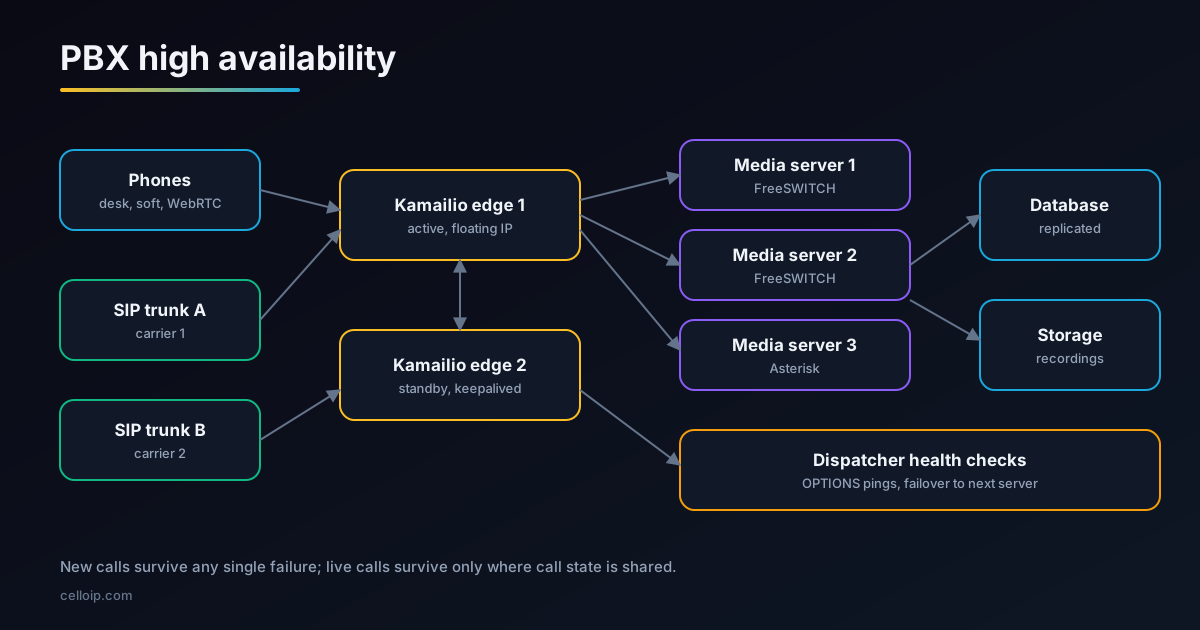
A PBX is highly available when the failure of any one component, whether a server, a network link, a database or a carrier, does not stop people making and receiving calls. That sounds simple, but a phone system has more moving parts than most web applications, and they fail in different ways.
It helps to separate three questions. Can new calls be made after a failure, and how quickly? Do calls in progress survive it? Do phones stay registered, or do they all have to re-register at once? Most designs guarantee the first, aim for the third, and only some achieve the second.
High availability is not the same as backup. Backups help you rebuild after losing data; high availability keeps the service running while something is broken. A serious PBX needs both.
Choose an uptime target first
Every extra "nine" of uptime costs more in servers, design work, testing and monitoring. Pick a target from what an outage costs your business, then design to it.
| Uptime | Downtime a year | Downtime a month | Typical design |
|---|---|---|---|
| 99% | About 3.7 days | About 7.3 hours | Single server with good backups |
| 99.9% | About 8.8 hours | About 44 minutes | Active-passive pair, one site |
| 99.99% | About 53 minutes | About 4.4 minutes | Redundant SIP edge, media pool, replicated data, two carriers |
| 99.999% | About 5 minutes | About 26 seconds | All of the above across two sites, with automated failover and regular drills |
Maximum downtime a year at each uptime target (minutes)
Calculated from a 365-day year: (1 − uptime) × 525,600 minutes.
Be precise about what the target covers. Planned maintenance, carrier outages and problems in a customer's own network are often excluded from a PBX uptime figure, so state what is in and out.
What can fail in a PBX
| Component | What happens when it fails | Usual protection |
|---|---|---|
| SIP edge or SBC | Nothing reaches the PBX; phones and trunks lose service | Two proxies with a floating IP, DNS SRV or a UDP load balancer |
| Media server (Asterisk / FreeSWITCH) | Calls on that server drop; new calls fail if it is the only one | A pool of servers behind the proxy, with health checks |
| Database | Logins, dialplans, voicemail settings or CDRs fail | Replication or a cluster, plus backups |
| Media relay (RTPengine) | Audio stops on calls it carries | Several relays; shared call state where supported |
| SIP trunk provider | No calls to or from the phone network | Two or more providers with automatic failover |
| Network or data centre | Everything at that site is unreachable | Second site or cloud region, DNS-based failover |
| Shared storage | Recordings, voicemail and prompts unavailable | Replicated object storage |
Our VoIP toll fraud prevention guide covers a different kind of failure that HA does not fix: attackers using your PBX to place expensive calls.
Three common HA patterns
| Pattern | How it works | Live calls on failure | Good for |
|---|---|---|---|
| Active-passive pair | One PBX serves all traffic; keepalived or Pacemaker moves a floating IP to the standby on failure | Asterisk: dropped. FreeSWITCH: can be recovered with track-calls and shared state | Single-company PBX, up to a few hundred users |
| Proxy plus N+1 pool | Kamailio or OpenSIPS spreads calls over several media servers and stops sending to a failed one | Calls on the failed server drop; all others continue | Hosted and multi-tenant PBX, contact centres |
| Multi-site | Two or more sites or regions, each with its own edge and pool, with DNS SRV or carrier routing between them | Depends on the site design; new calls move to the healthy site | Carrier-grade and 99.999% targets |
The proxy-plus-pool pattern is the most common for anything larger than one company. It turns a server failure from a full outage into a partial one: if one of five media servers fails, roughly a fifth of live calls drop and every new call goes to a healthy server. Our guides to multi-tenant VoIP platform architecture and OpenSIPS load balancing cover the wider design.
A redundant SIP edge with keepalived
The SIP edge is the front door, so it must not be a single server. A common approach is two Kamailio or OpenSIPS servers sharing a virtual IP address managed by keepalived, which uses VRRP to move the address to the standby when the active node fails a health check.
# /etc/keepalived/keepalived.conf on both SIP edge nodes
vrrp_script chk_kamailio {
    script "/usr/bin/pgrep -x kamailio"   # better: a script that sends a SIP OPTIONS
    interval 2
    fall 2
    rise 2
}

vrrp_instance SIP_EDGE {
    state BACKUP                 # both start as BACKUP; priority decides
    interface eth0
    virtual_router_id 51
    priority 100                 # use 90 on the second node
    advert_int 1
    nopreempt                    # don't flap back when the first node returns
    virtual_ipaddress {
        203.0.113.10/24
    }
    track_script {
        chk_kamailio
    }
    notify_master "/usr/local/bin/sip-edge-became-master.sh"
}- Let Kamailio bind to the floating IP on both nodes by setting net.ipv4.ip_nonlocal_bind = 1.
- Health-check SIP, not just the process: a running Kamailio that cannot route calls should still fail over.
- In public clouds, VRRP often does not work; move a reserved IP through the provider's API in the notify script, or use a UDP-capable network load balancer.
- Keep both nodes' configuration identical through configuration management, not by hand.
- Plan for TLS: both nodes need the same certificates for SIP over TLS and WebSocket clients.
For more on hardening the edge itself, see our Kamailio SBC configuration guide.
Kamailio dispatcher: failing over between media servers
Behind the edge, Kamailio's dispatcher module sends each new call to a media server in a set, probes the servers with SIP OPTIONS, and skips any that stop answering. If a server fails mid-setup, the failure route tries the next one.
# kamailio.cfg (excerpt): dispatch to a pool of FreeSWITCH/Asterisk servers
loadmodule "dispatcher.so"
modparam("dispatcher", "list_file", "/etc/kamailio/dispatcher.list")
modparam("dispatcher", "flags", 2)                  # keep remaining targets for failover
modparam("dispatcher", "ds_ping_interval", 10)      # OPTIONS ping every 10 s
modparam("dispatcher", "ds_probing_mode", 1)        # probe all destinations
modparam("dispatcher", "ds_probing_threshold", 2)   # 2 failures -> inactive
modparam("dispatcher", "ds_inactive_threshold", 2)  # 2 successes -> active again
modparam("dispatcher", "ds_ping_reply_codes", "class=2;code=403;code=404")

route[DISPATCH] {
    # set 1, algorithm 4 = round-robin
    if (!ds_select_dst("1", "4")) {
        send_reply("503", "No media server available");
        exit;
    }
    t_on_failure("DISPATCH_FAILOVER");
    route(RELAY);
    exit;
}

failure_route[DISPATCH_FAILOVER] {
    if (t_is_canceled()) exit;
    # server error or no reply: mark it inactive and try the next one
    if (t_check_status("500|503") || (t_branch_timeout() && !t_branch_replied())) {
        ds_mark_dst("ip");          # inactive + probing
        if (ds_next_dst()) {
            t_on_failure("DISPATCH_FAILOVER");
            route(RELAY);
            exit;
        }
    }
}

# /etc/kamailio/dispatcher.list
# setid  destination
1 sip:10.0.1.11:5060
1 sip:10.0.1.12:5060
1 sip:10.0.1.13:5060| Algorithm | Number | When to use it |
|---|---|---|
| Round-robin | 4 | Even spread across identical servers |
| Hash over Call-ID | 0 | Keep all messages of a call on the same server |
| Priority-ordered serial | 8 | Primary server first, standby only on failure |
| Weight-based | 9 | Servers of different sizes |
| Call load | 10 | Spread by active calls rather than by request |
Algorithm numbers and parameter names are from the Kamailio 5.8 dispatcher documentation; older releases differ slightly, so check the docs for your version. OpenSIPS offers the same ideas through its dispatcher and load_balancer modules.
Keeping calls up during a failure
Making new calls work again is the easy part. Keeping calls that are already connected is harder, because the media server holds the state of each call: who is talking to whom, codecs, recordings and queue position.
| Engine | Live call recovery | How |
|---|---|---|
| FreeSWITCH | Supported, with limits | Enable track-calls on every SIP profile a call uses, store core state in a shared database through ODBC, move the IP to the standby and run 'sofia recover' |
| Asterisk | Not supported natively | Calls on the failed server drop; minimise impact with a pool of servers and fast failover for new calls |
| Kamailio / OpenSIPS | Proxy state can be shared | Dialog and registration data can be replicated between proxies (for example with DMQ in Kamailio) |
<!-- FreeSWITCH: sip_profiles/external.xml and internal.xml -->
<param name="track-calls" value="true"/>

<!-- autoload_configs/switch.conf.xml: core state in a shared database -->
<param name="core-db-dsn" value="pgsql://hostaddr=10.0.2.20 dbname=freeswitch user=fs password=CHANGE_ME"/>

# On the standby, after it has taken over the floating IP:
fs_cli -x "sofia recover"
FreeSWITCH's own high-availability documentation describes this pattern, and notes a small performance cost because call state is written to the database on every state change. Users have reported that some states, such as calls on hold, do not always recover, so treat recovery as best effort and test the call types that matter to you. Our Asterisk vs FreeSWITCH comparison covers other differences between the two engines.
Registrations, settings and data
A PBX keeps three kinds of data, and each needs its own plan.
Registrations
Where each phone can be reached. Store them in a shared database or replicate them between proxies so a failover does not force every phone to re-register at once.
Configuration
Extensions, dialplans, queues, IVRs and tenants. Keep them in a replicated database (PostgreSQL streaming replication, or a MariaDB Galera cluster) and generate config from it.
Call records and media
CDRs, recordings and voicemail. Write CDRs to a replicated database or a queue; store recordings in replicated object storage, not on the media server's disk.
Phones help too. Most desk phones and softphones accept a primary and a backup registrar, or follow DNS SRV records with several targets, which gives a second path if the first fails. Keep re-registration intervals sensible: very short intervals cause storms after an outage, very long ones slow recovery.
SIP trunks and media relays
A perfectly redundant PBX is still down if its only carrier is. Use at least two SIP trunk providers, ideally on different networks, and route outbound calls to the second when the first returns errors or times out. For inbound calls, ask each provider to fail over to a second IP or site, and keep a plan for moving numbers between providers in an emergency.
- Two or more SIP trunk providers, with automatic outbound failover on 5xx responses and timeouts.
- Inbound routes from each provider to at least two SIP edge addresses or sites.
- Several RTPengine (or other media relay) instances; RTPengine can keep call state in Redis so another instance can take over calls.
- Monitoring of trunk health with OPTIONS pings and alerts on failed call attempts, not only on server status.
- Capacity on each provider for the full load, not just a share of it.
Our SIP trunk solutions page covers carrier connectivity in more detail.
Adding a second site or region
Single-site redundancy protects against a server failing. It does not protect against a data centre, cloud region or network provider failing. For the highest targets, run a second site with its own SIP edge and media pool.
| Decision | Options |
|---|---|
| How calls find the healthy site | DNS SRV with priorities, carrier routing with failover, or a global load balancer that supports SIP |
| Active-active or warm standby | Both sites take traffic all the time, or the second only on failure |
| Database replication | Synchronous within a site; asynchronous between distant sites to avoid adding delay |
| Recordings and voicemail | Object storage replicated across regions |
| Failover decision | Automated with health checks, or a documented manual switch for rare events |
Test failover, or it will not work
Untested failover is a hope, not a design. Test it before go-live and on a regular schedule after.
- Kill each component in turn (edge node, media server, database primary, relay, trunk) and record what users experience.
- Measure how long new calls fail after each failure, and how many live calls drop.
- Run failover under load with a SIP load generator such as SIPp, not on an idle system.
- Check that phones re-register cleanly and that queues, voicemail and recordings still work afterwards.
- Fail back to the original node and test again; failback is where many designs break.
- Write a runbook for each scenario and keep it next to the alerts that trigger it.
A real example: a hosted PBX at enterprise scale
CelloIP built a multi-tenant hosted PBX for a North American enterprise on public cloud. It runs on FreeSWITCH behind a Kamailio/OpenSIPS SIP edge with RTPengine for media, and includes IVR and queues, call recording, a tenant admin portal, CDR and billing, desk-phone provisioning, softphones, WebRTC calling and CRM APIs.
At that scale, the separation described in this guide matters: a SIP edge in front, media servers behind it and media relays alongside, so each layer can be scaled and protected on its own.
CelloIP project outcome (client kept private)
1,000+ concurrent channels, 50,000+ extensions and 50,000+ DIDs for 100+ tenants. Built in three to six months, and CelloIP still maintains it.
Frequently asked questions
Can Asterisk keep calls up when a server fails?
Not natively. Asterisk does not replicate live call state between servers, so calls on a failed server drop, and the usual goal is fast failover so new calls work again within seconds. Placing several Asterisk servers behind a SIP proxy limits how many calls a single failure affects.
Can FreeSWITCH recover calls after a failover?
Yes, within limits. With track-calls enabled on the SIP profiles and call state stored in a shared database, a standby FreeSWITCH that takes over the same IP address can run 'sofia recover' to re-establish calls. FreeSWITCH's documentation designs this around failing over the IP address too, and some call states, such as calls on hold, have been reported not to recover, so test your own scenarios.
What is the difference between active-passive and active-active?
In active-passive, one server handles traffic and a standby takes over when it fails, usually by moving a floating IP. In active-active, several servers handle traffic at once behind a proxy or load balancer, and the others absorb the load if one fails. PBX estates usually combine both: an active-passive SIP edge in front of an active-active pool of media servers.
Do I need Kamailio or OpenSIPS for PBX high availability?
Not for a small active-passive pair, which keepalived or Pacemaker can manage on their own. For more than two media servers, or when you want to send calls to healthy servers automatically, a SIP proxy such as Kamailio or OpenSIPS in front is the standard approach.
Does a floating IP work in the public cloud?
Not always in the classic way. VRRP as used by keepalived relies on network features that many public clouds do not offer. Cloud deployments usually move an elastic or reserved IP through the provider's API in a keepalived notify script, use a cloud network load balancer that supports UDP, or rely on DNS SRV with several SIP edges.
How much uptime should a business PBX target?
It depends on what an outage costs you. 99.9% allows about 8.8 hours of downtime a year, 99.99% about 53 minutes and 99.999% about 5 minutes. Each extra nine needs more redundancy, testing and monitoring, so choose a target from the business impact, not habit.
What does a highly available PBX cost to build?
As a guide, a company IP PBX is typically $8,000 to $20,000 and a multi-tenant cloud PBX platform with portals and billing $30,000 to $80,000. Carrier-scale and highly available estates are scoped after discovery, because the cost depends on the number of sites, the uptime target and how much call state must survive a failure.
Work with CelloIP
Need a PBX that stays up?
CelloIP designs and builds highly available PBX and hosted PBX platforms on Asterisk, FreeSWITCH, Kamailio and OpenSIPS, from single-company failover pairs to multi-site estates. We reply within one business day, and you own the code and the platform.