Cloud PBX vs Custom PBX: Which Should You Choose?
Renting a cloud phone system is the default for most businesses, and often the right one. But past a certain size, or with the wrong kind of requirements, it becomes expensive and limiting. This guide compares the options honestly and shows where the line usually falls.
Quick answer
Cloud PBX or custom PBX: which should I choose?
Choose a cloud PBX if you want a standard business phone system quickly and are happy to pay a per-user monthly fee for the provider's features. Choose a custom PBX, built on Asterisk or FreeSWITCH and hosted in your cloud or on-premise, if you have many users, unusual call flows or integrations, strict data rules, or want to sell phone service to your own customers.
Three ways to get a business phone system
The terms overlap, so it helps to be precise. Almost every modern business phone system is an IP PBX; the question is who owns and runs it.
Cloud PBX (hosted PBX, UCaaS)
A provider runs a shared platform and rents you seats. You configure users and call flows in their portal. Simple, fast, and priced per user.
White-label PBX platform
A ready-made multi-tenant PBX you rebrand and resell to your own customers. Quicker than building, limited to the product's features.
Custom PBX
PBX software built to your requirements, usually on Asterisk or FreeSWITCH, hosted in your cloud or on-premise. You own the code and the roadmap.
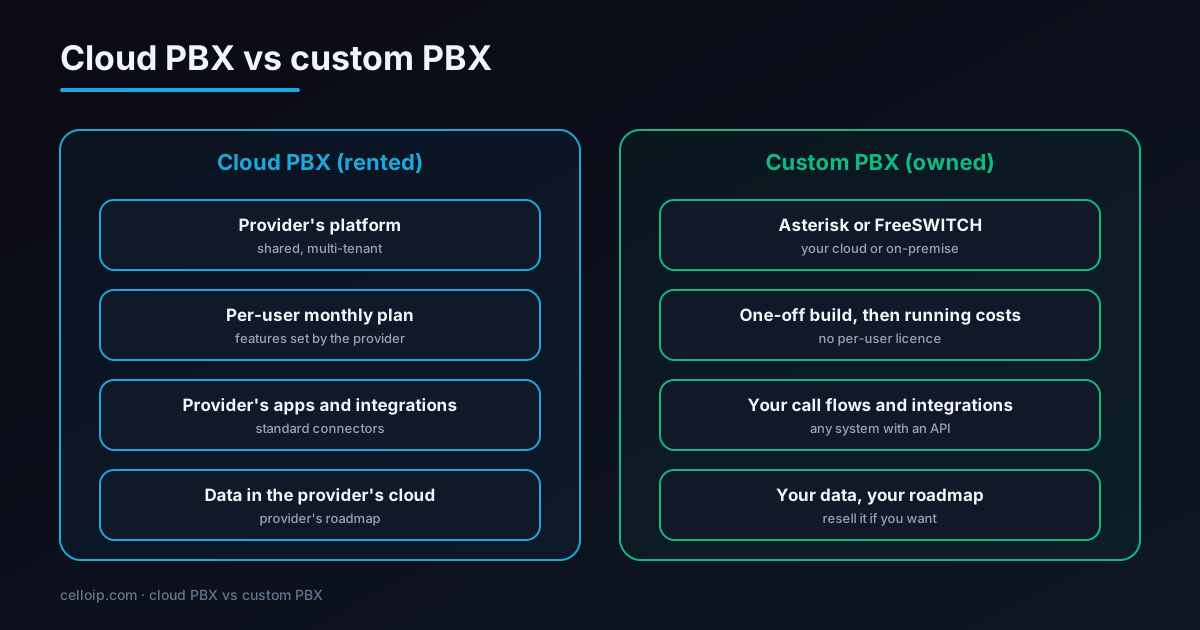
Under the hood, many cloud PBX providers and white-label platforms are themselves built on the same open-source engines a custom PBX uses, such as Asterisk, FreeSWITCH and Kamailio. The technology is rarely the difference. What differs is who controls the configuration, the integrations, the data and the price.
There is also an older option: an on-premise PBX appliance bought outright and installed in your office. It still suits some sites with strict local requirements, but most new deployments run in the cloud, whether rented or owned, because remote work and mobile softphones make a single office box less useful.
Cloud PBX vs custom PBX, side by side
| Cloud PBX | Custom PBX | |
|---|---|---|
| What you get | A provider's hosted phone system, rented per user | Your own PBX software, built to your requirements |
| Time to go live | Days | Weeks to a few months |
| Pricing model | Per user per month, plus add-ons | One-off build, then hosting, SIP trunks and support |
| Call flows and features | The provider's feature set and settings | Anything you can specify |
| Integrations | The provider's connectors and APIs | Any system with an API, including in-house tools |
| Where data lives | The provider's cloud and regions | Your cloud, region or data centre |
| Carriers and numbers | Usually the provider's | Any SIP carriers you choose, with failover |
| Scaling cost | Rises with every user | Rises with servers and minutes, not users |
| Reselling to your customers | Only through a reseller programme | Yes, with your brand, portals and billing |
| Who runs it | The provider | You or a partner |
The table hides one important difference: who adapts to whom. With a cloud PBX, your team adapts its processes to the provider's features and roadmap. With a custom PBX, the phone system adapts to how your business works. For simple needs that hardly matters. For contact centres, multi-site organisations, service providers and businesses where calling is part of the product, it is often the deciding factor.
Reliability is comparable when each is done well. Large cloud providers run redundant platforms, and a well-designed custom PBX uses clusters, multiple carriers and monitoring. The difference is responsibility: with a cloud PBX the provider owns outages; with a custom PBX you or your partner do, which is why design and operations matter as much as the build.
How hosted PBX pricing works
Cloud PBX plans are priced per user per month. Business plans commonly fall somewhere around $15–$40 per user, depending on what is included, and providers change plans often, so always check current pricing. What moves the price:
- Feature tier: video meetings, call recording, analytics, CRM integrations
- Contact-centre functions such as queues, supervisor tools and dialers, often priced separately
- Included minutes and international or toll-free calling
- Numbers, toll-free numbers and porting
- Minimum seat counts and contract length
- Support level and uptime commitments
For a provider, the costs behind that price are servers and bandwidth, SIP trunk minutes, numbers, support and the software itself. With a custom PBX you pay the software cost once, then pay those underlying costs directly.
When comparing quotes, look at the total for your real user count over three years, including the add-ons you will actually need, rather than the headline price for the cheapest plan. Ask how prices change at renewal, what happens to your numbers and data if you leave, and which features are limited to higher tiers.
The 3-year cost shape
Subscription spend grows with every user; a custom build is mostly a one-off cost plus running costs that grow with servers and minutes. This example uses an assumed $25 per user per month to show the shape; it is not a quote for any provider.
3-year cloud PBX subscription spend at an assumed $25 per user per month
For comparison, a custom company PBX typically costs $8,000–$20,000 to build, plus hosting, SIP trunks, numbers and support, which a subscription includes. The larger the user count, the more those running costs are outweighed by avoided per-user fees.
For a small office the subscription is usually cheaper once you count the work of running your own system. For a few hundred users, a multi-site organisation or a provider selling to many businesses, owning the platform usually wins. Run the numbers with your own user count, call volume and support needs.
Two other cost factors are easy to miss. First, growth: if you expect to double your users, subscription spend doubles with them, while a custom platform's costs rise more slowly. Second, the cost of change: moving away from a cloud provider later means porting numbers, retraining staff and rebuilding call flows, so the cheapest option today is not always the cheapest over five years.
Who should choose which
Choose a cloud PBX if
- You have up to a few dozen users with standard needs
- You want to be live this week
- You have no one to run a phone system
- The provider's integrations cover your tools
- You are fine with the provider's data locations
Choose a custom PBX if
- You have hundreds of users or many sites
- Your call flows, routing or integrations are unusual
- Recordings and data must stay in a country or on your servers
- You want to sell phone service under your brand
- Calling is part of your product, so you need control of the roadmap
If you want to resell quickly without building, a white-label platform sits in between; our sister company Sheerbit offers one.
Size is the most common trigger, but not the only one. A 40-person company that must keep call recordings in its own country, or that needs the phone system tightly connected to an in-house booking platform, can be a better fit for a custom PBX than a 400-person company with entirely standard needs.
What a custom PBX looks like under the hood
A custom PBX is configuration and code you own. This small Asterisk example defines a softphone extension and a simple office-hours rule that rings a group and then falls back to voicemail. A full build adds a web portal, an API, call recording, CRM integration and monitoring on top.
; pjsip.conf: one extension for a desk phone or softphone
[1001]
type=endpoint
context=internal
disallow=all
allow=opus,g722,ulaw
auth=1001-auth
aors=1001
direct_media=no

[1001-auth]
type=auth
auth_type=userpass
username=1001
password=change-me-long-random

[1001]
type=aor
max_contacts=3

; extensions.conf: main number rings sales in office hours, else voicemail
[from-carrier]
exten => _X.,1,GotoIfTime(09:00-18:00,mon-fri,*,*?open)
 same => n,VoiceMail(600@default,u)
 same => n,Hangup()
 same => n(open),Dial(PJSIP/1001&PJSIP/1002&PJSIP/1003,25,tT)
 same => n,VoiceMail(600@default,u)
 same => n,Hangup()
For multi-tenant platforms, FreeSWITCH's domain-based tenancy and a SIP proxy such as Kamailio in front are the usual pattern. See multi-tenant VoIP platform architecture and Asterisk vs FreeSWITCH.
A custom PBX also means choosing your own phones and apps. Most standard SIP desk phones work, and branded softphones for iOS, Android and desktop can be built or configured to register to your PBX, with push notifications so calls reach mobile users even when the app is closed. That is often where a custom platform feels most different to users, because the apps carry your name and work exactly the way your teams do.
Moving from a cloud PBX to your own
- 1
Inventory
Export users, extensions, ring groups, IVRs, queues and numbers from the current system.
- 2
Carriers and numbers
Choose SIP carriers, ideally two for failover, and plan number porting.
- 3
Build and test
Rebuild call flows on the new PBX, connect phones and apps, and test every route.
- 4
Parallel run
Move a pilot group first while the old system keeps running.
- 5
Cutover
Port numbers in stages, often over a weekend, with the old system as fallback until porting completes.
CelloIP project outcome (client kept private)
We built a custom PBX platform handling 1,000+ concurrent channels, 50,000+ extensions and 50,000+ DIDs.
Plan the migration around your busiest periods and your carriers' porting timelines, which vary by country and number type. Keep users informed, give them new apps and short guides ahead of the switch, and keep a rollback plan until every number has ported and the first full week of normal traffic has run cleanly.
Features any business phone system should have
Whichever route you choose, check these are covered. On a custom PBX they are standard building blocks; on a cloud PBX, check which plan includes them.
Extensions, ring groups and transfers
Multi-level IVR and time-based routing
Voicemail to email
Call queues with basic reporting
Call recording with retention rules
Mobile and desktop softphones with push notifications
CRM screen-pop and click-to-call
Number porting and multiple carriers
Encryption (TLS and SRTP)
Call detail records and usage reports
Hybrid options
It doesn't have to be all or nothing. Many organisations combine the two.
Custom contact centre, cloud phones for staff
Keep a rented phone system for general staff and build a custom platform only for the contact centre, where requirements and volume justify it.
Cloud core with local survivability
A custom PBX in the cloud with a small local system at key sites so internal calls and emergency calls keep working if the internet link fails.
Microsoft Teams with your own PBX
Use Teams for calling on staff desktops through direct routing to your own PBX and SIP carriers, keeping control of numbers and routing.
Start rented, own later
Begin on a cloud PBX, then move to your own platform once user count or requirements grow, porting numbers when you are ready.
Questions to answer before you decide
Write down your answers to these; they usually make the decision obvious.
- How many users and sites will we have in three years?
- Which call flows, queues or integrations can't we do today?
- Where must recordings and call data be stored?
- Who will run the system day to day, and do we have the skills?
- Do we want to sell phone service or calling features to our own customers?
- How painful would it be to switch providers in two years?
Frequently asked questions
What is the difference between a cloud PBX and a custom PBX?
A cloud PBX (hosted PBX or UCaaS) is a phone system you rent per user from a provider, using their features and infrastructure. A custom PBX is phone-system software built for you, usually on Asterisk or FreeSWITCH, hosted where you choose, with your own call flows, integrations and branding. You own it rather than renting it.
How much does a hosted or cloud PBX cost?
Business plans are commonly priced per user per month, often roughly $15–$40 per user depending on features such as video, contact-centre functions, call recording and integrations, with extra charges for add-ons and some call types. Check current pricing with providers, because plans change often.
How much does a custom PBX cost to build?
As a guide, a company IP PBX is typically $8,000–$20,000 over 4–8 weeks, and a multi-tenant cloud PBX platform with portals and billing $30,000–$80,000 over 10–20 weeks. Hosting, SIP trunks, numbers and support are separate running costs.
When does a custom PBX pay off?
Mostly when you have many users, because subscription fees grow with every seat; when you need call flows or integrations a subscription can't do; when data must stay in a particular place; or when you want to sell phone service yourself. For a small office with standard needs, a cloud PBX is usually cheaper and simpler.
Is a custom PBX harder to maintain?
It needs someone to run it: updates, monitoring, carrier issues and security. You can do that in-house or have a partner operate it. A cloud PBX includes that in the subscription, which is part of what you pay for.
Can we move from a cloud PBX to a custom PBX later?
Yes. Numbers can usually be ported to your own SIP carriers, users and call flows rebuilt on the new PBX, and both systems run in parallel during cutover so calls aren't lost.
What about white-label PBX platforms?
A white-label PBX is a ready-made multi-tenant platform you can rebrand and resell. It is quicker than a custom build but limited to the product's features. Our sister company Sheerbit offers one; CelloIP builds custom platforms when the ready-made route doesn't fit.
Asterisk or FreeSWITCH for a custom PBX?
Asterisk suits company PBXs, IVR-heavy systems and contact centres; FreeSWITCH suits high-concurrency multi-tenant platforms and conferencing. Large platforms often put Kamailio or OpenSIPS in front of either.
Work with CelloIP
Thinking about your own PBX?
CelloIP builds company PBXs and multi-tenant cloud PBX platforms on Asterisk and FreeSWITCH, and migrates businesses off rented systems. Tell us your user count and requirements and we'll give you an honest view of whether custom makes sense.