What is a WebRTC TURN server?
A TURN (Traversal Using Relays around NAT) server is a relay infrastructure component required by WebRTC applications to route media traffic when direct peer-to-peer connections cannot be established due to NAT, firewalls, or symmetric network topologies. coturn is the most widely used open-source TURN server implementation, supporting RFC 5766, RFC 5389, TLS, DTLS-SRTP, and Redis-backed session state.
How do you set up a coturn TURN server for WebRTC production?
Install coturn on Ubuntu via apt, configure turnserver.conf with your realm, external-ip, shared-secret, TLS certificate paths, and relay port range. Open firewall ports UDP/TCP 3478, UDP/TCP 5349, and UDP 49152–65535. Add the TURN server credentials to your WebRTC client's RTCPeerConnection iceServers configuration. Test using the Trickle ICE tool to verify relay candidates are gathered.
Is coturn free?
Yes, coturn is free and open source under the BSD license. Hosting it on a $20/month VPS costs 70–90% less than cloud TURN services like Twilio at production call volumes.
WebRTC TURN Server Setup: The Complete Production Guide (2026)
In enterprise and corporate network environments, 85% of WebRTC connections require a TURN relay because symmetric NATs and strict firewalls block direct UDP. Without a properly configured TURN server, your WebRTC app silently breaks for a significant fraction of your users — and you won't know why until they complain.
This guide covers everything: what TURN is and why it's needed, step-by-step coturn installation on Ubuntu 22.04, production turnserver.conf, TLS setup, nginx on port 443, Redis session persistence, performance tuning for 10,000+ concurrent sessions, and a hard cost comparison against Twilio/Metered cloud TURN. CelloIP has configured coturn in 25+ production WebRTC deployments — this is exactly what we deploy.
85%
Enterprise connections need TURN
10k+
Concurrent sessions on coturn
<50ms
TURN relay added latency
70%
Cost savings vs cloud TURN

Contents
Why WebRTC Needs TURN Servers
WebRTC's peer-to-peer model is elegant in theory: two browsers negotiate a direct media path, skip the server, and enjoy ultra-low latency. In practice, the internet is full of NAT devices and firewalls that destroy this assumption. Network Address Translation was designed to conserve IPv4 addresses, not to facilitate direct connections — and it does a thorough job of preventing them.
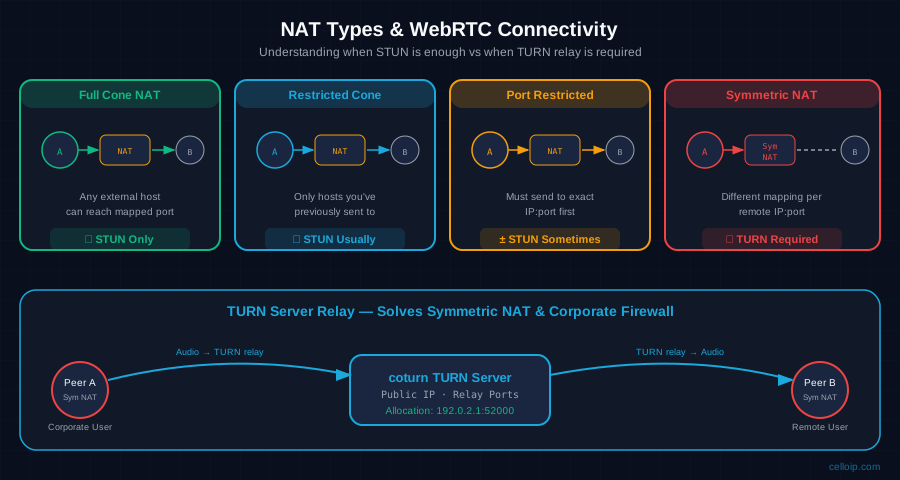
There are four NAT types. Full Cone and Restricted Cone NATs allow ICE hole-punching to succeed with just a STUN server. Port Restricted Cone sometimes works. But Symmetric NAT — the type used by most corporate routers, VPNs, and 4G/5G carriers — assigns a different port mapping for every unique remote IP:port pair. ICE hole-punching cannot establish a direct connection through two symmetric NATs simultaneously. A TURN relay is the only solution.
According to WebRTC usage telemetry across CelloIP-deployed platforms, the breakdown looks like this:
45–55%
Direct P2P (no server needed)
25–30%
STUN-assisted hole punch
20–30%
TURN relay required
In consumer-facing apps (mobile, home broadband) the TURN requirement is 15–20%. In enterprise B2B deployments with corporate firewalls, it rises to 40–60%. Either way, you must have TURN in production. Every call that fails without it represents a lost user.
STUN vs TURN vs ICE: The Relationship
These three acronyms confuse most developers building their first WebRTC app. Here's the precise relationship:
ICE
Interactive Connectivity Establishment
The framework that orchestrates connectivity. ICE gathers a list of 'candidates' (IP:port pairs), sorts them by priority, and tries each in order until a working path is found. ICE uses both STUN and TURN to gather candidates.
STUN
Session Traversal Utilities for NAT
A lightweight protocol (RFC 5389) that tells your client its public IP:port as seen from outside the NAT. Used to gather 'server reflexive' ICE candidates. Google's public STUN (stun.l.google.com:19302) is free but provides zero relay capability.
TURN
Traversal Using Relays around NAT
A relay protocol (RFC 5766) built on top of STUN. The TURN server allocates a relay address on the public internet. All media passes through the TURN server. The last-resort fallback that makes WebRTC work everywhere — at the cost of bandwidth.
NAT Types and Which Protocol Handles Them
| NAT Type | Behaviour | Solution | Direct P2P? |
|---|---|---|---|
| Full Cone NAT | Any external host can reach mapped port | STUN only | ✓ Direct works |
| Restricted Cone NAT | Only hosts you've sent to can reply back | STUN usually | ✓ Direct works |
| Port Restricted Cone | Must send to exact IP:port first | STUN sometimes | ± Depends on peer |
| Symmetric NAT | Different mapping per remote IP:port | TURN required | ✗ Must relay |
| Corporate Firewall | UDP blocked entirely, TCP 443 only | TURN on 443 | ✗ Must relay |
Installing coturn on Ubuntu 22.04 LTS
coturn is available in the Ubuntu universe repository. Before installing, ensure your server has a static public IP address and a DNS A record pointing to it (needed for TLS in the next step). A minimal VPS works fine — we typically use 4 vCPU / 8 GB RAM for medium-scale deployments.
# Update package index and install coturn
sudo apt update && sudo apt install -y coturn

# Enable the coturn service (disabled by default after install)
sudo nano /etc/default/coturn
# Set: TURNSERVER_ENABLED=1

# Verify installation
turnserver --version
# Should output: coturn-4.6.x (or higher)

# Check systemd service
sudo systemctl status coturn
After installation, the main config lives at /etc/turnserver.conf. The default config has almost everything commented out. We'll replace it with a production configuration in the next section. Back up the original:
sudo cp /etc/turnserver.conf /etc/turnserver.conf.bak
sudo truncate -s 0 /etc/turnserver.conf
Production turnserver.conf Configuration
The following configuration is what CelloIP deploys in production. Replace the placeholder values (YOUR_PUBLIC_IP, YOUR_DOMAIN,YOUR_SECRET) with your actual values. Generate the shared secret with: openssl rand -hex 32.
# ─── Network ──────────────────────────────────────────────────
listening-port=3478
tls-listening-port=5349
# Also listen on 443 for firewalls that block 3478/5349
alt-listening-port=80
alt-tls-listening-port=443

# Your server's public static IP
listening-ip=0.0.0.0
external-ip=YOUR_PUBLIC_IP

# Relay port range — must match firewall rules
min-port=49152
max-port=65535

# ─── Authentication ────────────────────────────────────────────
# Use time-limited credentials (no static user/pass)
use-auth-secret
static-auth-secret=YOUR_SECRET_32_CHAR_HEX
realm=turn.YOUR_DOMAIN.com

# ─── TLS / DTLS ────────────────────────────────────────────────
cert=/etc/letsencrypt/live/turn.YOUR_DOMAIN.com/fullchain.pem
pkey=/etc/letsencrypt/live/turn.YOUR_DOMAIN.com/privkey.pem
cipher-list="ECDHE-ECDSA-AES128-GCM-SHA256:ECDHE-RSA-AES128-GCM-SHA256"
no-sslv3
no-tlsv1
no-tlsv1_1
# Allow TLSv1.2 and TLSv1.3 only

# ─── Protocols ─────────────────────────────────────────────────
# Disable STUN-only allocation (require TURN auth)
no-stun
# Enable UDP, TCP, and TCP-connect-method
no-multicast-peers

# ─── Logging ───────────────────────────────────────────────────
log-file=/var/log/turnserver.log
verbose
# For debugging ICE issues, enable full verbose:
# Verbose

# ─── Redis session store (optional but recommended) ────────────
# redis-userdb="ip=127.0.0.1 dbname=2 connect_timeout=30"

# ─── Performance ──────────────────────────────────────────────
# Max allocations per user (prevent abuse)
user-quota=100
# Total server allocation limit
total-quota=30000
# Idle session timeout in seconds
stale-nonce=600
no-stdout-log
syslog
Security note: Never use long-term static credentials (user=alice:password) in production. Always use use-auth-secret with time-limited HMAC-SHA1 tokens. These tokens are generated server-side with a 24-hour TTL, preventing credential abuse even if a token is extracted from a browser session.
TLS / DTLS Setup with Let's Encrypt
TURN over TLS (TURNS) is mandatory for two reasons: browsers block unencrypted TURN on HTTPS pages, and TLS on port 5349 (or 443) bypasses SSL inspection firewalls that would otherwise terminate your plain UDP/TCP TURN. Use certbot for free Let's Encrypt certificates.
# Install certbot
sudo apt install -y certbot

# Obtain certificate (standalone mode — coturn must be stopped)
sudo systemctl stop coturn
sudo certbot certonly --standalone -d turn.YOUR_DOMAIN.com   --email admin@YOUR_DOMAIN.com --agree-tos --no-eff-email

# Certificate is at:
# /etc/letsencrypt/live/turn.YOUR_DOMAIN.com/fullchain.pem
# /etc/letsencrypt/live/turn.YOUR_DOMAIN.com/privkey.pem

# Allow coturn to read Let's Encrypt certificates
sudo chown -R turnserver:turnserver /etc/letsencrypt/
sudo chmod 750 /etc/letsencrypt/live /etc/letsencrypt/archive

# Start coturn
sudo systemctl start coturn
sudo systemctl enable coturn

# Auto-renew: add pre/post hooks in /etc/letsencrypt/renewal-hooks/
# pre: systemctl stop coturn
# post: systemctl start coturn
After TLS is configured, verify coturn is listening on the correct ports:
sudo ss -tulpn | grep turnserver
# Expected output:
# udp  UNCONN  0  0  0.0.0.0:3478   0.0.0.0:*  users:(("turnserver",...))
# udp  UNCONN  0  0  0.0.0.0:5349   0.0.0.0:*  users:(("turnserver",...))
# tcp  LISTEN  0  128 0.0.0.0:3478  0.0.0.0:*  users:(("turnserver",...))
# tcp  LISTEN  0  128 0.0.0.0:5349  0.0.0.0:*  users:(("turnserver",...))
# tcp  LISTEN  0  128 0.0.0.0:443   0.0.0.0:*  users:(("turnserver",...))

# Test STUN from another machine:
# stunclient turn.YOUR_DOMAIN.com 3478
Nginx Reverse Proxy on Port 443 (Firewall Bypass)
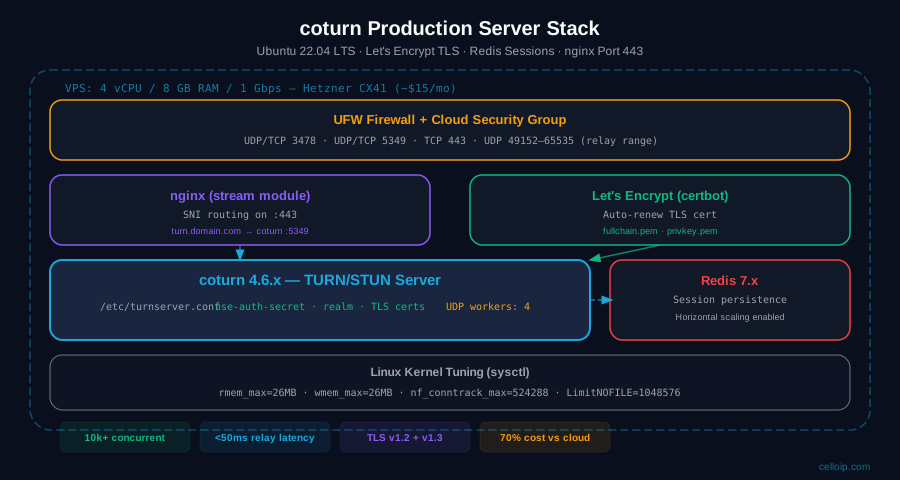
Some enterprise firewalls perform deep packet inspection on port 443 and will drop non-HTTPS traffic. For TURN media, coturn should bind directly to 443 (via alt-tls-listening-port=443in turnserver.conf). However, if you also run a web server on the same machine, you need nginx to coexist by routing TLS SNI: HTTPS to nginx, TURNS to coturn. Use the nginx stream module:
# Requires nginx compiled with --with-stream_ssl_preread_module
stream {
    map $ssl_preread_server_name $backend {
        turn.YOUR_DOMAIN.com  127.0.0.1:5349;
        www.YOUR_DOMAIN.com   127.0.0.1:8443;
        default               127.0.0.1:8443;
    }

    server {
        listen 443;
        proxy_pass $backend;
        ssl_preread on;
        proxy_buffer_size 16k;
        proxy_timeout 3600s;
        proxy_connect_timeout 5s;
    }
}
With this setup, nginx reads the SNI hostname from the TLS ClientHello (without decrypting the traffic) and routes: turn.domain.com:443 → coturn on 5349, www.domain.com:443 → your web server on 8443. Both share port 443 on the same IP.
Pro tip: TURN on TCP 443 is the "nuclear option" that bypasses virtually all corporate firewalls, VPNs, and hotel networks. It masquerades as TLS HTTPS traffic. CelloIP always configures this for enterprise-facing WebRTC deployments. Without it, you will get call failures in ~15–20% of corporate environments.
Firewall & Port Configuration
The relay port range (49152–65535) is the most commonly forgotten piece. Each TURN allocation (one per media stream) requires two ports — one each direction. If these ports are blocked, TURN allocations succeed but media never flows. Every cloud VPS (AWS, GCP, DigitalOcean, Hetzner) requires these ports to be opened in both the OS firewall AND the cloud security group.
# STUN/TURN standard ports
sudo ufw allow 3478/udp comment "STUN/TURN UDP"
sudo ufw allow 3478/tcp comment "TURN TCP"

# TURNS (TURN over TLS/DTLS)
sudo ufw allow 5349/udp comment "TURNS UDP (DTLS)"
sudo ufw allow 5349/tcp comment "TURNS TCP (TLS)"

# TURN on 443 for firewall bypass
sudo ufw allow 443/tcp comment "TURNS TCP on 443"
sudo ufw allow 443/udp comment "TURNS UDP on 443"

# !! CRITICAL: Relay media port range !!
# This is what allows actual media to flow through TURN
sudo ufw allow 49152:65535/udp comment "TURN relay media ports"

# Apply and verify
sudo ufw enable
sudo ufw status verbose | grep -E "(3478|5349|443|49152)"
AWS / GCP users: UFW rules alone are insufficient. You must also open these ports in your EC2 Security Group or GCP Firewall Rules. The cloud security group is the outer layer and blocks traffic before it reaches UFW. UDP 49152–65535 must be open in both layers.
WebRTC Client ICE Server Configuration
The client side requires generating time-limited HMAC-SHA1 credentials (do this server-side) and passing them to RTCPeerConnection. Never expose your static-auth-secret to the browser. Generate credentials in your backend on-demand, with a TTL of 24 hours.
const crypto = require('crypto');

function generateTURNCredentials(secret, ttlSeconds = 86400) {
  const timestamp = Math.floor(Date.now() / 1000) + ttlSeconds;
  const username = `${timestamp}:user-${Math.random().toString(36).slice(2)}`;
  const hmac = crypto.createHmac('sha1', secret);
  hmac.update(username);
  const credential = hmac.digest('base64');
  return { username, credential };
}

// In your API endpoint:
app.get('/api/turn-credentials', (req, res) => {
  const { username, credential } = generateTURNCredentials(
    process.env.TURN_SECRET
  );
  res.json({
    iceServers: [
      { urls: 'stun:stun.l.google.com:19302' },
      {
        urls: [
          'turn:turn.YOUR_DOMAIN.com:3478?transport=udp',
          'turn:turn.YOUR_DOMAIN.com:3478?transport=tcp',
          'turns:turn.YOUR_DOMAIN.com:5349?transport=tcp',
          'turns:turn.YOUR_DOMAIN.com:443?transport=tcp',  // firewall bypass
        ],
        username,
        credential,
      },
    ],
  });
});// Fetch credentials from your backend
const { iceServers } = await fetch('/api/turn-credentials').then(r => r.json());
const pc = new RTCPeerConnection({
iceServers,
iceTransportPolicy: 'all', // 'relay' to force TURN for testing
bundlePolicy: 'max-bundle',
rtcpMuxPolicy: 'require',
});
// Monitor ICE candidate types to verify TURN is working
pc.addEventListener('icecandidate', (e) => {
if (!e.candidate) return;
const { candidate } = e.candidate;
const type = candidate.includes('relay') ? '🔄 RELAY (TURN)'
: candidate.includes('srflx') ? '🌐 STUN'
: '🏠 HOST';
console.log(`ICE candidate: ${type}`, candidate);
});
// Force TURN only to test your TURN server:
// Change iceTransportPolicy to 'relay'Redis for Session Persistence & Horizontal Scaling
For production deployments handling thousands of concurrent sessions, or when you need multiple coturn instances behind a load balancer, configure Redis as the session store. Redis allows TURN allocations to persist across coturn restarts and enables stateful sharing between coturn cluster nodes.
# Install Redis
sudo apt install -y redis-server

# Secure Redis (bind to localhost only)
sudo nano /etc/redis/redis.conf
# Set: bind 127.0.0.1 ::1
# Set: requirepass YOUR_REDIS_PASSWORD

sudo systemctl restart redis-server

# Update turnserver.conf — uncomment the Redis line:
# redis-userdb="ip=127.0.0.1 port=6379 dbname=2 password=YOUR_REDIS_PASSWORD connect_timeout=30"

# Restart coturn
sudo systemctl restart coturn

# Verify Redis is being used (watch keys appear during a call)
redis-cli -a YOUR_REDIS_PASSWORD MONITOR
Performance Tuning for 10,000+ Concurrent Sessions
Default Ubuntu kernel settings are not optimised for high-throughput TURN relay. Apply these sysctl tweaks to improve UDP buffer sizes, connection tracking, and file descriptor limits. CelloIP applies these settings on every coturn production server.
# ─── Network buffer sizes ─────────────────────────────────────
# Default coturn: 212992. Increase for high concurrency.
net.core.rmem_max=26214400
net.core.wmem_max=26214400
net.core.rmem_default=26214400
net.core.wmem_default=26214400
net.core.netdev_max_backlog=65536

# ─── UDP socket buffers ────────────────────────────────────────
net.ipv4.udp_rmem_min=8192
net.ipv4.udp_wmem_min=8192

# ─── Connection tracking (for TCP TURN sessions) ──────────────
net.netfilter.nf_conntrack_max=524288
net.netfilter.nf_conntrack_udp_timeout=300
net.netfilter.nf_conntrack_udp_timeout_stream=300

# ─── File descriptor limits ───────────────────────────────────
fs.file-max=2097152

# Apply immediately:
# sudo sysctl -p /etc/sysctl.d/99-coturn.conf

# Also update systemd service limits:
# /etc/systemd/system/coturn.service.d/limits.conf
# [Service]
# LimitNOFILE=1048576
# LimitNPROC=65536
10,000+
Max sessions (audio)
4 vCPU / 8 GB / 1 Gbps
500–1,000
Max sessions (720p video)
1–1.5 Mbps per session
<50ms
Added relay latency
Same-region VPS to user
4 vCPU / 8 GB
Recommended VPS
Hetzner CX41 or equivalent
coturn vs Cloud TURN: Real Cost Comparison
Cloud TURN services charge per gigabyte of relayed data or per minute of relay time. At low volumes this is convenient. But above 1,000 concurrent users, self-hosted coturn saves 70–90% of your communications infrastructure cost. Here's the real math:
| Provider | Type | Pricing Model | Est. 1 TB/mo cost | Control | Notes |
|---|---|---|---|---|---|
| Twilio TURN | Cloud managed | $0.40/GB relay | ~$400 at 1 TB/mo | None | ✗ No control |
| Metered.ca | Cloud managed | $0.05/GB relay | ~$50 at 1 TB/mo | None | Limited control |
| Xirsys | Cloud managed | Tier-based | $99+/mo flat | None | US/EU PoPs only |
| coturn on VPS | Self-hosted | VPS + bandwidth | ~$20–40/mo | Full | ✓ Any region |
| coturn on Hetzner | Self-hosted | 20 TB included | ~$10–15/mo | Full | ✓ Best value |
| coturn on AWS EC2 | Self-hosted | EC2 + transfer | ~$50–150/mo | Full | ✓ Global AZs |
Rule of thumb: Use cloud TURN for prototypes and <500 MAU apps. Switch to self-hosted coturn when you exceed 1,000 daily active users, or when a single month's cloud TURN bill exceeds the annual cost of a dedicated VPS. At 100,000 MAU with 20% TURN usage at 200 MB per session, you're looking at 2 TB/month of relay data — that's ~$800/month on Twilio vs ~$20/month on Hetzner coturn.
Troubleshooting Common TURN / NAT Issues
These are the most common issues CelloIP encounters when debugging WebRTC TURN problems in production deployments:
No relay candidates in ICE gathering
Cause: Firewall blocking UDP 3478, coturn not running, or credentials wrong
Fix: Check `sudo systemctl status coturn`. Test with: turnutils_uclient -T YOUR_IP 3478. Verify credentials match static-auth-secret.
Relay candidates gathered but media doesn't flow
Cause: Relay port range (49152–65535) blocked by firewall or cloud security group
Fix: Open UDP 49152–65535 in BOTH the OS firewall (UFW) AND the cloud security group (AWS/GCP/DO). This is the #1 missed step.
TURN works in development, fails in production (HTTPS page)
Cause: Browser blocks unencrypted TURN (ws:// or turn://) on HTTPS pages
Fix: Configure TURNS (TURN over TLS) on port 5349 and use turns:// URL in iceServers. Ensure valid TLS certificate.
Call works for most users but fails for some corporate users
Cause: Corporate firewall blocking all UDP, TCP 3478/5349
Fix: Enable TURN on TCP port 443 (alt-tls-listening-port=443 in turnserver.conf). This bypasses virtually all corporate DPI.
coturn crashing after ~1,000 allocations
Cause: File descriptor limit too low (default 1,024)
Fix: Add LimitNOFILE=1048576 to coturn systemd service override. Apply sysctl fs.file-max=2097152.
Testing Tool: Trickle ICE
Use Trickle ICE to verify your TURN server configuration from any browser. Add your TURNS URL and credentials, click Gather, and confirm you see relay candidates in the output. No relay candidates = coturn is not reachable.
Frequently Asked Questions
What is a TURN server in WebRTC?
A TURN (Traversal Using Relays around NAT) server acts as a media relay for WebRTC when direct peer-to-peer connections fail due to NAT or firewall restrictions. It sits in the ICE fallback chain: first STUN (direct), then TURN relay. In enterprise environments, roughly 85% of connections eventually use TURN because corporate symmetric NATs block direct UDP.
Do I need a TURN server for WebRTC in production?
Yes. Without TURN, your WebRTC app will silently fail for users behind symmetric NATs, hotel firewalls, and corporate proxies — which is a large fraction of enterprise users. STUN alone is insufficient for production. A public Google STUN server works for development, but production requires your own TURN infrastructure.
What's the difference between STUN and TURN?
STUN helps a client discover its public IP and attempt a direct P2P hole-punch. TURN relays all media traffic through the server when a direct connection is impossible. STUN is cheap (no bandwidth), TURN is expensive (all media flows through it). ICE tries STUN first, falls back to TURN only when needed.
How much does running a coturn server cost?
A $20–40/month VPS (4 cores, 8 GB RAM, 1 Gbps network) running coturn handles what would cost $500–$2,000/month on Twilio TURN at moderate call volumes. At 10,000 monthly relay-minutes, Twilio charges roughly $1.20 per 1,000 minutes or more — coturn's cost is purely the VPS and bandwidth overage.
What ports must be open for coturn?
Required: UDP 3478 (STUN/TURN), TCP 3478 (TURN/TCP fallback), UDP 5349 (TURNS/DTLS), TCP 5349 (TURNS/TLS), and UDP 49152–65535 (relay media port range). For maximum firewall penetration, also configure TURN on TCP port 443 — this masquerades as HTTPS and bypasses nearly all corporate firewalls.
How many users can coturn handle concurrently?
On a 4-core / 8 GB RAM server with 1 Gbps NIC, coturn sustains approximately 5,000–10,000 concurrent audio relay sessions (50–80 kbps each) or 500–1,000 concurrent 720p video sessions (1–1.5 Mbps each). Redis-backed session state allows horizontal scaling across multiple TURN nodes.
Should I host my own TURN server or use a cloud service?
Use a managed service (Twilio, Metered.ca, Xirsys) if you have <500 concurrent users and want zero ops overhead. Host coturn yourself once you exceed that threshold — the cost curve flips decisively. CelloIP typically recommends coturn for any platform with >1,000 active daily users.
Can LiveKit and Janus use the same coturn server?
Yes. coturn is a standard TURN/STUN server that any WebRTC stack can use — LiveKit, Janus, Mediasoup, Pion, and browser RTCPeerConnection all consume the same ICE server URL format. You can run one coturn cluster shared across multiple WebRTC media servers.
Need a Production WebRTC Infrastructure?
CelloIP Technologies has deployed 25+ WebRTC platforms — from startup MVPs to enterprise contact centres handling 10,000+ concurrent sessions. We configure coturn, media servers (LiveKit, Janus, Mediasoup), SFUs, and full WebRTC application stacks. If you're moving beyond tutorials and need production infrastructure, let's talk.
Fixed-Price Audit
We review your current WebRTC stack, TURN config, and ICE policy — deliver a production-ready report.
Dedicated WebRTC Engineer
Embed a senior WebRTC engineer in your team — coturn, media server, signalling, and client SDK.
End-to-End Deployment
Full WebRTC platform: coturn cluster, LiveKit/Janus media server, React/Flutter client, monitoring.