SFU vs MCU vs P2P: WebRTC Architecture Guide
Every WebRTC product with more than two people on a call has to answer one architecture question: connect everyone directly, forward streams through a server, or mix them on a server. The choice decides your bandwidth, server bill, call quality and how far the product can grow. This guide explains each option with the numbers behind it.
Quick answer
Should you use SFU, MCU or P2P for WebRTC?
P2P (mesh) connects every participant directly to every other one, which is cheapest and best for one-to-one calls but breaks down beyond about four people because each device uploads a copy of its video to everyone. An SFU receives one stream from each participant and forwards the right ones to each viewer without mixing, which makes it the default for group calls. An MCU decodes and mixes everyone into one stream, which suits weak devices, legacy systems and recording, at a much higher server cost.
Three ways to connect a call
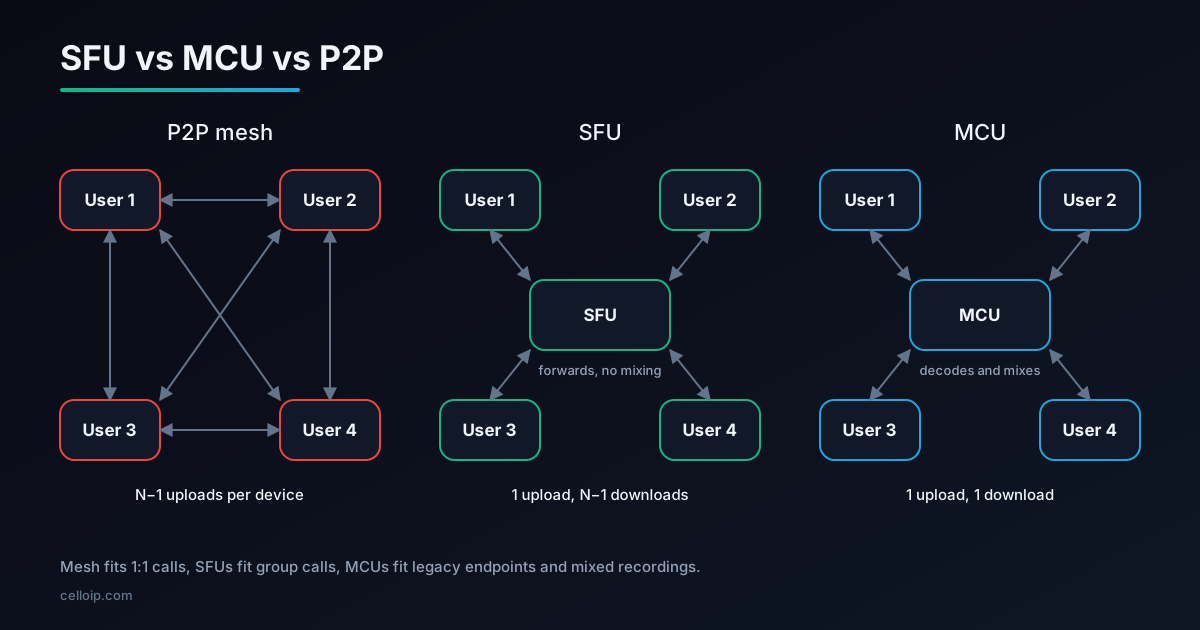
P2P mesh. Each participant opens a direct WebRTC connection to every other participant. In a one-to-one call this is ideal: the media takes the shortest path and no media server is needed. In a group, each device has to send its camera and microphone separately to everyone else.
SFU (Selective Forwarding Unit). Each participant sends one stream to a media server. The server forwards each stream to the participants who need it, without decoding or mixing it. Each viewer receives several streams and lays them out on screen.
MCU (Multipoint Control Unit). Each participant sends one stream to a media server. The server decodes all of them, mixes the audio and composes the video into a single layout, re-encodes the result and sends one stream back to each participant.
All three still need signalling to set up the call, and STUN and usually TURN to get through firewalls. Our TURN server production guide covers that part.
P2P vs SFU vs MCU, side by side
| Factor | P2P mesh | SFU | MCU |
|---|---|---|---|
| Uploads per participant | N−1 streams | 1 stream (or a few simulcast layers) | 1 stream |
| Downloads per participant | N−1 streams | Up to N−1 streams, often limited by layout | 1 mixed stream |
| Server CPU | None for media | Low: forwarding only | High: decode, mix, re-encode |
| Added delay | Lowest | Low | Higher, from decoding and encoding |
| Practical group size | About 2–4 with video | Tens to hundreds of active participants per room, more with viewers | Limited by server CPU per room |
| Layout control | Client | Client | Server |
| End-to-end encryption | Natural | Possible with insertable streams / encoded transforms | Not possible: the server must decode |
| Recording | Hard: no central point | Record tracks, or compose separately | Easy: the mix is already there |
| Best for | 1:1 calls | Group calls, webinars, voice AI rooms | Legacy endpoints, mixed recordings, phone dial-in audio |
Group-size figures are practical ranges reported across the industry, not hard limits. Real limits depend on resolution, codecs, devices, network quality and how many people have their cameras on at the same time.
The bandwidth maths
Mesh fails because of upload bandwidth, which is usually the scarcer direction on home broadband and mobile networks. If one 720p video stream needs around 1.5 Mbps, each participant in a mesh call uploads 1.5 Mbps for every other person on the call.
| Participants | Mesh upload per device | SFU upload per device (simulcast) | MCU upload per device |
|---|---|---|---|
| 2 | 1.5 Mbps | About 2.2 Mbps | 1.5 Mbps |
| 4 | 4.5 Mbps | About 2.2 Mbps | 1.5 Mbps |
| 6 | 7.5 Mbps | About 2.2 Mbps | 1.5 Mbps |
| 10 | 13.5 Mbps | About 2.2 Mbps | 1.5 Mbps |
Illustrative upload bandwidth per participant at 8 participants (Mbps)
Illustrative only. Assumes about 1.5 Mbps for a 720p stream and three simulcast layers totalling about 2.2 Mbps (1.5 + 0.5 + 0.15). Real bitrates depend on codec, resolution and content.
Download is the next bottleneck. With an SFU, a ten-person call could send nine streams to each viewer, which is why SFUs send only the active speakers or visible tiles at full quality, and thumbnails at low quality. CPU matters too: every incoming stream has to be decoded on the device, and on low-end phones that limits how many tiles you can show.
When P2P is the right choice
One-to-one calls
Telehealth consultations, support calls, dating and tutoring apps: two people, shortest path, no media server cost.
Privacy by design
Media flows directly between the two devices (or through TURN, which cannot read it), with no media server in the middle.
Very small groups
Three or four people with modest video quality, where a server would add cost without much gain.
Data channels
File transfer and peer-to-peer data between two devices, where a server would only add latency.
Plan for growth even in a one-to-one product. If you might later add a third participant, a supervisor, recording or an AI agent, starting on an SFU often costs less than migrating later. LiveKit and similar SFUs handle one-to-one calls well too.
How an SFU works
An SFU sits in the middle of the call and makes forwarding decisions for every participant, many times a second. It never decodes the video, which is why one server can handle so many streams.
- Each participant publishes audio and video tracks to the SFU once.
- Each participant subscribes to the tracks it needs, often only those visible on screen.
- The SFU forwards RTP packets, rewriting headers so each receiver sees a consistent stream.
- It watches each receiver's bandwidth and packet loss, and switches them to a lower or higher quality layer.
- It forwards audio for all speakers, or only the loudest few in large rooms.
- It scales out by adding more SFU nodes, with rooms spread or cascaded across them.
This is the architecture behind most modern video platforms, and also behind voice AI frameworks: in LiveKit Agents, an AI agent joins a room as just another participant on the SFU. See our guides to building a video app with LiveKit and self-hosting LiveKit.
Simulcast and SVC: sending each viewer the right quality
An SFU cannot re-encode video, so it needs the sender to provide choices. There are two ways to do that.
| Simulcast | SVC (scalable video coding) | |
|---|---|---|
| What the sender does | Encodes the same video several times at different resolutions and bitrates | Encodes one stream with layers of quality |
| What the SFU does | Forwards one of the encodings to each viewer | Drops layers for viewers who need lower quality |
| Codecs | VP8, H.264, VP9, AV1 | VP9 and AV1 (SVC modes) |
| Sender cost | More upload and encoding work | Less upload; encoder support needed |
| Typical use | Most widely supported default | Growing, especially with AV1 |
Some SFUs go a step further and tell senders to stop encoding layers nobody is watching, saving upload bandwidth and battery. LiveKit calls this dynacast. Our WebRTC in 2026 guide covers recent codec and API changes, including AV1.
Simulcast in code
With plain WebRTC in the browser, simulcast is requested when you add the video track, by listing the encodings you want. An SFU then chooses which one to forward to each viewer.
// Browser: publish camera video with three simulcast encodings to an SFU
const stream = await navigator.mediaDevices.getUserMedia({ video: { width: 1280, height: 720 }, audio: true });
const [videoTrack] = stream.getVideoTracks();
const [audioTrack] = stream.getAudioTracks();

const pc = new RTCPeerConnection({ iceServers: [{ urls: "turns:turn.example.com:443", username: "u", credential: "p" }] });
pc.addTransceiver(audioTrack, { direction: "sendonly" });
pc.addTransceiver(videoTrack, {
  direction: "sendonly",
  sendEncodings: [
    { rid: "q", scaleResolutionDownBy: 4, maxBitrate: 150_000 },   // 320x180
    { rid: "h", scaleResolutionDownBy: 2, maxBitrate: 500_000 },   // 640x360
    { rid: "f", maxBitrate: 1_500_000 },                           // 1280x720
  ],
});
// ...then createOffer / setLocalDescription and send the SDP to your SFU's signalling.
An SFU SDK hides most of this. With LiveKit's JavaScript client, simulcast is on by default, and two room options let the SFU adapt quality to what each viewer actually displays:
import { Room } from "livekit-client";

const room = new Room({
  adaptiveStream: true,   // subscribe to a quality that fits each video element's size
  dynacast: true,         // pause simulcast layers nobody is receiving
});
await room.connect(LIVEKIT_URL, accessToken);
await room.localParticipant.enableCameraAndMicrophone();
When an MCU still makes sense
MCUs were the standard for video conferencing before WebRTC, and they are far from obsolete. Their weakness is cost: decoding, mixing and re-encoding every stream takes a lot of server CPU, and the mixing adds delay. Their strength is that every participant receives exactly one stream.
Legacy and SIP endpoints
Room systems and SIP video phones that can only handle one incoming stream.
Very weak devices or networks
Clients that cannot decode several streams, or links that cannot carry them.
One recording or live stream
A single composed file or broadcast, laid out the same way for everyone.
Audio with phone callers
Mixing audio on the server is cheap and lets PSTN participants hear everyone on one line.
FreeSWITCH's mod_conference and Asterisk's ConfBridge are widely used for server-side audio mixing, and FreeSWITCH can also mix video. They are a natural fit when a conference must include phone participants.
Hybrid designs used in production
| Design | How it works | Used for |
|---|---|---|
| P2P first, SFU on growth | Start one-to-one calls peer-to-peer; move to the SFU when a third person joins | Apps where most calls are 1:1 |
| SFU plus composite recording | Run the call on an SFU; a separate recorder joins and composes a single file or stream | Webinars, meetings, compliance recording |
| SFU video, mixed audio | Forward video through the SFU and mix audio on a server | Large rooms, phone dial-in |
| SFU plus SIP gateway | Bridge phone callers into an SFU room through a SIP gateway or SIP service | Meetings with dial-in, AI voice agents |
| Cascaded SFUs | Connect SFU nodes in several regions so each participant joins the nearest one | Global meetings and large events |
Dial-in is a common reason to combine architectures. Our guides to WebRTC with PSTN fallback, WebRTC to SIP gateway architecture and LiveKit with Asterisk and FreeSWITCH show how phone calls join WebRTC rooms.
Open-source media servers by architecture
| Server | Architecture | Notes |
|---|---|---|
| LiveKit | SFU | Go; full platform with SDKs, simulcast, dynacast, SIP, recording (Egress) and voice AI agents |
| mediasoup | SFU library | Node.js API with a C++ media worker; you build the application and signalling around it |
| Janus | General-purpose WebRTC server | C; plugins include VideoRoom (SFU), AudioBridge (audio mixing) and a SIP gateway |
| Jitsi Videobridge | SFU | Java; the media server behind Jitsi Meet |
| FreeSWITCH (mod_conference) | Mixing (MCU-style) | Audio and video mixing, strong SIP and PSTN support |
| Asterisk (ConfBridge) | Audio mixing, video forwarding | Mixes audio; forwards video in its SFU mode |
Managed alternatives such as LiveKit Cloud, Agora and Twilio run the media servers for you and charge per minute. Our LiveKit vs Agora vs Twilio cost comparison covers how those prices compare with self-hosting.
How to choose
| If your product is… | Choose |
|---|---|
| Strictly one-to-one calls, privacy-sensitive | P2P, with TURN |
| One-to-one now, groups or recording later | SFU from the start |
| Group video calls, classes or webinars | SFU with simulcast or SVC |
| Large broadcasts to many viewers | SFU for speakers, plus streaming or cascaded SFUs for viewers |
| Conferences that must include phone callers | SFU plus SIP gateway, or audio mixing on FreeSWITCH or Asterisk |
| Legacy room systems or SIP video endpoints | MCU, or an SFU with a mixing gateway |
| AI voice or video agents | SFU-based framework such as LiveKit Agents |
- Estimate peak participants per room and peak concurrent rooms, not averages.
- Decide which participants publish video and which only watch.
- Check the weakest devices and networks you must support.
- Decide early whether you need recording, live streaming, dial-in or end-to-end encryption.
- Budget TURN bandwidth: some participants will always need a relay.
A real example: browser calling for a VoIP provider
CelloIP built a WebRTC-to-SIP gateway for a North American VoIP provider, so its customers can make and receive calls from a web browser. Kamailio handles SIP over secure WebSocket from the browser, RTPengine converts encrypted browser media into standard RTP, and the provider's FreeSWITCH platform connects the calls. Customers get a web softphone, a click-to-call widget, video calls and calls to ordinary phone numbers.
Here the architecture choice was driven by the provider's existing SIP platform: rather than adding an SFU, the gateway bridges browsers into the FreeSWITCH system that already handled routing, billing and the PSTN.
CelloIP project outcome (client kept private)
Handles hundreds of concurrent calls. Built in one to three months, and CelloIP maintains it.
Frequently asked questions
What is the difference between an SFU and an MCU?
An SFU (Selective Forwarding Unit) receives each participant's media and forwards it to the others without decoding or mixing it, so each viewer receives several streams. An MCU (Multipoint Control Unit) decodes every stream, mixes them into one composed audio and video stream, and sends that single stream to each participant. SFUs use far less server CPU and add less delay; MCUs use far less client bandwidth and CPU.
How many participants can a WebRTC P2P mesh call support?
There is no hard limit in WebRTC, but practical experience across the industry puts reliable mesh video at about two to four participants. Each participant uploads a separate copy of their video to every other participant, so upload bandwidth and device CPU run out quickly. Audio-only mesh calls can stretch a little further.
Is LiveKit an SFU or an MCU?
LiveKit is an SFU. It forwards streams between participants and supports simulcast and dynacast to send each viewer a suitable quality. For recording or live streaming, LiveKit's Egress service can compose a room into a single mixed output, which is an MCU-style step used only where it is needed.
Do I need a TURN server with an SFU?
Usually yes. Even with an SFU, some participants sit behind firewalls that block direct UDP, so a TURN server relaying over TCP or TLS on port 443 keeps them connected. Many SFUs include an embedded TURN option, or you can run coturn alongside.
What are simulcast and SVC?
Both let an SFU send different quality levels to different viewers. With simulcast, the sender encodes the same video several times at different resolutions and bitrates, and the SFU picks one per viewer. With SVC (scalable video coding), the sender encodes one stream in layers, and the SFU drops layers for viewers who need lower quality. SVC is supported in codecs such as VP9 and AV1.
When should I still use an MCU?
When clients cannot handle several streams, such as old room systems, SIP video phones or very low-end devices; when you need one mixed recording or live stream; and for audio conferences that include phone callers, where mixing audio on the server is simple and efficient.
How much does it cost to build a group video platform?
As a guide, browser calling or a click-to-call widget is typically $8,000 to $20,000, a video calling app MVP for web and mobile $30,000 to $50,000, and a group video or conferencing platform $50,000 to $120,000. Media servers, TURN bandwidth or CPaaS minutes are separate running costs.
Work with CelloIP
Choosing an architecture for your calling product?
CelloIP designs and builds WebRTC calling and video platforms on LiveKit, mediasoup, Janus, Kamailio, FreeSWITCH and Asterisk, from one-to-one apps to group video with phone dial-in. We reply within one business day, and you own the code.