WebRTC with PSTN Fallback: Keep Calls Connected
Browser and app calls work well most of the time. When they don't, it's usually the network: a corporate firewall, hotel Wi-Fi or a weak mobile signal. For sales calls, telehealth, support and anything else that can't simply be rescheduled, you need a plan for those moments. This guide covers the fallback ladder, from TURN relays to the phone network, and how to move a user to the phone without dropping them from the call.
Quick answer
How do you add PSTN fallback to WebRTC calls?
WebRTC calls fail when networks block UDP, firewalls inspect traffic, bandwidth collapses or devices misbehave. Keep users connected with a ladder of fallbacks: direct WebRTC, then TURN relay over UDP, then TURN over TCP or TLS on port 443, and finally the phone network. Detect problems early with the ICE connection state and getStats, then offer the user a dial-in number with a PIN, or call them back (call-me), joining their phone into the same room or conference through a SIP gateway. Video can continue in the browser while audio moves to the phone.
Why WebRTC calls fail
WebRTC is reliable on ordinary home and mobile connections. Failures cluster in a few predictable situations, and knowing them tells you which fallback each one needs.
| Cause | What happens | What fixes it |
|---|---|---|
| UDP blocked by a firewall | Media can't flow; the call connects but stays silent or fails | TURN over TCP or TLS on port 443 |
| Symmetric NAT | Direct connections fail between peers | TURN relay |
| Deep packet inspection or strict proxies | Even relayed traffic is blocked or broken | TURN over TLS 443, or phone fallback |
| Captive portals and guest Wi-Fi | Connection drops or never starts | Phone fallback |
| Poor bandwidth or heavy packet loss | Robotic audio, frozen video, drop-outs | Audio-only mode, then phone fallback |
| Microphone or headset problems | No audio from the user | Device check, then phone fallback |
| Blocked permissions or old browsers | Call can't start | Clear guidance, then phone fallback |
The fallback ladder
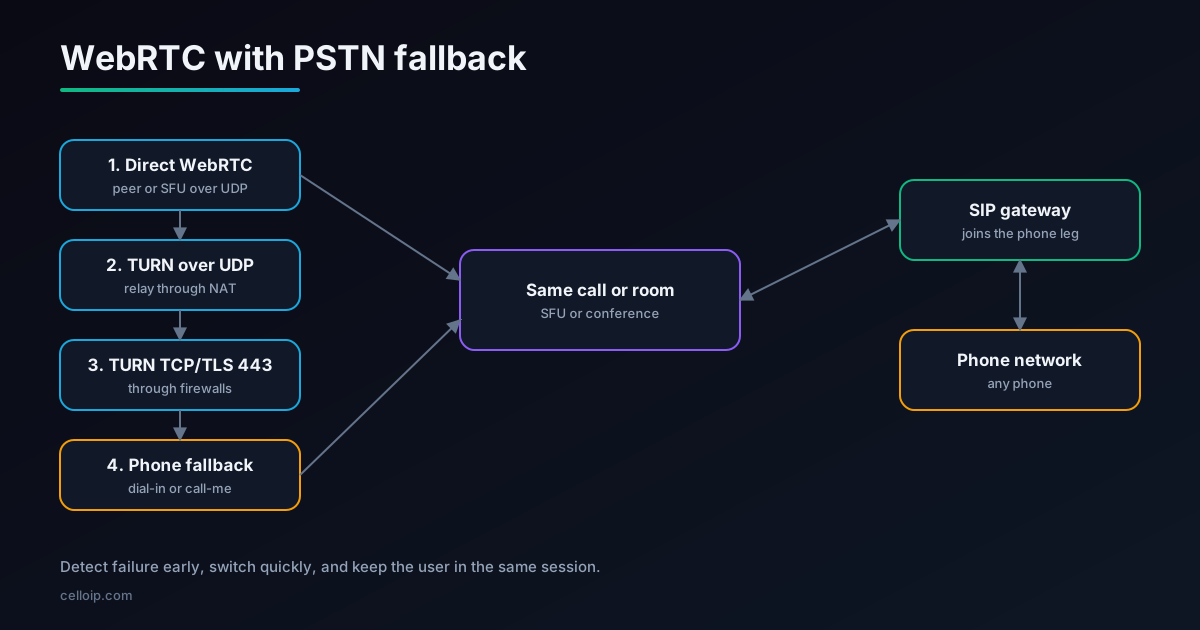
The goal is to try the cheapest, best-quality option first and fall back only as far as you have to. ICE, the connection process built into WebRTC, already tries the first three steps automatically if you give it the right servers. The last step is yours to build.
| Step | How it connects | Catches |
|---|---|---|
| 1. Direct WebRTC | UDP between the browser and the peer or SFU | Most home, office and mobile connections |
| 2. TURN over UDP | Media relayed through your TURN server | Symmetric NAT and many restrictive routers |
| 3. TURN over TCP or TLS on 443 | Media relayed over a connection that looks like HTTPS | Most corporate firewalls and proxies |
| 4. Phone network | User joins by phone into the same call | Everything else: blocked networks, poor bandwidth, device problems |
Illustrative share of calls connected at each step
Illustrative only: the real split depends heavily on your users' networks, and corporate audiences rely more on TURN.
Get TURN right before adding the phone
A phone fallback is no substitute for a well-configured TURN service; it is what you add after it. Most "WebRTC doesn't work here" reports disappear once TURN over TLS on port 443 is in place.
- Run TURN servers close to your users, in each region you serve.
- Offer TURN over UDP, TCP and TLS, with TLS on port 443 using a valid certificate.
- Give the browser all of them in iceServers, so ICE can try each automatically.
- Use short-lived TURN credentials generated by your server, not static passwords in the page.
- Monitor TURN usage and bandwidth; relayed calls cost you bandwidth on every minute.
Our production TURN server guide covers coturn configuration, TLS on 443 and scaling in detail.
Detecting a failing call
The sooner you notice a problem, the sooner you can offer the phone, ideally before the user gives up. Combine three signals:
Pre-call check
Before joining, test the microphone, speaker and a connection to your TURN server. Catch blocked networks and device problems before the call starts.
ICE connection state
'failed' means no path worked; 'disconnected' for more than a few seconds usually means the network dropped.
Live quality stats
getStats reports packet loss, round-trip time and jitter. Sustained loss above a few percent or high round-trip time means audio is suffering.
Don't switch on a single bad second. Smooth the numbers over several seconds, show a gentle "connection is weak" notice first, and offer the phone if it doesn't recover.
Detection code in the browser
// Watch connection state and quality; offer phone fallback when needed
function watchCall(pc, onTrouble) {
  let badSamples = 0;

  pc.addEventListener("iceconnectionstatechange", () => {
    if (pc.iceConnectionState === "failed") onTrouble("no-connection");
  });

  const timer = setInterval(async () => {
    const stats = await pc.getStats();
    stats.forEach((r) => {
      if (r.type === "remote-inbound-rtp" && r.kind === "audio") {
        const loss = r.fractionLost ?? 0;          // 0..1, reported by the far end
        const rtt = r.roundTripTime ?? 0;          // seconds
        const poor = loss > 0.05 || rtt > 0.4;     // tune for your users
        badSamples = poor ? badSamples + 1 : 0;
        if (badSamples >= 5) onTrouble("poor-quality"); // about 5 seconds of poor audio
      }
    });
  }, 1000);

  return () => clearInterval(timer);
}

// Usage: show the fallback panel with dial-in details or a call-me form
const stop = watchCall(peerConnection, (reason) => {
  showPhoneFallback({ reason });                  // your UI
});
Report each fallback with its reason to your analytics. Over time you will see which networks and regions cause trouble, which often points to a missing TURN region or a customer whose firewall needs a rule.
Try audio-only before the phone
When the connection works but bandwidth is poor, the phone isn't the first answer. Video uses far more bandwidth than voice, so dropping it often rescues the call while keeping the user in the browser.
- Turn off the user's outgoing video, or lower its resolution and frame rate, when packet loss or round-trip time rises.
- Stop receiving other participants' video, or switch to a low-quality layer if your SFU uses simulcast.
- Keep Opus audio with forward error correction (FEC) enabled, which helps it survive packet loss.
- Prioritise audio in your SFU, so voice keeps flowing when the network is congested.
- Tell the user what happened ('switched to audio only to keep your call stable') and let them turn video back on.
Only if audio is still poor, or the connection fails outright, offer the phone.
Phone fallback options
| Option | How it works | Pros | Cons |
|---|---|---|---|
| Dial-in | The user calls a number and enters a PIN to join | Familiar; user pays nothing extra on toll-free | Needs numbers per country; typing PINs is error-prone |
| Call-me (callback) | The user enters their number; the system calls them | Easiest for users; one click | You pay for outbound calls; some numbers block unknown callers |
| Audio on phone, video in browser | Phone carries audio; browser keeps video and screen share | Keeps the visual part of the meeting | Users must mute the browser to avoid echo |
| Full switch to phone | The user leaves the browser and continues by phone | Simplest when the browser is unusable | Loses video and chat |
Most products offer both dial-in and call-me, with call-me as the default and dial-in for users who prefer it or whose number can't receive calls.
Joining the phone into the same call
The critical design choice: the phone leg must join the same session, not start a new call. Otherwise the user disappears from the meeting and reappears as a stranger.
| Architecture | How the phone joins |
|---|---|
| SFU such as LiveKit | A SIP participant joins the same room, by dial-in through a SIP trunk or by dial-out from the server |
| FreeSWITCH conference | WebRTC users (through Verto or a SIP-over-WebSocket gateway) and phone users join the same conference |
| Asterisk ConfBridge | WebRTC and SIP channels join the same ConfBridge |
| CPaaS platform | The provider's conference or room API adds a phone participant |
Link the phone participant to the user's identity, so the room shows "Priya (phone)" rather than an unknown number, and so you can mute the browser's microphone automatically when the phone connects. Our WebRTC-SIP gateway guide covers the gateway side.
Example: call the user back into a LiveKit room
With LiveKit, your server can dial the user's phone and add them to the existing room as a SIP participant, using an outbound SIP trunk you have configured.
# Python (livekit-api): call the user's phone and join it to the same room
from livekit import api

async def call_me(room_name: str, user_id: str, phone_e164: str):
    lk = api.LiveKitAPI()   # reads LIVEKIT_URL, LIVEKIT_API_KEY, LIVEKIT_API_SECRET
    try:
        await lk.sip.create_sip_participant(api.CreateSIPParticipantRequest(
            sip_trunk_id="ST_outbound_trunk_id",       # your outbound trunk
            sip_call_to=phone_e164,                     # e.g. "+14155550123"
            room_name=room_name,
            participant_identity=f"{user_id}-phone",    # tie it to the user
            participant_name="Phone audio",
        ))
    finally:
        await lk.aclose()
Validate the phone number on your server, limit how often a user can request callbacks, and only allow callbacks to the number on the user's account or one they have verified, to prevent abuse.
Mobile apps: the same idea, easier switch
Native mobile apps have an advantage: the phone itself can make the fallback call. Instead of asking the user to dial and type a PIN, the app can start a regular phone call to your dial-in number with the PIN sent automatically as keypad tones.
// A tel: link with pauses and the PIN as DTMF: dial-in number, wait, then PIN and #
// iOS and Android both understand commas as pauses in tel: links
const dialIn = "tel:+14155550100,,482913%23";   // %23 is "#"
window.location.href = dialIn;                     // in a native app, open it with the platform's URL API
- Offer 'Continue on a regular phone call' when the in-app call degrades.
- Use CallKit on iOS and the Android telecom framework, so the switch looks like a normal phone call.
- Keep the app's video and chat running if the user wants them, muting the app's audio.
- Fall back to call-me when the device can't place calls, for example on a tablet without a SIM.
Designing the user experience
- Show the fallback inside the call screen, not as an error page: 'Your connection is weak. Continue by phone?'
- Default to call-me with the user's saved number, one click to confirm.
- Show dial-in numbers for the user's country, with the PIN pre-filled where the phone supports it.
- When the phone connects, mute the browser microphone and speaker automatically to prevent echo.
- Keep video, screen sharing and chat running in the browser if they still work.
- Let the user switch back to the browser when their connection recovers.
- Tell other participants what happened: 'Priya joined by phone'.
Cost, numbers and security
| Item | What to plan for |
|---|---|
| Phone numbers | Dial-in numbers for each country you serve; toll-free numbers cost more per minute |
| Outbound minutes | Call-me calls are charged per minute, varying by destination country |
| SIP trunks | Inbound and outbound trunks connected to your SFU, conference server or gateway |
| Security | Random PINs per session, rate limits on callbacks, no callbacks to premium-rate numbers |
| Caller ID | A recognisable, registered caller ID for callbacks, so users answer |
| Data | Phone audio follows the same recording and retention rules as the WebRTC call |
Because fallback is used on a small share of calls, phone costs are usually modest. Track minutes per call and per region to catch abuse or a misconfigured TURN region early. Our WebRTC developments guide covers related trends.
Testing your fallback
Fallback paths are used rarely, which is exactly why they break unnoticed. Test them on purpose, regularly.
| Scenario | How to simulate it |
|---|---|
| UDP blocked | Block outbound UDP on a test network or with a firewall rule; the call should connect over TURN TCP or TLS |
| Only port 443 open | Allow only TCP 443; TURN over TLS should still connect |
| Packet loss and delay | Add loss and delay with a network emulator such as Linux tc netem; check audio-only mode and the fallback prompt |
| Network drop mid-call | Disconnect Wi-Fi during a call; check reconnection, then the phone offer |
| Callback | Request a call-me to mobile and landline numbers in each country you serve |
| Dial-in | Dial each country number and join with the PIN |
Metrics to track
Connection path
Share of calls connected directly, through TURN UDP, TURN TCP/TLS and by phone, per region and customer.
Fallback reasons
No connection versus poor quality versus device problems; each points to a different fix.
Time to recover
How long users spent with poor audio before switching, and whether they stayed on the call.
Phone minutes
Dial-in and callback minutes per region, to watch cost and spot abuse.
Review these numbers monthly. A rising share of TURN TCP or phone fallback in one region usually means a missing TURN server nearby, a new corporate customer behind a strict firewall, or a browser update that changed behaviour, all of which are cheaper to fix than to keep paying for in phone minutes.
A real example
CelloIP built a WebRTC-to-SIP gateway for a VoIP provider using Kamailio, RTPengine and FreeSWITCH. Browser users get a web softphone, a click-to-call widget, video calls and calls to ordinary phone numbers, at hundreds of concurrent calls. The same building blocks, a SIP gateway between browsers and the phone network, are what make a PSTN fallback possible: the phone and the browser meet on the same platform.
CelloIP project outcome (client kept private)
Kamailio handles SIP over secure WebSocket, RTPengine converts browser media to standard RTP, and FreeSWITCH connects browser users to SIP phones, other browser users and the phone network. Built in one to three months and maintained by CelloIP.
Frequently asked questions
Why do WebRTC calls fail?
Most failures come from networks: corporate firewalls that block UDP or inspect traffic, symmetric NAT, hotel and guest Wi-Fi, VPNs, and poor mobile coverage. Others come from devices and browsers: denied microphone permission, a missing or busy headset, or an outdated browser.
Isn't a TURN server enough?
TURN fixes most connection failures, especially TURN over TLS on port 443, which looks like normal HTTPS traffic. It doesn't fix very poor bandwidth, heavy packet loss, locked-down networks that block media altogether, or device problems. A phone fallback covers those cases.
What is the difference between dial-in and call-me fallback?
With dial-in, the user calls a phone number and enters a PIN to join the same call. With call-me (callback), the user enters their phone number and the system calls them and connects them. Call-me is easier for users and avoids international dial-in numbers, but you pay for the outbound call.
How do you detect that a WebRTC call is failing?
Watch the RTCPeerConnection's ICE connection state for 'failed' or prolonged 'disconnected', and use getStats to track packet loss, round-trip time and jitter. A short pre-call test can also catch blocked networks and device problems before the call starts.
Can the user keep video while audio moves to the phone?
Yes. A common pattern is audio on the phone and video, screen sharing and chat in the browser, all in the same session. The phone leg joins the same room or conference, so everyone hears the user normally.
Which platforms support adding a phone participant to a WebRTC room?
LiveKit can dial out to a phone number as a SIP participant in a room, or accept dial-in through SIP trunks. FreeSWITCH and Asterisk conferences can mix WebRTC and SIP participants. CPaaS providers offer similar features.
What does a PSTN fallback cost to run?
Mainly phone minutes: inbound dial-in numbers (especially toll-free) and outbound callback calls. Because fallback is used only on a small share of calls, the cost is usually modest compared with the calls it saves.
Work with CelloIP
Want calls that don't drop when the network does?
CelloIP builds WebRTC calling with TURN, SIP gateways and phone fallback on LiveKit, FreeSWITCH, Asterisk and Kamailio, so users stay connected whatever network they're on. You own the code.