Inject Audio into Live Calls on Asterisk and FreeSWITCH
Playing a recording notice, whispering a hint to an agent, announcing a transfer, or letting an AI agent speak: all of them mean putting audio into a call that is already in progress. The method depends on who should hear it and on your platform. This guide covers the main techniques on Asterisk and FreeSWITCH, with working examples and the quality problems to avoid.
Quick answer
How do you inject audio into a live call?
To inject audio into a live call, decide who should hear it, then use the right tool for your platform. On Asterisk, ARI can play a file to a channel or a whole bridge, and an ARI snoop channel or ChanSpy can whisper to one party or barge into both. On FreeSWITCH, uuid_broadcast plays a file to one leg or both, and uuid_displace mixes audio into the call or replaces it. For AI speech, stream audio over AudioSocket on Asterisk or mod_audio_stream on FreeSWITCH, matching the call's sample rate and stopping playback when the caller talks.
Why inject audio into a live call
Most call audio comes from the people on the call. But many real systems need to add something while the call is running, without disconnecting anyone or moving them to a new context.
| Use case | Who hears it | Typical source |
|---|---|---|
| Recording or monitoring notice | Both parties | Prerecorded file |
| Periodic recording beep | Both parties | Tone, mixed in |
| Supervisor whisper coaching | Agent only | Live supervisor audio |
| Automated agent hints | Agent only | Text-to-speech |
| Transfer or hold announcement | Caller only | File or text-to-speech |
| Time-limit or balance warning | Caller or both | Text-to-speech |
| AI voice agent speech | Caller | Streamed audio from the AI |
| Supervisor barge-in | Both parties | Live supervisor audio |
First decide who should hear it
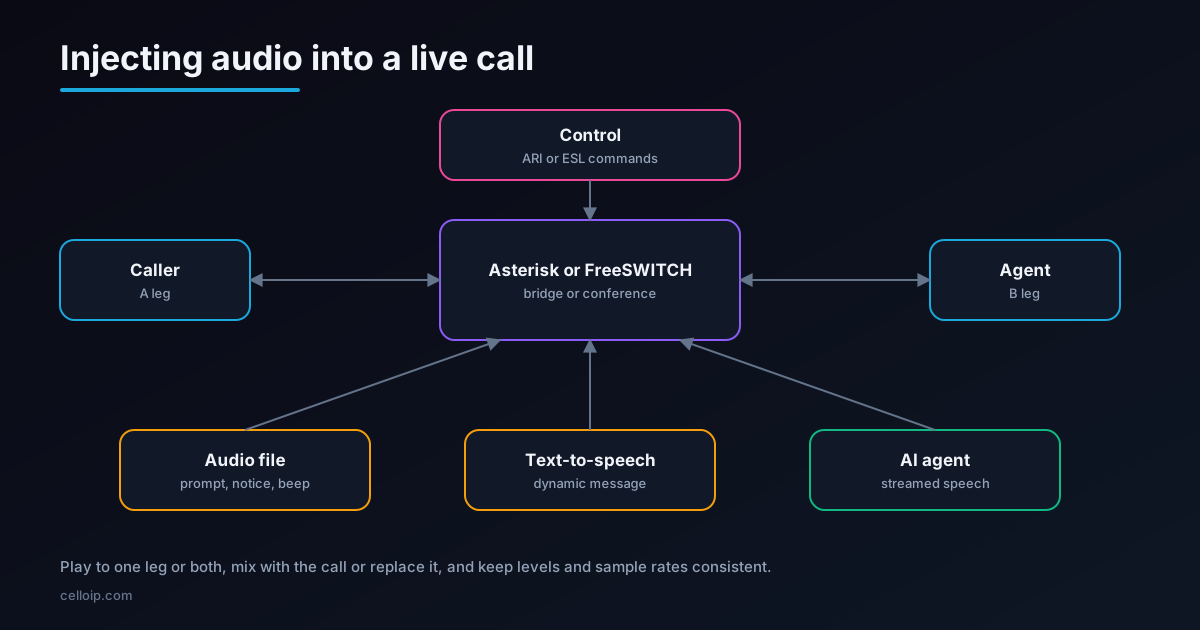
A two-party call has two legs: the caller (often called the A leg) and the agent or callee (the B leg). Audio sent "to a leg" is heard by the person on that leg. That gives three common targets:
Caller only
Announcements and AI speech the agent shouldn't hear repeated, such as transfer notices.
Agent only (whisper)
Coaching, caller details or compliance prompts that the caller must not hear.
Both (broadcast)
Recording notices, beeps and barge-in, which everyone on the call should hear.
A second choice matters too: should the injected audio replace the conversation while it plays, or mix with it? A recording notice usually replaces; a beep or a whisper usually mixes, so the conversation continues underneath.
Asterisk: the main techniques
| Technique | Who hears it | Best for |
|---|---|---|
| ARI play to a channel | That channel's party | Announcements to one party during a call |
| ARI play to a bridge | Everyone in the bridge | Notices and tones for both parties |
| ARI snoop channel (whisper=out) | The snooped party | Agent whisper with a file, TTS or a live supervisor |
| ChanSpy with w (whisper) | The spied party | Supervisor whisper from a dialplan extension |
| ChanSpy with B (barge) | Both parties | Supervisor barge-in |
| MixMonitor periodic beep | Both parties | Recording beeps while recording |
| AudioSocket or ARI external media | The caller | Streaming AI speech in real time |
Plain dialplan applications such as Playback work before a call is bridged. Once two parties are bridged, live injection is easiest through ARI (the Asterisk REST Interface), which can act on channels and bridges at any time.
Asterisk examples
Play a notice to everyone in a bridge with ARI. Your ARI application knows the bridge ID; one request plays the file to all participants.
# Play a recording notice to everyone in a bridge
curl -u ariuser:secret -X POST \
  "http://127.0.0.1:8088/ari/bridges/$BRIDGE_ID/play?media=sound:custom/recording-notice"

# Play only to the caller's channel
curl -u ariuser:secret -X POST \
  "http://127.0.0.1:8088/ari/channels/$CALLER_CHANNEL/play?media=sound:custom/transfer-notice"
Whisper to the agent with an ARI snoop channel. A snoop channel attached to the agent's channel with whisper=out (audio going out from Asterisk to the agent) sends whatever it plays to the agent only. Whispering needs a continuous media stream to the channel, which a bridged call normally provides. Play a file, a text-to-speech prompt, or bridge a supervisor's channel into it.
# Create a snoop channel on the agent's channel: whisper to the agent, don't listen
curl -u ariuser:secret -X POST \
  "http://127.0.0.1:8088/ari/channels/$AGENT_CHANNEL/snoop?app=coach&whisper=out&spy=none"
# -> returns the snoop channel; then play a hint into it:
curl -u ariuser:secret -X POST \
  "http://127.0.0.1:8088/ari/channels/$SNOOP_CHANNEL/play?media=sound:custom/offer-discount-hint"
Supervisor whisper and barge with ChanSpy. A supervisor dials an extension, enters the agent's number, and listens; the options decide whether they can talk to the agent only or to both.
; extensions.conf: supervisor features
exten => 555,1,NoOp(Whisper to agent)
 same => n,Read(AGENT,agent-number,4)
 same => n,ChanSpy(PJSIP/${AGENT},qw)   ; q = quiet, w = whisper to the agent only

exten => 556,1,NoOp(Barge into the call)
 same => n,Read(AGENT,agent-number,4)
 same => n,ChanSpy(PJSIP/${AGENT},qB)   ; B = barge: talk to both parties
FreeSWITCH: the main techniques
| Technique | Who hears it | Best for |
|---|---|---|
| uuid_broadcast | A leg, B leg or both | Announcements; interrupts while it plays |
| uuid_displace (mux) | The chosen leg, mixed with the call | Beeps, background tones, quiet prompts |
| uuid_displace (replace) | The chosen leg | Replacing call audio while a file plays |
| eavesdrop with whisper | The chosen party | Supervisor whisper and barge |
| conference play | Everyone in a conference | Multi-party announcements |
| mod_audio_stream | The caller | Streaming call audio to an AI and playing replies |
All of these can be triggered from the Event Socket (ESL), so a Node.js or Python service can inject audio into any active call by its UUID. Our FreeSWITCH ESL with Node.js guide covers the control side.
FreeSWITCH examples
# From fs_cli or an ESL "api" command, using the call's UUID

# Play a notice to both legs (interrupts the conversation while it plays)
uuid_broadcast 7d1c...e2 /var/sounds/recording-notice.wav both

# Play only to the caller (A leg)
uuid_broadcast 7d1c...e2 /var/sounds/please-hold.wav aleg

# Mix a short beep into the call without interrupting it
uuid_displace 7d1c...e2 start /var/sounds/beep.wav 0 mux

# Stop a running displace
uuid_displace 7d1c...e2 stop /var/sounds/beep.wav
For supervisors, eavesdrop lets a supervisor listen to a call and switch between listening, whispering to one side and talking to both using keypad digits during the session, which is the FreeSWITCH equivalent of ChanSpy.
Files, text-to-speech or live audio?
What you inject matters as much as how. Each source has a different cost in delay, flexibility and quality.
| Source | Strengths | Watch out for | Typical use |
|---|---|---|---|
| Prerecorded files | Instant, consistent, best quality | Every change needs a new recording | Legal notices, hold messages, beeps |
| Cached text-to-speech | Generated once, played instantly | Cache invalidation when wording changes | Common prompts in several languages |
| Live text-to-speech | Any wording, including names and amounts | Delay before the first word; provider cost | Balances, appointment details, agent hints |
| Live human audio | Natural and flexible | Needs a supervisor available | Coaching, barge-in, escalation |
| AI agent speech | Conversational, responds to the caller | Needs streaming, barge-in handling and guardrails | Voice agents and AI assistants |
Most systems use a mix: recordings for anything legally worded, cached text-to-speech for common prompts, and live generation only where the content changes per call.
Injecting AI speech into calls
An AI voice agent speaking into a call is a special case: the audio is generated on the fly, sentence by sentence, and must stop the moment the caller starts talking.
- Stream call audio to the AI over AudioSocket or ARI external media on Asterisk, or mod_audio_stream on FreeSWITCH.
- Send the AI's speech back in small chunks (typically 20 ms frames) as soon as text-to-speech produces them.
- Match the call's audio format: for example 8 kHz signed linear for AudioSocket, resampling text-to-speech output if needed.
- On barge-in, stop sending audio immediately and clear any buffered audio, so the agent doesn't talk over the caller.
- Alternatively, add the AI as a participant in a conference or an SFU room such as LiveKit, connected over SIP.
Our guides to Asterisk AudioSocket and FreeSWITCH with OpenAI Realtime walk through both platforms in detail.
Comparing the methods
| Need | Asterisk | FreeSWITCH |
|---|---|---|
| Notice to both parties | ARI play to bridge | uuid_broadcast ... both |
| Notice to the caller only | ARI play to the caller's channel | uuid_broadcast ... aleg |
| Beep without interrupting | MixMonitor periodic beep | uuid_displace ... mux |
| Whisper to the agent | ARI snoop (whisper=out) or ChanSpy w | eavesdrop whisper or uuid_broadcast to the agent leg |
| Supervisor barge | ChanSpy B | eavesdrop (talk to both) |
| AI speech, real time | AudioSocket or external media | mod_audio_stream |
| Many participants | ARI play to bridge or ConfBridge | conference play |
Illustrative time from command to the first audio a caller hears
Illustrative only, not measurements: real values depend on server load, network and text-to-speech provider.
Getting the audio quality right
Match sample rates
Convert prompts to the platform's native format, for example 8 kHz mono for narrowband calls, instead of relying on on-the-fly conversion.
Normalise loudness
Injected audio that is much louder or quieter than the conversation is jarring. Normalise all prompts to the same level.
Mind the codecs
Each transcoding step between codecs costs quality. Prefer G.711 or the call's native codec for injected audio.
Short, clear prompts
Mixed-in audio competes with speech. Keep whispered hints and notices brief.
Avoid echo loops
When streaming to an AI, make sure its own speech isn't fed back into its speech recognition.
Test on real phones
Test on mobile networks and with headsets, not only on a desk phone in the office.
Building audio injection as a service
In production, injection is rarely typed into a console. It is triggered by events: a supervisor clicks "whisper", a timer fires a recording beep, a CRM rule decides an agent needs a hint. That calls for a small control service between your applications and the telephony platform.
| Component | Role |
|---|---|
| Event listener | Subscribes to ARI events (WebSocket) or FreeSWITCH ESL events to track live calls, legs and bridges |
| Call state store | Keeps which channel or UUID belongs to which caller, agent and queue, updated as calls transfer |
| Injection API | A simple internal API, such as 'play this to the agent of call X', that hides platform details |
| Media library | Prompts and tones converted to the right formats, plus a text-to-speech cache for common phrases |
| Permissions and audit | Who may whisper or barge into which calls, with every action logged |
Keeping the platform details behind one API also makes it easier to support both Asterisk and FreeSWITCH, or to move between them later.
Recording and monitoring notices, done right
- Play the notice to both parties as soon as the call is answered, before the conversation starts.
- Use the caller's language, chosen from the number they called or their account.
- Keep it short and clear; long legal wording makes callers hang up.
- If recording starts mid-call, for example on transfer, play the notice again at that point.
- For periodic beeps, mix them in at a low level rather than interrupting the conversation.
- Check the rules where your callers are: some places require notices or consent from everyone on the call.
Common pitfalls
- Playing to the wrong leg: confirm which leg is which in transfers and forwarded calls, where they can swap.
- Breaking the bridge: some dialplan approaches unbridge the call; use ARI or ESL commands that keep the call connected.
- Long announcements during urgent calls: keep notices short, and skip non-essential ones on repeat calls.
- Whispers leaking: test that 'agent only' audio really isn't heard by the caller, including on conference calls.
- Forgotten legal notices: recording and monitoring notices are required in many places; check where your callers are.
- Race conditions: injecting before the call is answered or after it ends causes errors; check the call state first.
Testing checklist
| Test | What to confirm |
|---|---|
| Leg targeting | Caller-only audio is not heard by the agent, and agent-only audio is not heard by the caller |
| Mid-call transfer | Injection still reaches the right person after attended and blind transfers |
| Conference calls | Whispers stay private when a third party is on the call |
| Codecs | Audio sounds right on G.711, Opus and any other codec your trunks and phones use |
| Mobile networks | Prompts stay clear on poor mobile connections and with headsets |
| Load | Many simultaneous injections don't delay audio or overload the media server |
| Failure | If the control service is down, calls continue normally without injected audio |
A real example
In CelloIP's AI voice agent for a contact centre, calls run through the centre's FreeSWITCH platform and the AI agent joins over SIP. When the agent hands a call to a person, the human agent receives a summary of the conversation so the caller doesn't repeat themselves, the same principle as an agent-only whisper: information for one party, without interrupting the other.
CelloIP project outcome (client kept private)
FreeSWITCH kept control of trunks, queues and human agents; the AI agent on LiveKit Agents handles inbound support, outbound calls and booking in English and Spanish, with handover back to FreeSWITCH queues.
Frequently asked questions
How do I play an announcement to both parties in a bridged call on Asterisk?
With ARI, play the media to the bridge (POST /bridges/{bridgeId}/play) and everyone in it hears it. In the dialplan alone it is harder once the call is bridged, which is why most live-injection use cases are built on ARI or AMI rather than plain dialplan.
How do I whisper to an agent without the caller hearing?
On Asterisk, use ChanSpy with the w option, or create an ARI snoop channel on the agent's channel with whisper set to 'out' (audio going out to the agent) and play audio into it or connect a supervisor to it. On FreeSWITCH, eavesdrop supports whisper modes, or use uuid_broadcast to the agent's leg only.
What is the difference between uuid_broadcast and uuid_displace in FreeSWITCH?
uuid_broadcast plays a file or application on a leg, interrupting what that leg hears while it plays. uuid_displace inserts audio into the stream and can mix it with the conversation (with the mux option) or replace it, which suits background tones, beeps and whispered prompts.
Can an AI voice agent speak into an existing call?
Yes. The usual pattern streams call audio to the AI over AudioSocket (Asterisk) or mod_audio_stream (FreeSWITCH) and plays the AI's speech back into the call, or adds the AI as a participant in a conference or SFU room. Match the sample rate, stream audio in small chunks and stop playback immediately when the caller speaks.
Why does injected audio sound distorted or too fast?
Usually a sample-rate or format mismatch: an 8 kHz call playing a 16 or 44.1 kHz file without conversion, or raw audio sent in the wrong encoding. Convert prompts to the platform's preferred format, normalise loudness, and check the codec negotiated on each leg.
Is it legal to play a recording notice or whisper during a call?
Recording notices are often required. Whisper coaching that only the agent hears is generally treated as part of the call's monitoring, but call recording and monitoring rules vary by country and state, so check the rules where your callers are.
Work with CelloIP
Need audio injection, whisper or AI speech in your calls?
CelloIP builds call control on Asterisk and FreeSWITCH: announcements, whisper coaching, barge-in, recording notices and AI voice agents that speak into live calls. You own the code.