How to build an AI contact center with FreeSWITCH and the OpenAI Realtime API
Connect FreeSWITCH to the OpenAI Realtime API via a Node.js WebSocket bridge that uses FreeSWITCH ESL to stream PCM audio bidirectionally. FreeSWITCH handles SIP/WebRTC call termination and media processing; the Node.js bridge relays audio frames to the OpenAI Realtime WebSocket; GPT-4o processes voice input and streams audio responses back with sub-500ms end-to-end latency.
What is the OpenAI Realtime API for voice?
The OpenAI Realtime API enables bidirectional audio streaming with GPT-4o over a persistent WebSocket connection — accepting live audio input and streaming audio output in real time without separate ASR or TTS steps. This makes it suitable for building conversational AI phone agents with natural, low-latency dialogue.
Building an AI Contact Center with FreeSWITCH and OpenAI Realtime API
The OpenAI Realtime API (launched October 2024) changes the economics of AI voice agents fundamentally. By streaming audio directly to GPT-4o over a WebSocket — no separate ASR transcription, no TTS synthesis — response latency drops to 300–600ms end-to-end. That is conversational quality. And FreeSWITCH, handling 10,000+ concurrent calls on commodity hardware, is the telephony engine that makes it production-scale.
This guide covers the complete architecture: FreeSWITCH ESL audio streaming, the Node.js WebSocket bridge, OpenAI Realtime API integration, AI tool calls for CRM lookups, human agent handoff, interruption handling, and a real cost model vs hosted AI voice platforms. CelloIP has deployed this stack in production — here is exactly what works.
<500ms
End-to-end AI response latency
GPT-4o
Realtime voice model used
10k+
Concurrent calls on FreeSWITCH
70%
Cost savings vs hosted AI voice

Why FreeSWITCH for Production AI Voice?
Hosted AI voice platforms (Twilio ConversationalAI, Vonage AI Studio, Bland AI) bundle telephony and AI into one managed service. That is convenient for prototypes. For production at scale, FreeSWITCH wins on every dimension that matters to a serious contact centre:
10,000+
Concurrency
Concurrent calls on a single FreeSWITCH server (8-core). Hosted platforms charge per concurrent channel slot.
Any LLM
Model Portability
Swap OpenAI Realtime → Anthropic → Gemini → local Llama without changing your telephony layer.
On-Premise
Data Sovereignty
Healthcare, finance, and government deployments can keep all audio and transcripts on-premise or in a private cloud.
70% cheaper
Cost
vs hosted AI voice platforms at 10,000+ minutes/month. Infrastructure cost scales sublinearly with volume.
Native
SIP Integration
Any SIP trunk, any PBX, any carrier. No gateway fees, no PSTN markup, direct SIP termination.
Full
Codec Control
PCMU, PCMA, G.729, Opus, iLBC. Transcode precisely where needed. Minimise audio quality loss.
OpenAI Realtime API: What Changed in 2024
Before the Realtime API, building a voice AI agent required chaining three separate services: ASR (Whisper) → LLM (GPT-4) → TTS (ElevenLabs). Each hop added 150–400ms latency. Total pipeline: 600–1,200ms — noticeable, bordering on jarring for natural conversation.
Before: ASR → LLM → TTS Chain
After: OpenAI Realtime API
The Realtime API also adds built-in VAD (voice activity detection) with interrupt handling — if the caller speaks during the AI response, the AI stops and listens. This is the feature that makes voice AI feel like a real conversation rather than a robot reading a script.
Full System Architecture
The architecture has four layers. Each is independently scalable:
Layer 1: SIP/Media Layer
FreeSWITCH 1.10.x — SIP registration, media handling, codec transcoding
Accepts inbound SIP calls from carrier SIP trunks or WebRTC browsers. Transcodes audio to 16kHz mono PCM (required by OpenAI Realtime API). Handles 10,000+ concurrent sessions.
Layer 2: Event & Audio Bridge
Node.js service using ESL (modesl) + mod_audio_stream
Subscribes to FreeSWITCH ESL events. When a call arrives in the AI IVR dialplan context, opens a WebSocket audio stream between FreeSWITCH and the OpenAI Realtime API. Handles the bidirectional audio relay.
Layer 3: AI Processing
OpenAI Realtime API (GPT-4o model) · Tool call handlers (CRM, KB, ticketing)
Processes inbound audio via VAD, generates conversational responses, streams audio back. Executes tool calls when the AI needs to look up account info, check order status, or route to a department.
Layer 4: Business Logic
CRM API (Salesforce, HubSpot, Zendesk) · Knowledge base (RAG vector store) · Human agent queue (ACD)
Tool call endpoints that the AI agent calls to retrieve customer info, look up answers, create tickets, and trigger human escalation. Completely decoupled from the telephony layer.
FreeSWITCH Configuration for AI IVR
The dialplan routes inbound calls to the AI IVR context. We configure a dedicated context that answers the call and immediately passes it to the Node.js bridge via a socket application or mod_audio_stream WebSocket endpoint.
<!-- Route inbound DID to AI agent context -->
<context name="public">
  <extension name="ai_agent_did">
    <!-- Match your DID number -->
    <condition field="destination_number" expression="^(18005551234)$">
      <!-- Set audio params for OpenAI Realtime (16kHz mono required) -->
      <action application="set" data="media_bug_answer_req=true"/>
      <action application="set" data="record_sample_rate=16000"/>

      <!-- Answer the call -->
      <action application="answer"/>

      <!-- Play a brief hold tone while bridge connects (optional) -->
      <action application="playback" data="silence_stream://500"/>

      <!-- Stream audio to our Node.js AI bridge via mod_audio_stream -->
      <!-- mod_audio_stream sends raw PCM to ws://localhost:3001/audio -->
      <action application="audio_stream" data="wss://localhost:3001/audio async full"/>

      <!-- If bridge hangs up cleanly, execute hangup -->
      <action application="hangup"/>
    </condition>
  </extension>
</context>

<!-- Sofia SIP profile — accept inbound SIP trunk calls -->
<!-- In conf/sip_profiles/external.xml: -->
<!-- <param name="context" value="public"/> -->
Install mod_audio_stream from the community repository. It streams raw 16kHz PCM audio frames over WebSocket to your bridge application:
# Install build dependencies
apt-get install -y libjson-c-dev libwebsockets-dev

# Clone and build mod_audio_stream
git clone https://github.com/nicholasgasior/mod_audio_stream
cd mod_audio_stream
make
make install

# Load in modules.conf.xml
# <load module="mod_audio_stream"/>

# Reload modules in fs_cli
freeswitch> reload mod_audio_stream
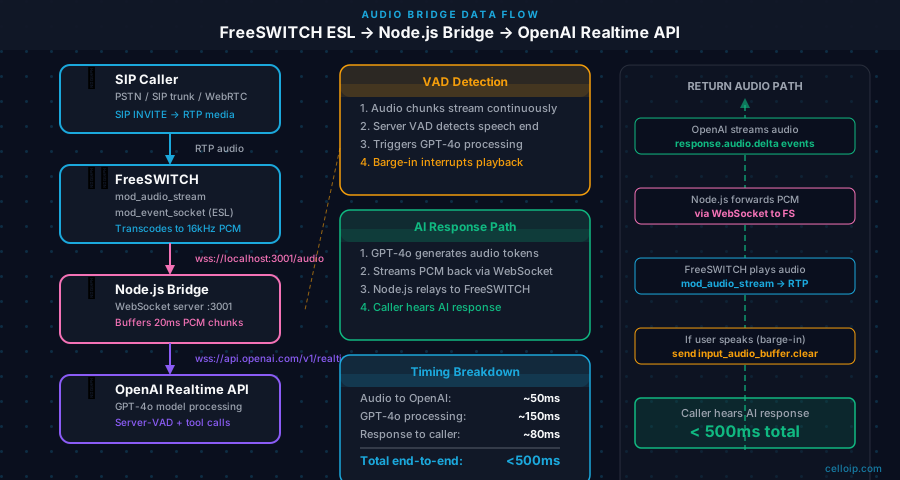
Node.js Audio Bridge: FreeSWITCH ↔ OpenAI Realtime
The bridge is the heart of the system. It accepts WebSocket connections from FreeSWITCH (audio stream), opens a connection to the OpenAI Realtime API, and relays audio frames bidirectionally. It also handles tool calls and the human escalation logic.
const WebSocket = require('ws');
const OpenAI = require('openai');

const openai = new OpenAI({ apiKey: process.env.OPENAI_API_KEY });

// WebSocket server — accepts connections from FreeSWITCH mod_audio_stream
const wss = new WebSocket.Server({ port: 3001, path: '/audio' });

wss.on('connection', async (fsSocket) => {
  console.log('[Bridge] FreeSWITCH connected');

  // Open OpenAI Realtime session
  const realtimeWs = new WebSocket(
    'wss://api.openai.com/v1/realtime?model=gpt-4o-realtime-preview-2024-10-01',
    {
      headers: {
        Authorization: `Bearer ${process.env.OPENAI_API_KEY}`,
        'OpenAI-Beta': 'realtime=v1',
      },
    }
  );

  realtimeWs.on('open', () => {
    console.log('[Bridge] OpenAI Realtime connected');

    // Configure the session
    realtimeWs.send(JSON.stringify({
      type: 'session.update',
      session: {
        modalities: ['text', 'audio'],
        instructions: `You are a helpful customer service agent for Acme Corp.
Be concise — phone responses should be under 30 words unless the caller asks for detail.
You have access to tools: lookup_account, create_ticket, transfer_to_agent.`,
        voice: 'alloy',
        input_audio_format: 'pcm16',
        output_audio_format: 'pcm16',
        input_audio_transcription: { model: 'whisper-1' },
        turn_detection: {
          type: 'server_vad',
          threshold: 0.5,
          prefix_padding_ms: 300,
          silence_duration_ms: 600,
        },
        tools: [
          {
            type: 'function',
            name: 'lookup_account',
            description: 'Look up a customer account by phone number',
            parameters: {
              type: 'object',
              properties: { phone: { type: 'string', description: 'Caller phone number' } },
              required: ['phone'],
            },
          },
          {
            type: 'function',
            name: 'transfer_to_agent',
            description: 'Transfer the call to a human agent when the caller requests it or the AI cannot help',
            parameters: {
              type: 'object',
              properties: { reason: { type: 'string' }, department: { type: 'string' } },
              required: ['reason'],
            },
          },
        ],
      },
    }));
  });

  // ── FreeSWITCH → OpenAI: relay incoming audio ────────────────
  fsSocket.on('message', (audioChunk) => {
    if (realtimeWs.readyState === WebSocket.OPEN) {
      realtimeWs.send(JSON.stringify({
        type: 'input_audio_buffer.append',
        audio: audioChunk.toString('base64'),
      }));
    }
  });

  // ── OpenAI → FreeSWITCH: relay AI audio response ─────────────
  realtimeWs.on('message', async (data) => {
    const event = JSON.parse(data.toString());

    switch (event.type) {
      case 'response.audio.delta':
        // Stream AI audio back to FreeSWITCH
        if (fsSocket.readyState === WebSocket.OPEN) {
          fsSocket.send(Buffer.from(event.delta, 'base64'));
        }
        break;

      case 'response.function_call_arguments.done':
        // Handle tool calls
        await handleToolCall(event, realtimeWs, fsSocket);
        break;

      case 'input_speech_started':
        // Caller is speaking — interrupt AI audio
        console.log('[Bridge] Caller interruption detected');
        break;

      case 'error':
        console.error('[Bridge] Realtime API error:', event.error);
        break;
    }
  });

  fsSocket.on('close', () => {
    console.log('[Bridge] FreeSWITCH disconnected — closing OpenAI session');
    realtimeWs.close();
  });
});

async function handleToolCall(event, realtimeWs, fsSocket) {
  const args = JSON.parse(event.arguments);

  if (event.name === 'transfer_to_agent') {
    console.log(`[Bridge] Transferring to human agent: ${args.reason}`);
    // Signal FreeSWITCH to bridge to agent queue via ESL (out-of-band)
    // Your ESL client would issue: api uuid_transfer <uuid> 1001 xml default
    realtimeWs.send(JSON.stringify({
      type: 'conversation.item.create',
      item: {
        type: 'function_call_output',
        call_id: event.call_id,
        output: JSON.stringify({ status: 'transferring', estimated_wait: '2 minutes' }),
      },
    }));
    realtimeWs.send(JSON.stringify({ type: 'response.create' }));
  }
}
AI Tool Calls: CRM & Knowledge Base Integration
Tool calls are what elevate an AI voice agent from a novelty to a production system. The AI can look up account status, check order history, search a knowledge base, and create support tickets — all during the call, in real time. Here is a full example for CRM account lookup:
async function handleToolCall(event, realtimeWs) {
  const args = JSON.parse(event.arguments);
  let output;

  switch (event.name) {
    case 'lookup_account':
      try {
        // Query your CRM — replace with actual Salesforce/HubSpot API call
        const account = await crmClient.findByPhone(args.phone);
        output = account
          ? {
              found: true,
              name: account.name,
              account_id: account.id,
              plan: account.subscription_plan,
              open_tickets: account.open_tickets,
              last_interaction: account.last_contact_date,
            }
          : { found: false, message: 'No account found for this number' };
      } catch (err) {
        output = { found: false, error: 'CRM lookup failed' };
      }
      break;

    case 'create_ticket':
      const ticket = await crmClient.createTicket({
        caller_phone: args.phone,
        subject: args.subject,
        description: args.description,
        priority: args.priority || 'normal',
        channel: 'phone',
      });
      output = { ticket_id: ticket.id, estimated_resolution: '24 hours' };
      break;

    default:
      output = { error: 'Unknown tool' };
  }

  // Send tool result back to Realtime API
  realtimeWs.send(JSON.stringify({
    type: 'conversation.item.create',
    item: {
      type: 'function_call_output',
      call_id: event.call_id,
      output: JSON.stringify(output),
    },
  }));

  // Tell the model to continue the response with the tool result
  realtimeWs.send(JSON.stringify({ type: 'response.create' }));
}
Cost: FreeSWITCH + OpenAI vs Hosted Platforms
| Platform | AI Model Control | Data Privacy | Cost/10k min | SIP Integration | On-Premise |
|---|---|---|---|---|---|
| FreeSWITCH + OpenAI RT | ✓ Full (swap models) | ✓ BAA available | ~$850/mo | ✓ Native SIP | ✓ Yes |
| Twilio ConvAI | ✗ Twilio's choice | Twilio DPA only | $500–$2,000/mo | Twilio SIP | ✗ No |
| Vonage AI Studio | ✗ Limited | Vonage DPA | $600–$1,500/mo | Vonage SIP | ✗ No |
| LiveKit + OpenAI RT | ✓ Full | ✓ BAA available | ~$900/mo | ✓ Via SIP bridge | ✓ Yes |
| Bland AI | ✗ Proprietary | Limited | ~$0.09/min | PSTN only | ✗ No |
Rule of thumb: Use hosted AI voice platforms for <500 minutes/month or when you need zero infrastructure ops. Switch to FreeSWITCH + OpenAI RT when your monthly AI voice spend exceeds the annual cost of a FreeSWITCH server, or when you need on-premise, carrier SIP integration, or model portability.
Use Cases & Industry Applications
Customer Service IVR Replacement
Retail / E-commerce
Replace 'Press 1 for support' with a conversational AI that looks up order status, processes returns, and answers FAQs — escalating to humans for complex issues.
Healthcare Appointment Scheduling
Healthcare
HIPAA-compliant AI agent that books, reschedules, and cancels appointments by integrating with EHR scheduling APIs. On-premise FreeSWITCH ensures no PHI leaves the hospital network.
Outbound Collections & Reminders
Finance / Insurance
AI agent makes outbound calls for payment reminders, policy renewals, and debt collection — handles objections, accepts payments via DTMF, escalates disputes to humans.
Technical Support Tier 1
Telecom / SaaS
AI answers how-to questions from a knowledge base, runs guided troubleshooting scripts, creates tickets, and routes to L2 engineers when diagnosis requires hands-on access.
Hotel & Hospitality Concierge
Hospitality
AI handles room service orders, wake-up calls, housekeeping requests, and local recommendations — freeing front-desk staff for in-person guest interactions.
Government Citizen Services
Government
On-premise AI voice agent handles common citizen inquiries (permit status, benefit eligibility, office hours) with zero data leaving the government network.
Frequently Asked Questions
Can FreeSWITCH integrate with the OpenAI Realtime API?
Yes. A Node.js bridge application uses FreeSWITCH ESL to access a channel's audio stream, then relays the PCM audio frames to the OpenAI Realtime WebSocket in real time. AI audio responses stream back and are injected into the call via FreeSWITCH's uuid_audio or played via a temporary audio file. The round-trip enables fully conversational AI interactions over standard SIP.
What is the OpenAI Realtime API and why does it matter for telephony?
The OpenAI Realtime API (launched October 2024) accepts live audio input and streams audio output back through a persistent WebSocket connection — no separate ASR transcription step, no TTS synthesis step. For telephony, this removes 300–800ms of latency that traditional ASR→LLM→TTS pipelines incur, bringing the total response time to 300–600ms — conversational quality.
What FreeSWITCH module do I need for audio streaming to an external API?
mod_audio_stream is the cleanest option — it streams raw PCM audio frames from a FreeSWITCH channel to an external WebSocket. Alternatively, you can use ESL's uuid_record to record audio to a named pipe (FIFO) and stream the pipe contents. For production, CelloIP recommends mod_audio_stream for its clean frame-by-frame WebSocket API.
How does the AI agent hand off to a human agent?
The AI agent is equipped with a hand_off_to_agent tool call. When triggered (by the caller requesting a human, or the AI determining it cannot help), your bridge application receives the tool call, selects an available agent from your ACD queue, and issues a FreeSWITCH ESL bridge command to transfer the call. The conversation transcript is simultaneously posted to your CRM.
What is the cost of running this stack vs a hosted AI voice platform?
At 10,000 minutes/month: OpenAI Realtime API ≈ $600 (at $0.06/min), FreeSWITCH VPS ≈ $100/month, SIP trunk ≈ $150. Total: ~$850/month. A hosted AI voice platform (Twilio ConversationalAI, Vonage AI Studio) charges $0.05–$0.20 per minute — the same 10,000 minutes costs $500–$2,000/month with no control over the underlying models or data.
Is the OpenAI Realtime API suitable for HIPAA-compliant healthcare deployments?
OpenAI offers a Business Associate Agreement (BAA) for eligible enterprise plans, which enables HIPAA-compliant use of the Realtime API. For maximum data sovereignty, consider self-hosted alternatives: Whisper for ASR, an on-premise Llama 3 / Mistral LLM, and a local TTS engine. CelloIP has deployed fully on-premise AI voice agents for healthcare clients using this stack.
Can this architecture work with WebRTC browser calls instead of SIP?
Yes. FreeSWITCH natively supports WebRTC via mod_verto or mod_rtc. Browser-based calls from your web application land in FreeSWITCH as WebRTC channels, then the same ESL audio bridge connects them to the OpenAI Realtime API. The AI agent cannot tell the difference between a SIP desk phone and a browser WebRTC call.
How do I prevent the AI from interrupting itself mid-response?
The OpenAI Realtime API includes built-in VAD (Voice Activity Detection) with interruption support. When the caller speaks while the AI is playing audio, the Realtime API sends an InputAudioBufferSpeechStarted event. Your bridge application sends an input_audio_buffer.clear and conversation.item.truncate message to the Realtime API and plays a silence frame to FreeSWITCH, cleanly interrupting the AI response.
Ready to Build Your AI Contact Center?
CelloIP has deployed production AI voice agents on FreeSWITCH with OpenAI Realtime API, Whisper, ElevenLabs, and on-premise LLM stacks. We handle the full stack: FreeSWITCH cluster, AI bridge, CRM integration, human handoff, analytics, and SIP trunk provisioning. Typical project timeline: 8–12 weeks from discovery to production.
AI IVR Proof of Concept
Working FreeSWITCH + OpenAI Realtime demo with your use case in 2 weeks. Fixed price.
Full AI Contact Center
End-to-end: FreeSWITCH cluster, AI bridge, CRM integration, agent handoff, recording, and dashboard.
On-Premise AI Stack
HIPAA/GDPR-compliant deployment using local Whisper, Llama 3, and Kokoro TTS. Zero data leaves your network.