Custom vs White-Label Softphone: Which to Choose
If you run a VoIP service, your customers need an app to make and receive calls. You can rebrand an existing softphone or have one built for you. Both work; they suit different businesses. This guide compares cost, time, features, the technical must-haves and licensing, so you can choose with your eyes open.
Quick answer
Should you choose a custom or white-label softphone?
A white-label softphone is an existing app rebranded with your name and configured for your SIP platform: it launches in weeks for a monthly fee, but its features and roadmap belong to the vendor. A custom softphone is built for you, usually on a SIP engine such as Linphone or PJSIP, with your own interface, features and integrations, and you own the code: it costs more upfront and takes months. Choose white-label to launch quickly with standard calling; choose custom when the app is part of your product, needs features or integrations a vendor won't build, or when long-term per-user fees and control matter.
The two options
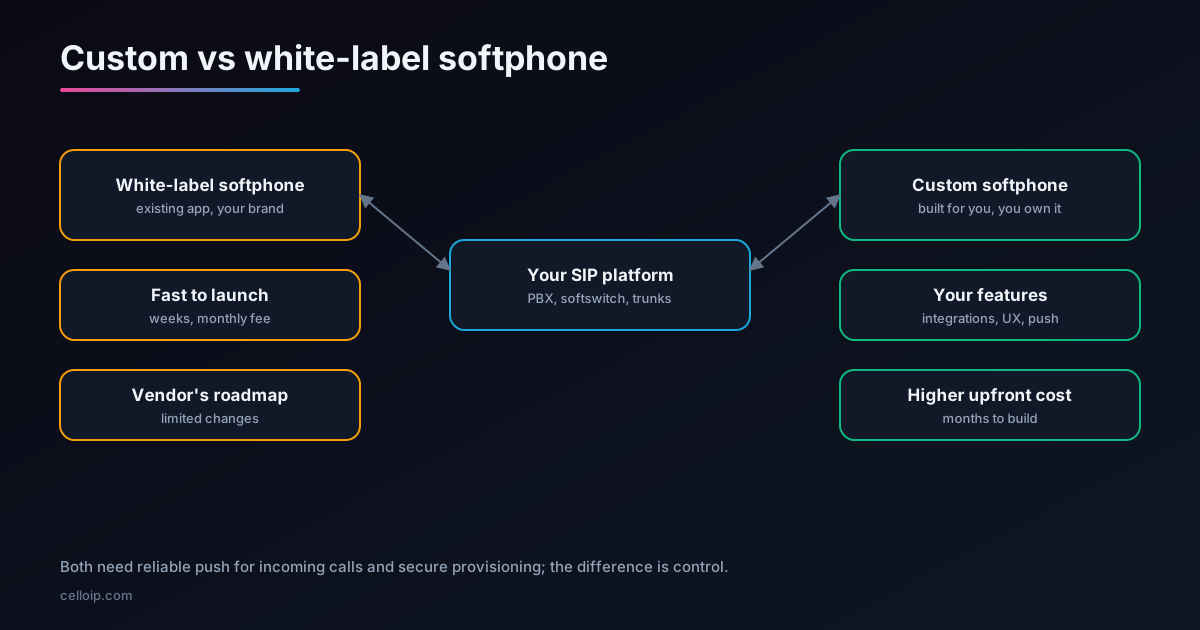
A white-label softphone is an existing app that a vendor rebrands for you. You choose a name, logo and colours and supply your SIP settings; the vendor builds your branded version, publishes it (often under your app store accounts) and keeps it updated. You pay a set-up fee and a monthly fee, sometimes with charges per active user or per feature.
A custom softphone is built specifically for you. A development team takes a proven SIP engine, such as Linphone or PJSIP, and builds your interface, features and integrations around it. You own the code and decide what it does and when it changes; you also carry the build cost and ongoing maintenance, directly or through your partner.
There's a middle option
Between the two sits an SDK-based app: your own interface and features, built on a commercial or open-source SIP SDK that handles the calling engine. It is really a form of custom development, but much faster than writing a SIP stack, which almost nobody should do.
| Option | What you get | Who controls the roadmap |
|---|---|---|
| White-label app | An existing app with your branding and settings | The vendor |
| SDK-based custom app | Your own app on a licensed SIP SDK such as Linphone or PJSIP | You, within the SDK's capabilities |
| Fully custom calling stack | Your own SIP and media engine | You, at very high cost; rarely justified |
White-label vs custom, side by side
| Factor | White-label softphone | Custom softphone |
|---|---|---|
| Time to launch | A few weeks | Two to five months |
| Upfront cost | Set-up fee | Development project |
| Ongoing cost | Monthly fee, sometimes per user or per feature | Hosting and maintenance |
| Branding | Name, logo, colours, some layout options | Every screen and interaction |
| Features | The vendor's feature set | Anything you specify |
| Integrations | Limited to what the vendor supports | Your CRM, billing, portal, APIs |
| Roadmap | Vendor decides | You decide |
| Code ownership | Vendor owns the app | You own the code |
| Differentiation | Similar to other providers using the same base app | Unique to your service |
| Exit | Moving away means a new app and user migration | No vendor to leave |
Cost and time to launch
White-label pricing is usually published or quoted per month. As one published example, Acrobits lists its white-label Cloud Softphone from about $549 a month, with optional per-user charges for some features, and quotes a one-time fee of around $4,200 plus monthly support for apps built on its platform. Other vendors price differently, so compare like for like, including per-user fees at your expected user numbers.
| Custom build (guide ranges) | Typical range | Typical timeline |
|---|---|---|
| Softphone for one platform with core calling | $15,000 – $35,000 | 8–12 weeks |
| Branded softphone with provisioning, multi-tenant support, video and chat | $35,000 – $70,000 | 12–20 weeks |
| Larger multi-platform or specialised builds | Scoped after discovery | Agreed in the plan |
Custom ranges match our VoIP mobile app development page.
Illustrative time to first app store release, in weeks
Illustrative only; real timelines depend on platforms, features, branding decisions and app store review.
Over several years the picture can flip. A monthly fee that is trivial for a hundred users can become significant for tens of thousands, especially where per-user charges apply, while a custom app's cost is mostly upfront.
What any softphone must get right
Whichever route you choose, these are the things that separate a softphone customers rely on from one they uninstall. Ask any vendor or developer how they handle each.
Incoming calls on iOS
A VoIP push through PushKit wakes the app, which must report the call to CallKit immediately. Apps that fail to do so are terminated, and iOS can stop delivering their VoIP pushes.
Incoming calls on Android
A high-priority push wakes the app. From Android 14, the full-screen incoming-call screen needs the USE_FULL_SCREEN_INTENT permission, which Google Play grants only to calling and alarm apps that declare it, plus the phone-call foreground service type.
Encryption
TLS for SIP signalling and SRTP for audio and video, so calls stay private on public Wi-Fi.
Easy setup
QR code or link provisioning, so customers never type SIP servers or passwords.
Network changes
Calls that survive moving between Wi-Fi and mobile data, with fast re-registration.
Your app store accounts
Publishing under your own developer accounts keeps the app, its reviews and its users yours.
Our Flutter CallKit and PushKit guide and React Native CallKit guide cover push and native calling screens in detail.
SIP engine licensing: read this before building custom
Custom softphones almost always use an existing SIP engine, and the licence matters as much as the code.
| Engine | Licence | What it means for a closed-source app |
|---|---|---|
| Linphone SDK (Belledonne Communications) | Dual: GPLv3 / AGPLv3, or a paid proprietary licence | A closed-source app needs the commercial licence, priced by platforms and units |
| PJSIP (Teluu) | Dual: GPL, or a paid commercial licence | A closed-source app needs the commercial licence |
| Codecs such as G.729, AMR and H.264 | Patent licences, separate from the SIP engine | Check codec licensing for the codecs you ship |
Budget the licence into the project from the start. Our Linphone and PJSIP guide compares the two engines in depth.
Provisioning: the feature that saves support time
For a provider with many customers, setup support is a real cost. Both white-label and custom apps should provision accounts automatically. Here is what a simple remote-provisioning file looks like for a Linphone-based app; the app fetches it over HTTPS after the customer scans a QR code.
<?xml version="1.0" encoding="UTF-8"?>
<config xmlns="http://www.linphone.org/xsds/lpconfig.xsd">
<section name="proxy_0">
<entry name="reg_proxy"><sip:sip.example.com;transport=tls></entry>
<entry name="reg_identity">"Alice" <sip:[email protected]></entry>
<entry name="reg_expires">3600</entry>
<entry name="reg_sendregister">1</entry>
<entry name="push_notification_allowed">1</entry>
</section>
<section name="auth_info_0">
<entry name="username">alice</entry>
<entry name="ha1">8f2b...e91c</entry> <!-- hashed, never the plain password -->
<entry name="realm">example.com</entry>
</section>
<section name="sip">
<entry name="media_encryption">srtp</entry>
</section>
</config>Keep the provisioning service on your own platform, whichever app you use. Then you can change servers or features centrally, and you can switch apps later without re-onboarding every customer by hand.
Desktop and web: the platforms people forget
Mobile gets the attention, but many business customers spend their day at a computer. A complete calling service usually needs a desktop app for Windows and macOS, a web softphone that runs in the browser, or both.
| Platform | How it usually works | Points to check |
|---|---|---|
| Android and iOS | Native or cross-platform app on a SIP engine, with push for incoming calls | PushKit and CallKit, Android full-screen call rules, battery use |
| Desktop (Windows, macOS) | Desktop app on the same SIP engine, or a shared cross-platform codebase | Headset support, screen sharing, auto-updates |
| Web browser | WebRTC softphone connected to your SIP platform through a WebRTC-SIP gateway | Gateway capacity, browser updates, microphone permissions |
White-label vendors differ widely on desktop and web support, so check both if your customers need them. For custom builds, a shared interface codebase, for example Flutter, keeps all platforms consistent. Our WebRTC-SIP gateway case study shows how browser calling reaches a provider's SIP platform.
Maintenance after launch
A softphone is never finished. Every major iOS and Android release can change how background tasks, notifications and calling screens behave, and app stores update their policies regularly. Whoever owns the app has to keep up.
- Test every new iOS and Android version before it reaches customers, especially incoming calls on locked phones.
- Update the SIP engine and its security fixes on a regular schedule.
- Keep push certificates and keys current; expired credentials silently stop incoming calls.
- Watch app store reviews and crash reports, and respond quickly to call failures.
- Re-check app store declarations, such as Android's full-screen intent permission, when policies change.
With white-label, this is the vendor's job, which is part of what the monthly fee pays for. With custom, it is yours or your partner's, so plan a maintenance arrangement before launch rather than after the first broken release.
Moving from white-label to custom later
Many providers start with white-label and move to custom once the app matters more to their business. The move is straightforward if you prepare for it from the start.
| Step | What to do |
|---|---|
| 1. Own the accounts | Publish the white-label app under your own app store developer accounts from day one |
| 2. Own provisioning | Keep account provisioning on your platform, so any app can fetch settings the same way |
| 3. Build alongside | Develop and test the custom app while the white-label app stays live |
| 4. Release as an update | Where possible, ship the custom app as an update to the same app store listing, so users keep their install and reviews |
| 5. Retire the old app | Move remaining users with in-app messages and support, then end the vendor contract |
When white-label is the right choice
- You need an app in weeks, for example to win or keep customers who ask for one.
- Standard calling, messaging and perhaps video cover what your customers need.
- The app supports your service rather than being the product itself.
- You have a modest number of users, so monthly and per-user fees stay small.
- You don't want to manage app development or app store releases.
If this is you, a good white-label vendor is the sensible choice. Our sister company Sheerbit offers ready-made white-label products; CelloIP focuses on custom, branded apps.
When custom is the right choice
- The app is part of your product and should look and behave like your brand, not a template.
- You need features or integrations a vendor won't build: your portal, billing, CRM, custom call flows.
- You serve many users, so per-user fees would add up over the years.
- You need control over releases, data and security reviews.
- You want to differentiate from providers using the same white-label base app.
- You want to own the code and its value.
A real custom example
CelloIP built a branded SIP softphone for a VoIP service provider, covering Android, iOS, desktop and web:
- One Flutter codebase for the interface over a native SIP engine, with WebRTC for the web version.
- Push for incoming calls through Firebase Cloud Messaging on Android and PushKit with CallKit on iOS.
- TLS and SRTP encryption, QR code or link provisioning, video calls and chat.
- Published under the provider's own name; built in three to six months and maintained by CelloIP.
CelloIP project outcome (client kept private)
The provider chose custom because the app is part of its service: its brand on every screen, accounts that set themselves up, and features it can keep shaping.
Questions to ask before you decide
| Ask a white-label vendor | Ask a custom developer |
|---|---|
| What are the set-up, monthly and per-user fees at our user numbers? | Which SIP engine will you use, and who pays its licence? |
| Is the app published under our app store accounts? | How do you handle PushKit, CallKit and Android full-screen call rules? |
| Which features can we change, and how quickly? | Do we own all the code, and is it handed over in full? |
| How do incoming calls work when the app is closed? | How will provisioning work with our platform? |
| What happens to our users if we leave? | Who maintains the app through new iOS and Android releases? |
Frequently asked questions
What is a white-label softphone?
An existing softphone app that a vendor rebrands with your name, logo and colours, configures for your SIP platform and publishes for you or under your app store accounts. You pay a set-up fee and a monthly fee, sometimes with per-user charges, and the vendor maintains the app.
What is a custom softphone?
An app built specifically for you, usually on a proven SIP engine such as Linphone or PJSIP, with your own interface, features and integrations. You own the code and control the roadmap, and you or your development partner maintain it.
Which is cheaper?
White-label is cheaper to start: published examples begin at a few hundred dollars a month plus a set-up fee. Custom costs more upfront; as a guide, a single-platform softphone with core calling is typically $15,000–$35,000 and a multi-platform branded softphone with provisioning, video and chat $35,000–$70,000. With many users and per-user fees, custom can cost less over several years.
How long does each take?
A white-label app can usually launch in a few weeks, mostly waiting for branding, configuration and app store review. A custom softphone typically takes two to five months depending on platforms and features.
Will incoming calls work when the app is closed?
They must, whichever option you choose. On iOS, a VoIP push through PushKit has to be reported to CallKit straight away or the system terminates the app. On Android, a high-priority push wakes the app, and from Android 14 the full-screen call screen needs a permission that Google Play grants only to genuine calling apps that declare it. Check that any vendor or developer handles both properly.
Can we start with white-label and move to custom later?
Yes. Keep provisioning on your own platform rather than the vendor's, keep your app store accounts in your name, and plan a migration path for users. Many providers launch on white-label and move to custom once the app becomes central to their service.
Does CelloIP offer white-label softphones?
CelloIP builds custom, branded softphones that you own. If a ready-made white-label app suits you better, our sister company Sheerbit offers white-label products, and we're happy to say which fits.
Work with CelloIP
Thinking about a custom softphone?
CelloIP builds custom, branded softphones for Android, iOS, desktop and the web, with push for incoming calls, encryption, provisioning, video and chat, connected to your SIP platform. You own the code.