Case Study: Branded SIP Softphone for a VoIP Provider
A VoIP service provider wanted its own softphone: an app its customers could install on their phones, computers and browsers, carrying the provider's brand and connecting straight to its SIP platform. It had to ring reliably when closed, keep calls private and be easy to set up. CelloIP designed and built it, and still maintains it. This is how it works.
Quick answer
What did CelloIP build in this softphone project?
CelloIP built a branded SIP softphone for a VoIP service provider, so its customers can make and receive calls on Android, iOS, desktop and the web under the provider's own name. The app interface is one Flutter codebase over a native SIP engine, the web version uses WebRTC, incoming calls arrive through push notifications even when the app is closed, calls are encrypted with TLS and SRTP, users are set up by QR code or link, and video calls and chat sit alongside voice. It was built in three to six months and CelloIP maintains it.
Project summary
| Details | |
|---|---|
| Client | VoIP service provider (name confidential) |
| Product | Branded softphone for the provider's customers |
| Platforms | Android, iOS, desktop and web |
| Technology | Flutter for the app interface over a native SIP engine; WebRTC for the web softphone |
| Incoming calls | Push notifications: Firebase Cloud Messaging on Android, PushKit and CallKit on iOS |
| Security | TLS for SIP signalling, SRTP for call audio and video |
| Setup | QR code or link provisioning |
| Extras | Video calls and chat |
| Timeline | First production version in three to six months |
| Status | Live, listed under the provider's own name, maintained by CelloIP |
Generic softphones work, but they carry someone else's brand, need manual setup and leave the provider with no control over features or updates. The client wanted an app that felt like part of its own service: its name on the app store, its logo on the screen, accounts that set themselves up, and features it could shape over time.
The challenge
Building a softphone that works in a demo is easy. Building one that customers rely on every day is not. Mobile operating systems aggressively stop apps running in the background to save battery, so a softphone that simply waits for calls will miss them. Networks change as people move between Wi-Fi and mobile data. Users expect the app to look and behave like the phone's own dialer.
- Incoming calls must ring even when the app is closed or the phone is locked.
- Calls must be encrypted, both the signalling and the audio and video.
- Setup must be simple enough for non-technical customers: no typing SIP servers and passwords.
- The same experience on Android, iOS, desktop and the web.
- Voice, video and chat in one app.
- The provider's branding throughout, published under its own app store accounts.
- A first production version within months.
Architecture
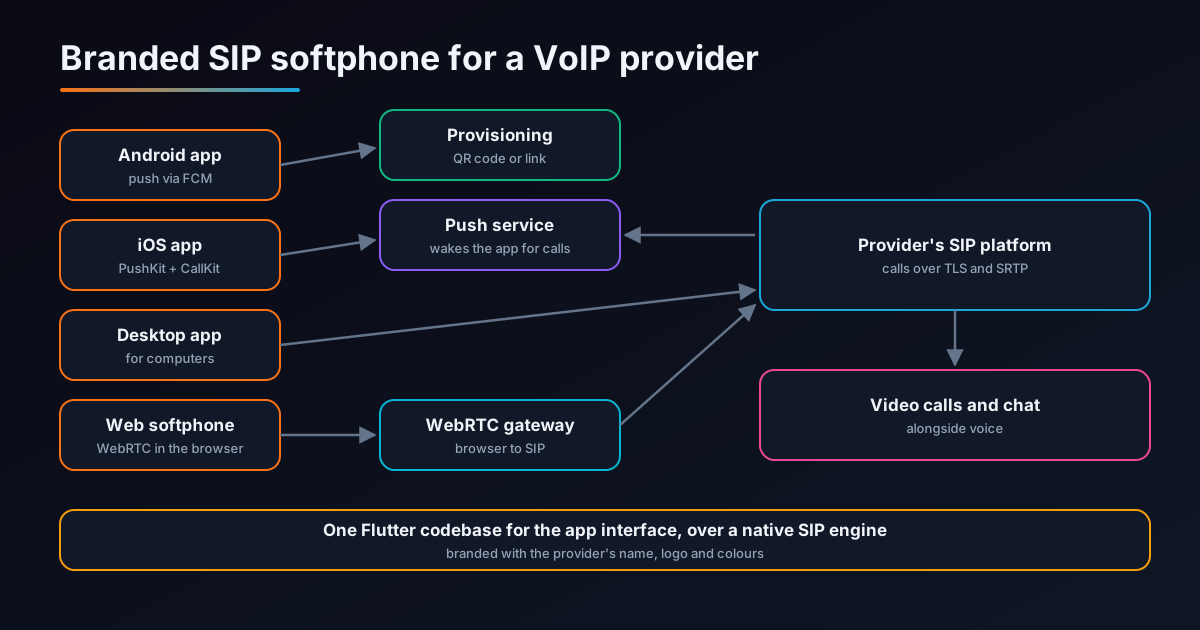
Apps (Android, iOS, desktop)
One Flutter codebase for the interface, with a native SIP engine underneath handling registration, calls, audio, video and codecs.
Web softphone
Calling from the browser using WebRTC, connected to the provider's SIP platform through a WebRTC gateway.
Push service
Wakes the mobile apps for incoming calls through Firebase Cloud Messaging on Android and PushKit on iOS.
Provisioning
Gives each user their account settings through a QR code or link, so the app is ready to use in seconds.
Provider's SIP platform
The provider's existing platform handles the calls. The apps connect to it over TLS, with SRTP media.
Video and chat
Video calls and messaging alongside voice, so customers don't need a separate app.
An important point: the apps work with the provider's existing platform. There was no need to replace the provider's switching or PBX to give customers a branded app.
Reliable incoming calls with push
This is where most softphones fail. Android and iOS both limit what apps can do in the background, so the reliable way to receive calls is for the server to send a push notification that wakes the app, which then registers and takes the call.
| Platform | How incoming calls reach the app |
|---|---|
| Android | A high-priority Firebase Cloud Messaging push wakes the app, which shows a full-screen incoming-call notification and connects the call |
| iOS | A VoIP push through PushKit wakes the app, which must report the call to CallKit immediately so iOS shows its native incoming-call screen |
| Desktop and web | The app stays registered while open, so calls arrive directly |
iOS is strict: an app that receives a VoIP push and doesn't report a call to CallKit straight away can be penalised by the system. Getting this right, along with handling calls on the lock screen, Bluetooth headsets and switching between networks, is what makes a softphone feel like a real phone. Our Flutter CallKit and PushKit guide walks through the details.
Encrypted calls
TLS for signalling
SIP messages between the app and the provider's platform travel over TLS, so call details and credentials can't be read on the network.
SRTP for media
Call audio and video are encrypted with SRTP, so conversations stay private on public Wi-Fi and mobile networks.
No passwords typed
Provisioning delivers credentials to the app, so customers never see or type their SIP password.
The web softphone uses WebRTC, which encrypts media by design using DTLS-SRTP, so browser calls are protected too.
Setup by QR code or link
For a provider with many customers, setup support is a real cost. Asking customers to type a SIP domain, username, password and transport settings leads to mistakes and support calls. The softphone removes that step:
- The provider's portal or support team generates a QR code or link for each user.
- The customer scans the code or taps the link, and the app fetches its settings securely.
- The app registers with the provider's platform and is ready to make calls.
- Settings can be changed centrally, so the provider can update servers or features without asking customers to reconfigure.
Features delivered
Voice calls
Making and receiving calls on the provider's numbers, with the usual in-call controls.
Video calls
Video calling between users, from the same app.
Chat
Messaging alongside calls, so customers can switch between them easily.
Native calling experience
CallKit on iOS and full-screen call notifications on Android, so calls look and behave like normal phone calls.
Four platforms
Android, iOS, desktop and web, so customers can use whichever device is at hand.
Provider branding
The provider's name, logo and colours, published under its own app store accounts.
Why Flutter over a native SIP engine
The app combines two approaches. The interface, meaning screens, contacts, chat and settings, is one Flutter codebase, so Android, iOS and desktop stay consistent and new features ship to every platform together. Underneath, a native SIP engine handles the parts where performance and platform integration matter most: SIP registration, audio and video processing, codecs and encryption.
| Approach | Strength | Trade-off |
|---|---|---|
| Fully native (Kotlin and Swift) | Maximum control of each platform | Two or more codebases to build and keep in step |
| Cross-platform only | Fastest to build | Calling features often need native work anyway |
| Flutter interface over a native SIP engine (this project) | Shared interface, native calling performance | Needs engineers comfortable with both Flutter and native platforms |
Our guides on Flutter VoIP SDK integration and Linphone and PJSIP customisation compare the options in more depth.
Delivery
The first production version was built in three to six months:
| Stage | What was built |
|---|---|
| 1. Calling core | Native SIP engine integration, registration with the provider's platform, TLS and SRTP |
| 2. Mobile apps | Flutter interface for Android and iOS, push notifications, CallKit and full-screen call screens |
| 3. Provisioning | QR code and link setup with central configuration |
| 4. Desktop and web | Desktop app and WebRTC web softphone |
| 5. Video and chat | Video calls and messaging in all apps |
| 6. Launch and support | Branding, app store publishing under the provider's accounts, then ongoing maintenance by CelloIP |
CelloIP maintains the app, including updates for new Android and iOS releases, which regularly change background, notification and calling rules.
Lessons for anyone building a softphone
- Design for push from day one; a softphone that relies on staying awake in the background will miss calls.
- Follow CallKit rules precisely on iOS, and test on locked phones, with Bluetooth and across network changes.
- Encrypt both signalling and media; TLS without SRTP leaves conversations exposed.
- Remove manual setup with QR or link provisioning; it saves support time for every customer.
- Share the interface across platforms, but keep calling native.
- Plan for maintenance: every major Android and iOS release can affect calling apps.
Frequently asked questions
What did CelloIP build?
A branded softphone that a VoIP service provider gives to its customers: apps for Android, iOS and desktop, plus a web softphone, all connected to the provider's SIP platform. It includes push notifications for incoming calls, TLS and SRTP encryption, QR code or link provisioning, video calls and chat.
Who is the client?
A VoIP service provider. Its name and its app's name are confidential under our agreement.
How long did it take?
The first production version was built in three to six months. The app is live and CelloIP continues to maintain it.
Why Flutter?
One Flutter codebase for the user interface keeps Android, iOS and desktop consistent and makes changes faster, while the SIP engine, audio and platform calling features run natively underneath, where performance and reliability matter most.
How do incoming calls work when the app is closed?
On Android, the provider's platform triggers a high-priority Firebase Cloud Messaging push that wakes the app to receive the call. On iOS, a VoIP push through PushKit wakes the app and CallKit shows the native incoming-call screen. The app then registers and answers the call.
Is the softphone white-label?
It is a custom app built for one provider and branded with its name, logo and colours, and published under the provider's own app store accounts. CelloIP builds custom branded apps; our sister company Sheerbit offers ready-made white-label products.
What would a similar app cost?
As a guide, a softphone for one platform with core calling typically costs $15,000–$35,000 over 8–12 weeks, and a branded softphone with provisioning, multi-tenant support, video and chat $35,000–$70,000 over 12–20 weeks. Larger multi-platform builds are scoped after discovery.
Work with CelloIP
Planning a branded softphone for your customers?
CelloIP builds custom branded softphones for Android, iOS, desktop and the web, with push notifications, encryption, provisioning, video and chat, connected to your existing SIP platform. You own the code.