What is the difference between Asterisk AGI and ARI?
Asterisk AGI (Asterisk Gateway Interface) is a synchronous, stdin/stdout protocol where Asterisk invokes your script during a call and your script issues sequential commands. FastAGI improves performance by running the script as a persistent TCP server. Asterisk ARI (Asterisk REST Interface) is an asynchronous REST+WebSocket model introduced in Asterisk 12 where your application receives real-time events over WebSocket and controls calls via HTTP REST — giving your code full ownership of Asterisk as a media server.
When should you use Asterisk AGI vs ARI?
Use AGI for linear, sequential IVR call flows — it is simpler to implement and debug. Use ARI for complex stateful applications: AI voice bots with async LLM integration, multi-party conferencing, WebRTC contact centres, and any scenario requiring simultaneous control of multiple Asterisk channels.
Asterisk AGI vs ARI: Which API Should You Use in 2026?
Asterisk exposes two primary programmatic interfaces for call control: AGI — a battle-hardened stdin/stdout scripting protocol from 2000 — and ARI — the modern REST+WebSocket event model introduced in Asterisk 12. Choosing the wrong one costs weeks of refactoring when your requirements inevitably outgrow it.
CelloIP has built production Asterisk applications on both interfaces — from simple DTMF IVR trees to real-time AI voice bots processing 500+ concurrent calls. This guide gives you the precise decision framework, real code examples, and a performance comparison so you can choose correctly the first time.
2000
AGI first available (Asterisk 1.2)
2013
ARI introduced in Asterisk 12
500+
Concurrent ARI calls per process
10×
FastAGI vs fork-AGI concurrency

The Three Asterisk APIs: Setting the Context
Asterisk has three external-facing APIs, and developers frequently conflate them. Here is the precise breakdown before we go deep on AGI vs ARI:
AGI
Asterisk Gateway Interface
In-call, synchronous call flow control. Dialplan invokes your script, which controls the call via stdin/stdout commands. Forks per call (AGI) or persistent daemon (FastAGI).
ARI
Asterisk REST Interface
Async, event-driven call control via REST + WebSocket. Your app subscribes to channel events and issues REST commands. Full programmatic control of Asterisk as a media server.
AMI
Asterisk Manager Interface
Management and monitoring API over persistent TCP. Used for call origination, channel monitoring, module management. Not for in-call media control.
The key distinction: AGI and ARI are for in-call control. AMI is for management and origination. You will often use AMI alongside either AGI or ARI — AMI originates the call, then AGI/ARI handles the call flow.
AGI Deep Dive: How the Asterisk Gateway Interface Works
AGI was introduced in Asterisk 1.2 and remains the most widely used external call control mechanism in deployed Asterisk systems today. The protocol is elegantly simple: when a dialplan extension hits an AGI() command, Asterisk:
- Forks a new process (or for FastAGI, opens a TCP connection) running your script
- Writes AGI environment variables to the script's stdin (channel name, caller ID, extension, etc.)
- Waits synchronously for your script to issue commands
- Executes each command and writes the result back to your script's stdin
- Continues until your script exits (or the call hangs up)
The AGI command set covers everything a linear IVR needs: ANSWER, HANGUP, STREAM FILE (play audio), GET DATA (collect DTMF), WAIT FOR DIGIT, SET VARIABLE, EXEC (run any dialplan application), CHANNEL STATUS, and many more.
When AGI shines: Sequential call flows, DTMF-driven menus, database lookups during calls, simple CRM integrations, voicemail, auto-attendant, and callback scheduling. Any scenario where each step in the call naturally waits for the previous one to complete.
AGI limitations: AGI is inherently single-channel — one script instance controls one call. You cannot use AGI to react to events on a different channel, control a conference bridge programmatically, or process async streaming data (like an LLM token stream) without awkward polling loops.
FastAGI: Production-Grade AGI
Standard AGI forks a new OS process for every single call. On a loaded server handling 200+ concurrent calls, this creates 200+ processes, each with startup overhead of 50–200ms and its own memory footprint. This kills scalability. FastAGI solves this by running your AGI handler as a persistent TCP daemon — Asterisk dials fastagi://127.0.0.1:4573and reuses the already-running process via a new TCP connection.
Fork AGI: startup latency
50–200ms per call
FastAGI: startup latency
<5ms (TCP connect)
Fork AGI: 200 concurrent calls
200 OS processes
FastAGI: 200 concurrent calls
1 process, 200 threads
In your dialplan, the only change is the AGI() call target: AGI(agi://127.0.0.1:4573) instead of AGI(my_script.py). Your script runs as a TCP server that accepts connections and handles each as a separate AGI session.
ARI Deep Dive: Asterisk as a Programmable Media Server
ARI (Asterisk REST Interface), introduced in Asterisk 12, represents a fundamental paradigm shift. Instead of Asterisk calling your code, your code calls Asterisk. ARI exposes:
REST API
HTTP endpoints for every call control action: answer a channel, play audio, start recording, create a bridge, add channels to a bridge, mute, originate. Stateless, cacheable, testable with curl. Base URL: http://asterisk:8088/ari/
Examples: POST /channels, POST /bridges, DELETE /channels/{id}
WebSocket Event Stream
A persistent WebSocket connection at ws://asterisk:8088/ari/eventspushes real-time events for every state change: ChannelCreated, ChannelAnswered, ChannelDtmfReceived, PlaybackFinished, RecordingFinished, BridgeCreated, ChannelHangupRequest.
70+ event types. Subscribe to all or filter by app name.
The entry point from the dialplan is the Stasis(my_app_name) application. When a call reaches this dialplan step, Asterisk hands full control to your ARI application — it stops processing dialplan and waits for your REST commands. Your application receives a StasisStart event on the WebSocket and takes it from there.
ARI mental model: Think of Asterisk as a headless media server — it handles SIP signalling, codec transcoding, media mixing, and DTMF detection. ARI is the API your application uses to tell that media server what to do. Your application is the brain; Asterisk is the hands.
AGI vs ARI: Full Feature Comparison
| Feature | AGI / FastAGI | ARI |
|---|---|---|
| Protocol | stdin/stdout (AGI) or TCP (FastAGI) | HTTP REST + WebSocket |
| Invocation | dialplan: AGI() or FastAGI() | dialplan: Stasis() |
| Programming model | Synchronous, request-response | Asynchronous, event-driven |
| Multi-channel control | ✗ One channel per script | ✓ All channels simultaneously |
| Concurrency model | Fork per call (AGI) or pooled (FastAGI) | Single async app — unlimited |
| LLM/ASR integration | ± Awkward (blocking I/O) | ✓ Native async streaming |
| WebSocket events | ✗ Not supported | ✓ Full real-time event stream |
| Dialplan interaction | ✓ Full AGI command set | ± via REST only |
| Recording control | ± Limited | ✓ Fine-grained |
| Bridge / conferncing | ± Via dialplan only | ✓ Programmatic bridge control |
| Learning curve | ✓ Low — script + dialplan | ± Moderate — async patterns |
| Debug simplicity | ✓ Print to stdout | ± WebSocket + REST logs |
| Language support | ✓ Any language via stdin/stdout | ✓ Any language via HTTP/WS |
| Production maturity | ✓ 25+ years in production | ✓ Mature since Asterisk 12 |
AGI Example: Python FastAGI Server
The following is a production-grade Python FastAGI server that collects a 4-digit PIN from the caller, validates it against a database, and routes accordingly. It runs as a persistent TCP daemon — no fork overhead per call.
#!/usr/bin/env python3
"""
FastAGI PIN validation server for Asterisk.
Dialplan: exten => s,1,FastAGI(agi://127.0.0.1:4573)
"""
import socketserver
import threading
from asterisk.agi import AGI  # pip install pyst2

# Simulated PIN database
VALID_PINS = {"1234": "support_queue", "5678": "sales_queue", "9999": "admin_queue"}


class AGIHandler(socketserver.BaseRequestHandler):
    def handle(self):
        agi = AGI(wfile=self.request.makefile("w"), rfile=self.request.makefile("r"))

        try:
            # Answer the call
            agi.answer()

            # Get caller ID for logging
            caller_id = agi.get_variable("CALLERID(num)")
            print(f"[FastAGI] Incoming call from {caller_id}")

            attempts = 0
            while attempts < 3:
                # Play PIN prompt
                agi.stream_file("please-enter-your-pin", escape_digits="0123456789#")

                # Collect 4 digits, 5s timeout
                digits = agi.get_data("beep", timeout=5000, max_digits=4)

                if digits and digits in VALID_PINS:
                    queue_name = VALID_PINS[digits]
                    agi.verbose(f"Valid PIN {digits} → queue {queue_name}", 2)
                    agi.stream_file("auth-thankyou")
                    # Transfer to the appropriate queue via dialplan exec
                    agi.execute("Queue", f"{queue_name},t,,,60")
                    return
                else:
                    attempts += 1
                    agi.stream_file("auth-incorrect")

            # 3 failed attempts — play sorry and hang up
            agi.stream_file("vm-sorry")
            agi.hangup()

        except Exception as e:
            print(f"[FastAGI] Error: {e}")


class ThreadedTCPServer(socketserver.ThreadingMixIn, socketserver.TCPServer):
    allow_reuse_address = True
    daemon_threads = True


if __name__ == "__main__":
    server = ThreadedTCPServer(("0.0.0.0", 4573), AGIHandler)
    print("[FastAGI] Listening on port 4573...")
    server.serve_forever()
Corresponding dialplan entry in extensions.conf: exten => s,1,FastAGI(agi://127.0.0.1:4573)
ARI Example: Node.js AI Voice Bot
This Node.js ARI application demonstrates why ARI is the right choice for AI integration. When a call arrives, it streams audio to an ASR service, sends the transcript to an LLM, and plays back the response — all fully asynchronous. AGI would require blocking waits between each step; ARI handles it natively with event callbacks.
const ari = require('ari-client');  // npm install ari-client
const OpenAI = require('openai');

const openai = new OpenAI({ apiKey: process.env.OPENAI_API_KEY });

ari.connect('http://localhost:8088', 'asterisk', 'asterisk', (err, client) => {
  if (err) throw err;
  console.log('[ARI] Connected to Asterisk');

  // Register our Stasis application name
  // Dialplan: exten => s,1,Stasis(ai-voice-bot)
  client.start('ai-voice-bot');

  // Handle incoming calls
  client.on('StasisStart', async (event, channel) => {
    console.log(`[ARI] StasisStart: ${channel.id} from ${channel.caller.number}`);

    try {
      // Answer the channel
      await channel.answer();

      // Play a greeting while we warm up
      const greeting = await channel.play({ media: 'sound:hello-world' });

      // Wait for greeting to finish before listening
      greeting.on('PlaybackFinished', async () => {
        // Start a live recording — 5s max, stop on silence
        const recording = await channel.record({
          name: `rec_${channel.id}`,
          format: 'wav',
          maxDurationSeconds: 5,
          maxSilenceSeconds: 1,
          beep: true,
        });

        recording.on('RecordingFinished', async (recEvent) => {
          const audioFile = recEvent.recording.name;
          console.log(`[ARI] Recording complete: ${audioFile}`);

          // Transcribe with Whisper (simplified — in prod, fetch the file)
          const transcript = await transcribeAudio(audioFile);
          console.log(`[ARI] Transcript: ${transcript}`);

          // Get LLM response
          const llmReply = await getLLMResponse(transcript, channel.caller.number);
          console.log(`[ARI] LLM reply: ${llmReply}`);

          // Convert to speech and play
          const ttsFile = await synthesizeSpeech(llmReply);
          await channel.play({ media: `sound:${ttsFile}` });
        });
      });

    } catch (e) {
      console.error('[ARI] Error:', e.message);
      await channel.hangup().catch(() => {});
    }
  });

  client.on('StasisEnd', (event, channel) => {
    console.log(`[ARI] Call ended: ${channel.id}`);
  });
});

async function getLLMResponse(userInput, callerId) {
  const completion = await openai.chat.completions.create({
    model: 'gpt-4o',
    messages: [
      { role: 'system', content: 'You are a helpful phone assistant. Be brief — under 50 words.' },
      { role: 'user', content: userInput },
    ],
    max_tokens: 100,
  });
  return completion.choices[0].message.content;
}

// Stubs — implement with your ASR/TTS provider
async function transcribeAudio(file) { return "How do I reset my password?"; }
async function synthesizeSpeech(text) { return "tts-response"; }
Real-World Use Cases: Which API Wins?
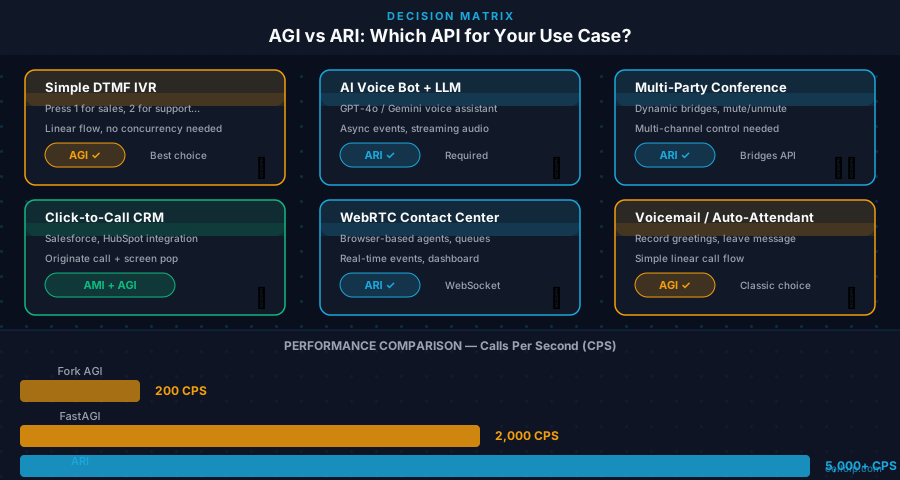
Simple DTMF IVR Menu
AGILinear: answer → play greeting → wait for digit → transfer. AGI's synchronous model maps perfectly. No async complexity needed.
AI-Powered Voice Bot (LLM + ASR)
ARIASR streams audio async, LLM responds async, TTS plays async. ARI's WebSocket event model handles all these streams concurrently without blocking.
Multi-Party Conferencing
ARIARI lets you programmatically create bridges, add/remove participants, mute/unmute, and react to speaking events in real time. AGI has no bridge API.
CRM-Integrated Click-to-Call
AMI + AGIUse AMI to originate calls from your CRM, then AGI to handle the call flow after answer. Simple, battle-tested pattern.
WebRTC Contact Centre
ARIBrowser-based agents using WebRTC need real-time channel event visibility: ring, answer, hold, transfer. ARI WebSocket events make this trivial.
Voicemail / Auto-Attendant
AGIStandard sequential flow: greeting, menu, record, email. AGI is faster to implement and debug. No async complexity justified.
Performance Benchmarks: AGI vs FastAGI vs ARI
These benchmarks reflect CelloIP production measurements on an 8-core server with 16 GB RAM running Asterisk 20 LTS:
| Metric | Fork AGI | FastAGI (TCP) | ARI (Node.js) |
|---|---|---|---|
| Per-call startup latency | 50–200ms | <5ms | <1ms |
| Max concurrent calls (8-core) | ~200 | ~2,000 | ~5,000+ |
| Memory per concurrent call | ~15–30 MB (process) | ~1–3 MB (thread) | <1 MB (event) |
| Multi-channel control | No | No | Yes |
| Async LLM streaming | No | No | Yes |
| DTMF inter-digit timeout | Configurable | Configurable | Event-driven |
| Call setup overhead | High (fork) | Low (TCP) | Minimal |
Takeaway: for production >200 concurrent calls, never use fork-based AGI. Use FastAGI at minimum. For >1,000 concurrent calls or AI integration, ARI is the right choice.
AMI, AGI, ARI Together: The Complete Picture
In a sophisticated Asterisk deployment, all three interfaces coexist. A typical enterprise contact centre CelloIP deploys uses this combination:
CRM triggers a call via AMI
Agent clicks 'Call' in CRM. The CRM backend sends an AMI Originate command to Asterisk, which dials the customer and bridges to the agent's SIP endpoint.
Call enters Stasis → ARI app takes control
The dialplan routes the answered call into Stasis(contact-center-app). The ARI WebSocket app receives StasisStart and plays a queue music file while the agent is connected.
Supervisor uses AMI for monitoring
The supervisor dashboard subscribes to AMI events — ChannelStateChange, AgentLogin, QueueMemberStatus — to update a real-time wallboard. This is pure AMI read-only monitoring.
Legacy IVR branches still use FastAGI
The overnight batch callback IVR was written years ago in Python FastAGI. It works fine and there is no business case to rewrite it in ARI. Both coexist on the same server.
Migrating from AGI to ARI: Incremental Strategy
The most common mistake teams make is attempting a big-bang AGI-to-ARI rewrite. This is unnecessary and risky. The right approach is incremental:
Audit your AGI scripts
Categorise each AGI script: simple sequential (keep as FastAGI), complex stateful with async needs (migrate to ARI), AI-integrated (priority migrate to ARI). Do not migrate scripts that work fine as FastAGI.
Add ARI infrastructure
Enable HTTP server in asterisk.conf: [ari] enabled=yes, bindaddr=127.0.0.1, port=8088. Create an ARI user. Install ari-client (Node.js) or panoramisk (Python). Confirm connectivity with: curl http://asterisk:8088/ari/asterisk/info.
Migrate one flow at a time
Pick your most complex AGI script — likely your AI IVR or conference manager. Create a new Stasis() dialplan app. Build the ARI version alongside the AGI version. Test with a parallel extension. Cut over when stable.
Keep FastAGI where it works
There is no prize for rewriting working FastAGI scripts. A voicemail handler or simple DTMF menu that has been in production for 5 years and never has issues is not a migration candidate. Maintain both indefinitely.
Frequently Asked Questions
What is Asterisk AGI and how does it work?
AGI (Asterisk Gateway Interface) is a protocol that allows external scripts to control Asterisk call flow during an active call. When a dialplan hits an AGI() command, Asterisk forks the script and communicates via stdin/stdout: Asterisk writes environment variables and status messages, your script reads them and issues commands like ANSWER, STREAM FILE, GET DATA, EXEC, and HANGUP. FastAGI replaces the fork with a persistent TCP connection to a daemon your script runs as a server.
What is Asterisk ARI and how is it different?
ARI (Asterisk REST Interface) flips the control model. Instead of Asterisk invoking your script, your application subscribes to Asterisk events via WebSocket and issues commands via REST API. When a call enters a Stasis() dialplan app, ARI takes ownership — your code decides everything: answer timing, audio playback, bridging, recording. This async model excels when you need to control multiple channels simultaneously or integrate with async I/O like LLM APIs.
When should I use AGI vs ARI?
Use AGI when your call flow is sequential and predictable: greet → collect input → route. The synchronous request-response model makes it easy to write and debug. Use ARI when you need: async event handling across multiple channels, real-time AI/LLM integration where responses arrive asynchronously, programmatic conference bridge control, WebRTC agent interfaces, or fine-grained recording control. In CelloIP's experience, about 60% of IVR use cases can use AGI; the remaining 40% with AI or multi-party requirements need ARI.
What is FastAGI and when should I use it?
FastAGI runs your AGI handler as a persistent TCP server instead of forking a new process per call. The performance difference is dramatic at scale: fork-based AGI adds 50–200ms startup latency per call and is limited by OS process limits. FastAGI eliminates fork overhead entirely — the same Python or Node.js process handles hundreds of concurrent calls. Always use FastAGI in production; plain fork-AGI is fine only for development.
What is AMI and how does it relate to AGI and ARI?
AMI (Asterisk Manager Interface) is the management and monitoring API — it is not for in-call media control. Use AMI to originate calls programmatically (from a CRM 'click to call' button), monitor channel status, reload modules, or receive manager events. Use AGI or ARI for controlling what happens during a call. All three interfaces can coexist: a common pattern is AMI for origination, AGI/ARI for in-call flow.
How do I migrate existing AGI scripts to ARI?
Migrate incrementally. Identify AGI scripts that handle complex flows (AI, conferencing, multi-leg). For each, create a Stasis() application in your dialplan and rewrite the logic using ARI REST+WebSocket. Keep simple AGI scripts (voicemail, basic menus) in place — there is no urgency to migrate them. ARI and AGI coexist on the same Asterisk server with no conflicts.
Which Asterisk version introduced ARI?
ARI was introduced in Asterisk 12 (released December 2013). It replaced the experimental Asterisk SCF project with a stable REST+WebSocket model. As of 2026, ARI is fully mature and available in all supported Asterisk LTS versions (20 LTS, 21). AGI dates back to Asterisk 1.2, circa 2000.
What libraries exist for Asterisk ARI in Node.js and Python?
For Node.js: the official `ari-client` npm package wraps the REST API and WebSocket events with promises and event emitters. For Python: `panoramisk` (asyncio-based), `ari-py`, and `asterisk-ari-client`. For Go: `ari` by CyCoreSystems. CelloIP primarily uses Node.js ari-client and Python with panoramisk in production ARI deployments.
Need Expert Asterisk Development?
CelloIP has 12+ years building production Asterisk systems — AGI, FastAGI, ARI, AMI, AI IVR with LLM integration, WebRTC bridges, contact centres, and high-availability clusters. Whether you're starting fresh, migrating from AGI to ARI, or scaling to 10,000+ concurrent calls, we've done it before.
AGI → ARI Migration Audit
We review your AGI scripts and deliver a phased migration plan with risk assessment and effort estimates.
Dedicated Asterisk Engineer
Embed a senior Asterisk developer in your team — ARI applications, FastAGI, AMI, SIP trunk config, and performance tuning.
AI IVR Development
Full AI voice bot stack: ARI + Whisper ASR + GPT-4o + ElevenLabs TTS. Deploy in 6–8 weeks.