Case Study: Secure Enterprise Messenger on the Client's Own Servers
An enterprise in the Middle East wanted its staff to stop using consumer chat apps for work. It needed a messenger of its own: private by design, hosted on its own servers, easy enough that people would actually use it, and controllable by its IT team. CelloIP designed and built it, and still maintains it. This is how it works.
Quick answer
What did CelloIP build in this secure messenger project?
CelloIP built a secure messenger for an enterprise in the Middle East to use with its own staff. It runs on Android, iOS, the web and desktop, and is hosted on the client's own servers. Messages and calls are end-to-end encrypted with the Signal protocol, so the servers only ever handle encrypted data. It supports group chats and group calls, files, voice notes and screen sharing, with an admin console for user provisioning, access control, remote wipe and message retention. The backend is Node.js and calls run on a LiveKit media server. It was built in three to six months, is live on Google Play under the client's own listing, and CelloIP maintains it.
Project summary
| Details | |
|---|---|
| Client | Enterprise in the Middle East, for internal staff use (name confidential) |
| Product | Private messenger with chat, voice and video calls |
| Platforms | Android, iOS, web and desktop |
| Encryption | End-to-end with the Signal protocol, for messages and calls |
| Communication | One-to-one and group chats, group calls, files, voice notes, screen sharing |
| Admin | User provisioning, access control, remote wipe, message retention |
| Technology | Node.js backend, LiveKit media server for calls |
| Hosting | The client's own servers |
| Timeline | First production version in three to six months |
| Status | Live on Google Play under the client's own listing, maintained by CelloIP |
Consumer messaging apps are convenient, but for a company they create real problems: work conversations sit on personal accounts, data lives on someone else's servers, and when an employee leaves, the company can't remove their access to groups or files. The client wanted the convenience of a modern messenger with the control of an internal system.
The challenge
Security and usability usually pull in opposite directions. A messenger that is secure but awkward gets abandoned for consumer apps, which defeats the purpose. The client needed both at once.
- Messages and calls must be end-to-end encrypted, so not even the client's own servers can read them.
- Group calls must stay end-to-end encrypted, even though they pass through a media server.
- Everything must run on the client's own servers.
- Staff must be able to use it on their phones, in a browser and on their computers.
- The IT team must control who has access, and be able to wipe the app from a lost device or a departing employee's phone.
- Message retention must follow the client's own rules.
- It must feel as easy as the consumer apps staff already use.
Architecture
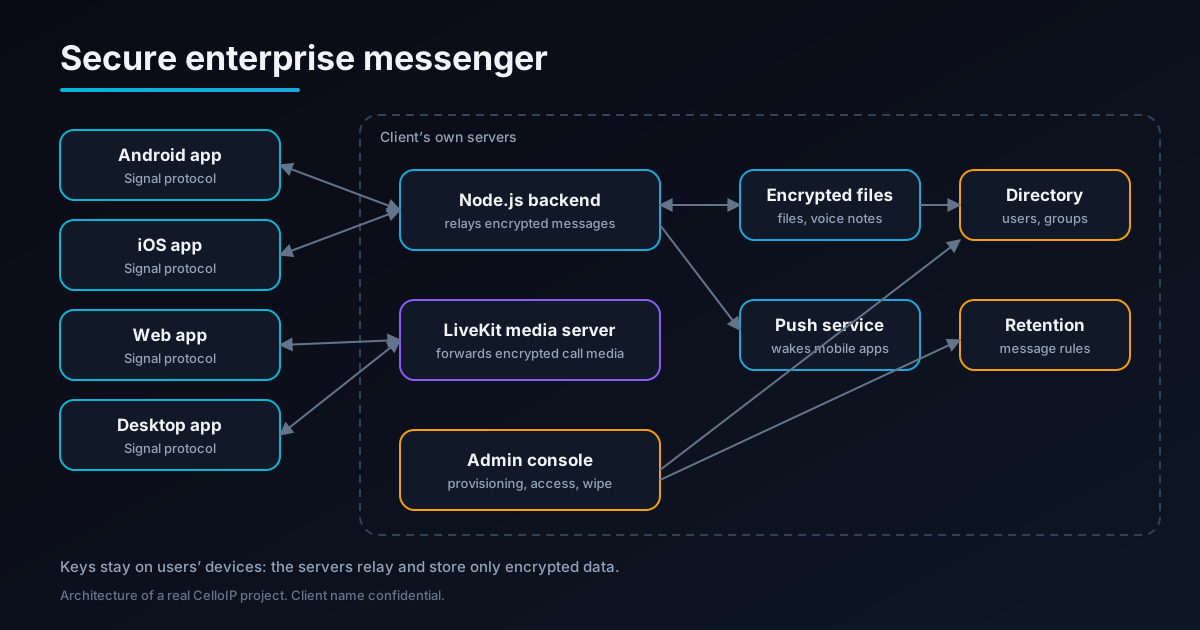
Apps on four platforms
Android, iOS, web and desktop apps that encrypt and decrypt messages and call media on the device using the Signal protocol.
Node.js backend
Relays encrypted messages between devices, delivers them to people who were offline, and handles accounts, groups and notifications.
LiveKit media server
Forwards audio, video and screen sharing for calls, including group calls, without being able to decrypt the media.
Encrypted file storage
Holds files and voice notes in encrypted form; only the people in the conversation can open them.
Admin console
Lets the IT team provision users, set access, wipe devices remotely and configure message retention.
Client's own servers
Every server component runs on infrastructure the client controls.
The design principle is simple: the servers are trusted to deliver data, not to read it. That keeps conversations private even from administrators with full access to the servers, and limits what an attacker could learn from a compromised server.
End-to-end encryption with the Signal protocol
The Signal protocol is the best-known, most widely studied end-to-end encryption protocol for messaging. Rather than inventing new cryptography, which is where many messaging apps go wrong, the messenger uses it for every conversation.
| Property | What it means for users |
|---|---|
| End-to-end encryption | Only the people in a conversation can read it; the servers can't |
| Keys on devices | Encryption keys are created and kept on users' devices, not on the server |
| Forward secrecy | Keys change constantly, so a key stolen today can't unlock past messages |
| Group encryption | Group messages are encrypted for every member's devices |
| Encrypted attachments | Files and voice notes are encrypted before upload |
Supporting four platforms adds work: each user may have several devices, and every message must be encrypted for each of them. Our guide to building a messaging app like WhatsApp covers the encryption design in more depth.
End-to-end encrypted group calls
Group calls need a media server to forward audio and video to everyone efficiently. Normally that server can see the media. To keep calls end-to-end encrypted, the media is encrypted on each device before it leaves:
- Each participant's device encrypts its audio, video and screen share before sending it.
- The LiveKit media server forwards the encrypted media to the other participants without decrypting it.
- Only participants' devices hold the keys, so only they can play the call.
- Voice, video and screen sharing all work this way, in one-to-one and group calls.
LiveKit was a good fit: it is open source, can be self-hosted on the client's servers and supports end-to-end encrypted media. Our self-hosted LiveKit deployment guide explains how to run it on your own infrastructure.
Features delivered
One-to-one and group chats
Private conversations and groups for teams, projects and departments.
Group calls
Voice and video calls with several participants, end-to-end encrypted.
Screen sharing
Share a screen during a call, for meetings and support.
Files
Share documents and images inside conversations, encrypted before upload.
Voice notes
Record and send voice messages, encrypted like everything else.
Four platforms
Android, iOS, web and desktop, so staff can use whichever device is at hand.
Admin controls for the IT team
A company messenger has to be manageable. The admin console gives the client's IT team control without giving them access to the content of conversations:
| Control | What it does |
|---|---|
| User provisioning | Add staff, set them up and remove them when they leave |
| Access control | Decide who can use the messenger and what they can do |
| Remote wipe | Remove the app's data from a lost device or a departing employee's phone |
| Message retention | Apply the client's rules on how long messages are kept |
Remote wipe matters most in practice. When a phone is lost or someone leaves the company, the IT team can remove their access and the app's data from the device, which consumer apps cannot offer.
Hosted on the client's own servers
The client wanted its communication infrastructure under its own control. The backend, media server, file storage and admin console all run on the client's own servers.
Control
The client decides where its data is stored, who can access the servers and when updates are applied.
No per-user fees
There is no third-party messaging service charging per user or per minute.
Defence in depth
Self-hosting and end-to-end encryption together mean data stays on the client's servers and is unreadable even there.
Self-hosting does bring responsibilities: servers, updates, monitoring and backups. CelloIP maintains the platform for the client.
Delivery
The first production version was built in three to six months:
| Stage | What was built |
|---|---|
| 1. Encryption core | Signal protocol on every platform, key management on devices, encrypted attachments |
| 2. Messaging | Node.js backend, one-to-one and group chats, files and voice notes, offline delivery |
| 3. Calls | LiveKit on the client's servers, end-to-end encrypted voice, video, group calls and screen sharing |
| 4. Apps | Android, iOS, web and desktop apps |
| 5. Admin console | User provisioning, access control, remote wipe, message retention |
| 6. Launch and support | Deployment on the client's servers, publishing on Google Play under the client's listing, then ongoing maintenance by CelloIP |
Lessons for anyone building a secure messenger
- Use a proven protocol such as Signal; never invent your own cryptography.
- Plan for several devices per user from the start; it shapes the whole encryption design.
- Encrypt group call media on the device, so the media server can't read it.
- Give administrators control over access, not over content.
- Build remote wipe and retention in early; they are what make a messenger acceptable to a company.
- Make it as easy as consumer apps, or staff won't switch.
Frequently asked questions
What did CelloIP build?
A private messenger for an enterprise's staff, on Android, iOS, the web and desktop. Messages and calls are end-to-end encrypted with the Signal protocol. It has group chats and group calls, file sharing, voice notes and screen sharing, and an admin console for provisioning users, controlling access, wiping devices remotely and setting message retention.
Who is the client?
An enterprise in the Middle East that uses the messenger internally. Its name and the app's name are confidential under our agreement.
What does end-to-end encryption mean here?
Messages and call media are encrypted on the sender's device and only decrypted on the recipients' devices. The client's servers relay and store encrypted data but do not hold the keys to read it. The Signal protocol is used for the encryption.
How can group calls be end-to-end encrypted through a media server?
Calls run through a LiveKit media server, which forwards audio and video between participants. With end-to-end encryption, each device encrypts its media before sending it, so the media server forwards packets it cannot decrypt. Only the participants' devices can play the call.
Where is it hosted?
On the client's own servers. The backend, media server, file storage and admin console all run on infrastructure the client controls.
How long did it take?
The first production version took three to six months. The messenger is live, published on Google Play under the client's own listing, and CelloIP maintains it.
What would a similar messenger cost?
As a guide, a single-platform chat MVP typically costs $25,000–$45,000 and a cross-platform MVP with group chat $35,000–$70,000. Full-scale apps with end-to-end encrypted calling and multi-device sync range from $90,000–$220,000. A self-hosted enterprise messenger like this one is scoped after discovery.
Work with CelloIP
Planning a secure messenger for your organisation?
CelloIP builds end-to-end encrypted chat and calling apps for Android, iOS, web and desktop, self-hosted on your servers, with the admin controls your IT team needs. You own the code.